

















Introducing Acumatica Cloud ERP: 2026R1
Retail Edition QnA
Recently active
I am working on a Shopify integration involving template items and their child stock items.The customer maintains Color and Size as product attributes. In addition, they use a Shopify color metafield for business verification. This metafield is configured as a single-choice text field with a predefined drop-down list, allowing the user to select one color.I created a corresponding attribute in Acumatica and tested both Combo and Multi Select Combo control types. I also configured entity mapping to export the attribute value from Acumatica to the Shopify metafield.
The client needs to have a different order type for orders passed thru Shopify from TikTok. An Order Data field, Source Name, is populated with ‘TikTok’. A different Acumatica Sales Order Type is required because TikTok takes care of the reporting of sales taxes so Tax Calculation needs to be disabled. The normal Shopify Orders are only taxed in two states and the client has Avalara.The Expression Editor only can be used for the External fields.
We have drop ship products on our Shopify site - if purchased, the order will sync to Acumatica, a drop ship PO will be created, and then a drop ship receipt once the vendor has confirmed the order has shipped.Is there a way natively to mark these orders as fulfilled in Shopify? This happens automatically for orders with product we stock and can ship from our own warehouse; a shipment is created and confirmed and the order is marked as fulfilled in Shopify. However, because the drop ship process uses a receipt instead of a shipment document, and there is no place to enter tracking # information in a receipt, we cannot see a way to mark the order as fulfilled in Shopify.We are currently on 21R1, in the process of upgrading to 23R1; perhaps this has changed in the latest release?
Reconfigure Amazon Order Mappings for the Orders API v2026 Migration Amazon is transitioning from the Selling Partner API Orders v0 to the new Orders API v2026-01-01(new API).Amazon originally announced that the old API operations would be removed in August 2026. The removal date has now been extended to March 27, 2027, giving customers additional time to complete the transition.Acumatica has updated the Amazon Connector to support the new API based on the initial August 2026 date. Customers with existing Amazon stores must complete an important manual configuration step after upgrading.Please check the attached document for the old vs new mappings.Who is affected?This action applies to existing Amazon Connector implementations running one of the following Acumatica versions: Acumatica version Minimum supported update 2026 R2 All builds 2026 R1 GA Patch 4 or later; build 26.100.0175.4 or later Service Pack 1 Patch 1 or later; build 26.101.0225
Hi everyone,I’m reviewing the documentation regarding the Multiple Base Currencies feature. It states that Retail Commerce is not supported when Multiple Base Currencies is enabled.I would like to clarify the practical impact of this restriction.If a company operates in multiple countries with different base currencies and requires the Multiple Base Currencies feature, does this mean Retail Commerce (Shopify, BigCommerce, etc.) cannot be used in that same tenant?In that case, would the recommended approach be separate tenants per country?I’m also trying to understand whether there is still value in enabling Multiple Base Currencies for a company that plans to use Retail Commerce, or whether the two features are fundamentally incompatible within a single tenant.Any insight on best practice architecture for multi-country companies using eCommerce would be greatly appreciated.
We are using the Acumatica Shopify Commerce Connector to synchronize item information from Acumatica to Shopify.A template item in Acumatica contains an attribute named TEMPCLOSEO. The attribute value can be either TRUE or FALSE.We want to configure an export entity mapping with the following logic:When TEMPCLOSEO is TRUE, export the value Closeout to Shopify. When TEMPCLOSEO is FALSE, export a blank value.We attempted to use the following formula in the Shopify export entity mapping:=IIf([[TemplateItems -> Attributes.TEMPCLOSEO]] = 'TRUE', 'Closeout', '') Data is syncing fine when the SKU has true value but it is failing false information(field: input.metafields.0.value) Value can't be blank. Acumatica returns this following error:Expected ResultThe export mapping should return:Closeoutwhen the TEMPCLOSEO attribute is set to TRUE.When the attribute is set to FALSE, the export mapping should return a blank value.
We are using the native Amazon Connector (BC201020), importing seller-fulfilled orders.I originally set up an item as a stock item and added its ASIN as an Alternate ID (Global type) on the Cross-Reference tab. We later decided the item should be a non-stock item instead. I created the non-stock item, removed the cross-reference row from the stock item (and saved), and added the same ASIN as a Global cross-reference on the non-stock item.When the Amazon Connector imports an order containing that ASIN, it errors out saying the cross-reference exists on two items — both the original stock item and the new non-stock item.**What I've checked:**- Reopened the stock item (IN202500) — the cross-reference row is not visible on the Cross-Reference tab.- The non-stock item (IN202000) shows exactly one row for the ASIN, Alternate Type = Global.- Only one UOM row exists per item; no duplicates within either item.**Questions:**1. Is there a place other than the item's Cross-Reference tab (e.g., a
Since Thursday August 6, we are seeing our Amazon FBM orders not sync into the system consistently. Results are sporadic at best, some come over right away, others come over 6 hours later and this is not sustainable. Anyone know if anything has changed on how Amazon is sending sales orders over for FBM? Most orders I cannot even see in the sync history if there is an error, they just do not populateNo one knows what to do to fix
Exciting News: BigCommerce Integration Coming to Acumatica 2025 R1 and Newer!Acumatica is thrilled to announce that the BigCommerce integration will soon be available for Acumatica versions 2025 R1 and newer launching in early 2026!This new integration allows Acumatica customers to seamlessly connect their BigCommerce storefront with Acumatica’s ERP platform. This means more automation, faster order processing, and real-time inventory and customer data sync between your ecommerce operations and your back-office workflows.What does this mean for you?Effortless order, inventory, and customer data flow between BigCommerce and Acumatica Fewer manual entry errors and time spent on double data input The ability to scale your online business with the latest and greatest from both platforms Remove the need for additional gateway fees and integrationsA note on paymentsAcumatica Payments is still the recommended option for the most streamlined, end-to-end payment experience. However, for custome
Hi everyone,I'm looking for guidance on syncing color information from Acumatica to Shopify using the native Shopify Connector on 2026 R1.The requirementIn Acumatica, product color is stored as a descriptive name. On the Shopify side we're populating a Color metafield, which expects a hexadecimal value rather than the name:Black → #000000 White → #FFFFFF Smoke → #808080 Dark Smoke → #4A4A4AWhat I've triedCreated a Substitution List mapping the Acumatica color names to their hex values, and referenced it in the Shopify Entity Mapping. The substitution was not applied and no hex value was exported. Changed the Acumatica color field to store the hex value directly (for example, #000000) and re-synced the product. The Shopify color metafield still was not populated. Tried the following expression in the entity mapping: =SubstituteListed([shopify.color-pattern], 'Metacolor') — the expression editor returns an error that the function is undefined.My questionsIs there a supported way to trans
Hi Everyone,We're encountering a customer sync issue with the BigCommerce Commerce Connector.We use a single Generic Guest Customer Account in BC201000 to store guest customers. When a guest customer later registers as a standalone customer in BigCommerce, Acumatica attempts to create a new customer record but the sync fails with the following error:“ The Customer record with the same field or fields (user@email.com) in the ERP system has already been synchronized with another Customer record with external ID user@email.com.” We searched the BCSyncStatus table (using both a GI and the All Records tab) but found no mapping for the reported external ID. We also tried making the original guest location inactive and changing its email address, but the error persists. Any suggestions would be greatly appreciated.
There is a scenario that I am looking to solve for. Customer puts in CAD shopify order/paid in CAD but I would like that order to get added into Acumatica as a USD order to avoid any currency exchange rounding issues between shopify payout and bank reconcilation. Any suggestions?
Hello folks,Wanted to see if this was remotely possible. But i have an import mapping setup that work in the following manner on the SALES ORDER entity in Commerce Connector: As you can see this will look for the “MISC” tag and if it exists it will map the customerID to my “ECOMGUEST” customer. If FALSE, it maps to the C0000011 customer. What I would LIKE to occur is that on the FALSE result of the IIF statement that it reverts to actually using the native connectors logic to either use the existing shopify customer or create a new one. Possible?
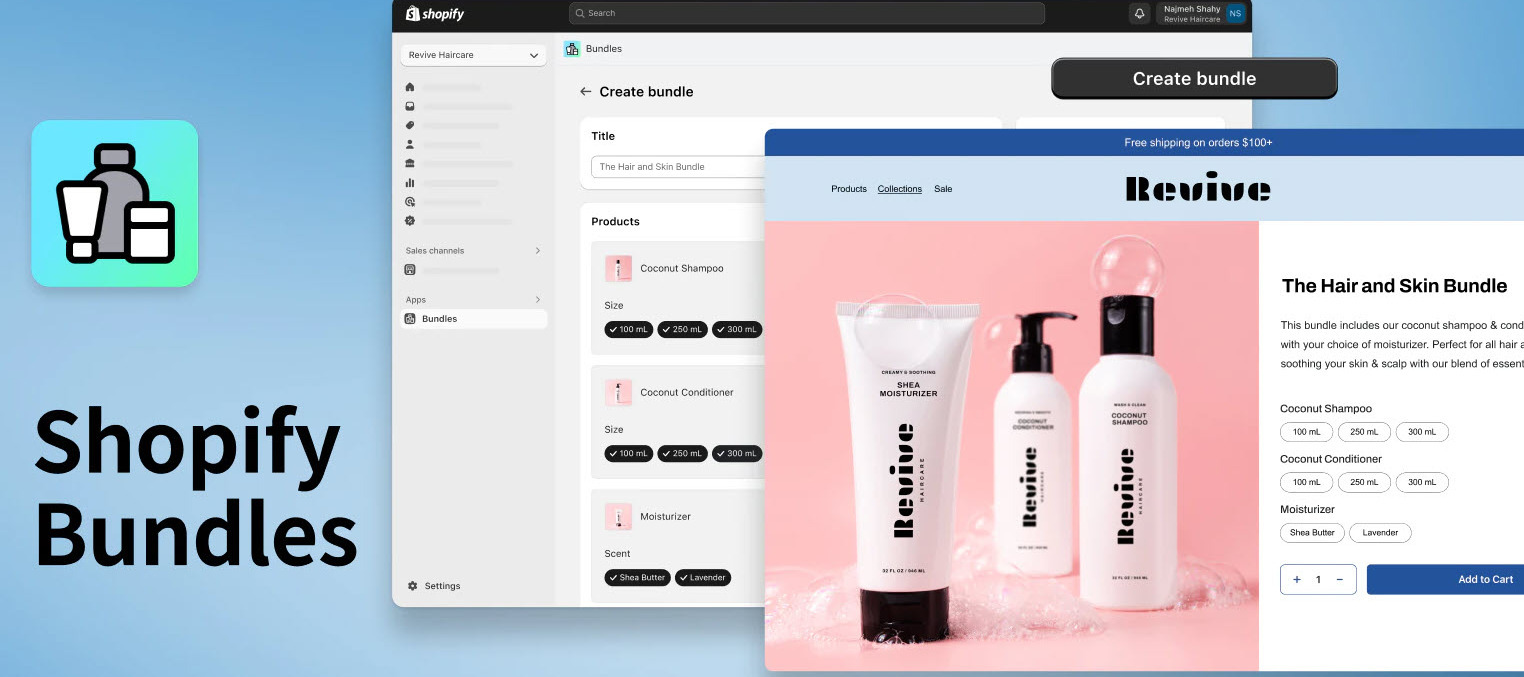
Recently Shopify released a new app for selling Bundles on Shopify eCommerce sites. Multiple customers have reached out with questions about if this feature will work with Acumatica’s native integration.The quick answer is “Yes!” - and it’s pretty easy to configure and leads to great results.Below is an introduction to the solution as well as steps for configuring your Shopify site to sell bundles, then automatically importing those orders into Acumatica for easy picking and packing.Use CaseA merchant sells 3 individual items on their Shopify site They found that their customers typically buy 2 of the 3 items at the same time. They decide that if they sold all three of the items together into a bundle with a discounted price this may lead to more revenue and higher customer satisfaction. The merchant does not want a unique SKU that represents the bundle. Instead, they only want to maintain the individual item SKUs. Plus, they need to be sure that the bundles inventory is based on the q
We have a client who is live on BigCommerce and wants to import their existing stock item catalog into Acumatica first to get Stock items set up and the External ID links established, then switch the sync direction to Export with Acumatica as the master going forward. Has anyone done this before? What's the recommended way to manage this? can we map item class using a custom field from BC to Acumatica to match it to the correct item class using import mapping? And once you flip to Export, does the connector pick up the existing External ID links and update the BC products cleanly without creating duplicates?
I got a couple issues with the Shopify Connector, specifically the customer location sync.At random it will create more than one location for the customer in Acumatica. It will activate one and deactivate the other. Since upgrading to 2025R2 we have every day one or two orders where it will fail to import due to "property set method not found". What we found is that it means that the location is not active. When you go to it in Acumatica, you cannot activate it either. You need to create an additional location, make that the default, then you can go back to the other location and activate it. In addition I found today that when I look at audit history for any customer, it will show me a bunch of location changes for different customers, different random locations. I don't know what these mean and why they're showing up on another customer that's not even connected to our Shopify store.
Hello,Does anyone able to manage sales categories in Acumatica and sync it to Shopify as product Collection?Thank you
Has anyone configured the BigCommerce connector to work with an existing BigCommerce store? Our client has a well established store and wants to connect to their new Acumatica install. We started testing the syncs in a sandbox to see how it would work and have run into errors. With the stock item sync, we can only export from Acumatica to BC, but the items already exist in BC. When we try to sync anyways, the error says the item already exists. Is there a way to somehow map the two together to resolve the sync issue? Any other gotchas we need to look for in configuring the connector for an existing store? Thanks for your help!
Is there a good way to accomplish this special situation? Send shopify transfer order details to Acumatica as 1 step transfers. Thanks,Nirav S.
Is there a way we can sync the actual HTML code to the shopify product description?
We are using the native shopify connecter with bidirectional sync for sales orders - and i found that if i cancel orders is shopify, it cancels the order in acumatica properly.but if i cancel the order in Acumatica, the moves to “Cancelled” in shopify - but the payment does not get “Voided”, it just remains authorized and i have no way to manually cancel it in shopify. i reached out to shopify plus support and they said it needs to be done by the API.Anyone have any insight into this?
Hi everyone,I'm currently working on an SPS Commerce integration project with Acumatica and was wondering if there is any public documentation that explains the overall integration process and setup.If anyone has implementation guides, knowledge base articles, training materials, or can point me to the appropriate documentation, I would greatly appreciate it.
Hello Everyone,We have one of our client working with 24R2 (24.212.0010) Shopify Connector and observed a discrepancy during Refund sync due to that the behavior is not consistent across RC orders created manually and synced through connector and this is specific for a serialized product associated with Lot/Serial number. Can you please review the scenario and help us with root cause identification and possible fix.Acumatica RC Order Reflection for a Serialized Product:• Created receipt with serial nbr 101. • Created order and selected serial. • Created & confirmed Shipment and released Invoice.• Created RC, selected this Invoice, Line Details pop-up updated with that serial. • Create Receipt, Confirm Shipment, and Released Invoice.Acumatica Connector RC Order Reflection for a Serialized Product is Not same as of Manual RC creation:• Created receipt with serial nbr 102. • Created order in Shopify and synced to Acumatica. • Created shipment but on confirm Shipment got error for ser
Looking for ways to import from acumatica the template id media url and the matrix item medial url. The idea is that if one of the matrix items is not available to sell in shopify then Acumatica will mark that variant as not sellable and shopify does not show that specific image of that matrix item in the shopify listing page. Any suggestions? Thanks!
Hi Everyone,I am working with Acumatica 2024R1 (Build 24.100.0139). I have one BigC order placed like below, initially order synced from BigC to Acumatica.Now, I updated line item qty from 1 to 2 in Acumatica and trying to sync this order from Acumatica to BigC but getting error like: “Error: v2/orders does not support product option modifiers with product_option_type = Configurable_Entry_File;Status: BadRequest”Can you suggested possible root cause and fix.
Already have an account? Login
No account yet? Create an account
Enter your E-mail address. We'll send you an e-mail with instructions to reset your password.