Solved

Multiple Base Currencies and Retail Commerce Compatibility

  • February 6, 2026
  • 7 replies
  • 145 views

Forum|alt.badge.img

Hi everyone,

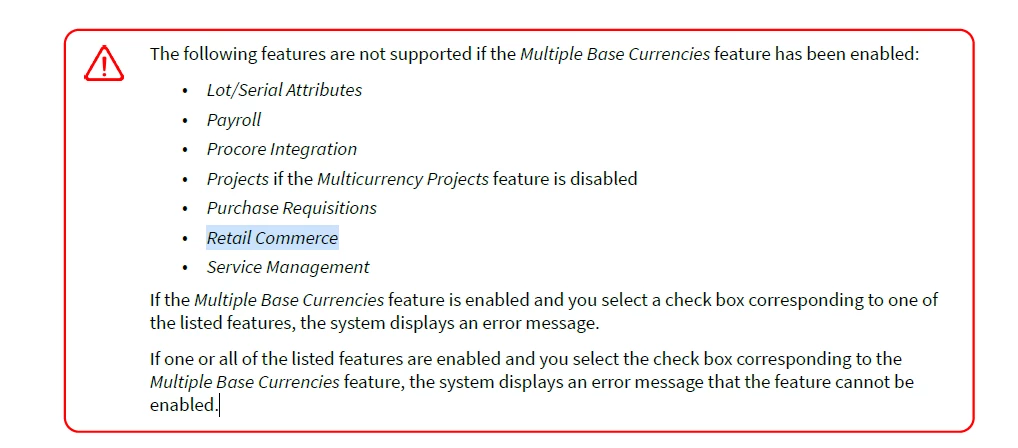
I’m reviewing the documentation regarding the Multiple Base Currencies feature. It states that Retail Commerce is not supported when Multiple Base Currencies is enabled.

I would like to clarify the practical impact of this restriction.

If a company operates in multiple countries with different base currencies and requires the Multiple Base Currencies feature, does this mean Retail Commerce (Shopify, BigCommerce, etc.) cannot be used in that same tenant?
In that case, would the recommended approach be separate tenants per country?

I’m also trying to understand whether there is still value in enabling Multiple Base Currencies for a company that plans to use Retail Commerce, or whether the two features are fundamentally incompatible within a single tenant.

Any insight on best practice architecture for multi-country companies using eCommerce would be greatly appreciated.
Best answer by KarthikGajendran

@jvarughese23  Like ​@kkeating24 mentioned it is supported. We are supporting this from 22R1. There is a mistake in the documentation. We have asked the documentation team to correct it. Thank you for pointing out. 

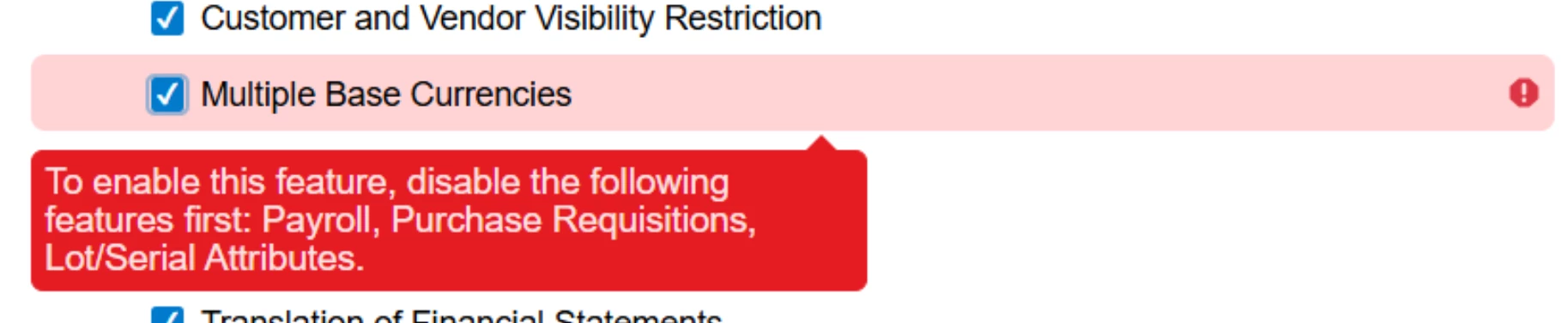
If you enabled the Multiple Base Currencies features in ERP, it gives the below warning. You can notice that there is nothing about Retail Commerce. 


You can have multiple currencies in Acumatica and create multiple sites in Shopify/BigCommerce with different base currencies for each site and import into Acumatica ERP without any issues. 

Each store in Acumatica ERP is associated with a Branch and this Branch can have any Base currency. 

When the orders are synced, you have the ability to choose whether to sync with the Shopify/BC Base currency or Customer payment currency for each store in ERP. The currency rates are brought from Shopify/BC to the sales orders in ERP because that is where the customer actually paid. The Payment will be created with the currency the order has created. 

It is very flexible, we have some customers where they have business in USA but sell the products in Canada. Shopify payouts to them in USD. So even though the customer paid using CAD they want the orders to be created in USD because of the easy Payment Reconciliation with Shopify Payouts. 


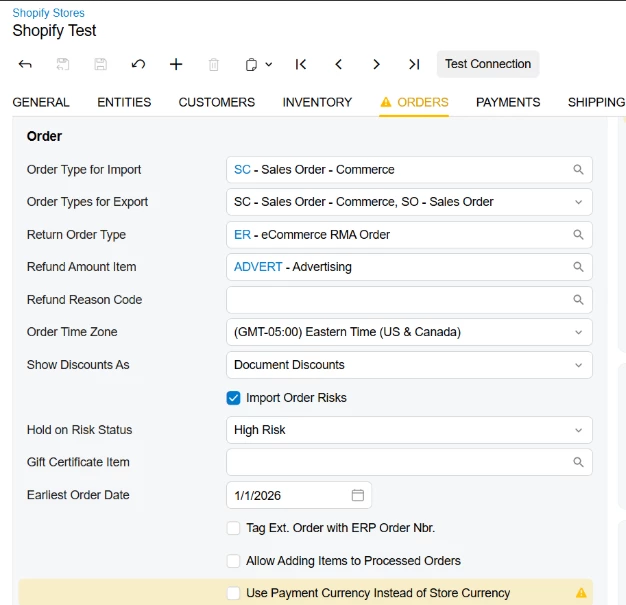
Below you can find the settings to decide how the orders to be imported. Either Shopify/BC base currency or customer payment currency. 


cc ​@BorisRudi56 

7 replies

Yuri Karpenko
Captain II
Forum|alt.badge.img+7
  • Captain II
  • February 6, 2026

@jvarughese23 , wow, that’s an unexpected twist. ​@KarthikGajendran , what do you know about this?


kkeating24
Semi-Pro II
Forum|alt.badge.img+1
  • Semi-Pro II
  • February 6, 2026

I thought in SHopify you can accept payments in multiple currencies, and there is a new option that allowed us to determine the store ‘base’ currency and import with the conversion not requiring translation.  I haven’t worked with it yet, but I remember the conversations.


KarthikGajendran
Acumatica Moderator
Forum|alt.badge.img+3
  • Acumatica Moderator
  • Answer
  • February 6, 2026

@jvarughese23  Like ​@kkeating24 mentioned it is supported. We are supporting this from 22R1. There is a mistake in the documentation. We have asked the documentation team to correct it. Thank you for pointing out. 

If you enabled the Multiple Base Currencies features in ERP, it gives the below warning. You can notice that there is nothing about Retail Commerce. 


You can have multiple currencies in Acumatica and create multiple sites in Shopify/BigCommerce with different base currencies for each site and import into Acumatica ERP without any issues. 

Each store in Acumatica ERP is associated with a Branch and this Branch can have any Base currency. 

When the orders are synced, you have the ability to choose whether to sync with the Shopify/BC Base currency or Customer payment currency for each store in ERP. The currency rates are brought from Shopify/BC to the sales orders in ERP because that is where the customer actually paid. The Payment will be created with the currency the order has created. 

It is very flexible, we have some customers where they have business in USA but sell the products in Canada. Shopify payouts to them in USD. So even though the customer paid using CAD they want the orders to be created in USD because of the easy Payment Reconciliation with Shopify Payouts. 


Below you can find the settings to decide how the orders to be imported. Either Shopify/BC base currency or customer payment currency. 


cc ​@BorisRudi56 


  • Freshman I
  • August 18, 2026

@KarthikGajendran 

It seems the wording changed slightly and several days ago the sync reported that orders failed to come in because the currency could not be found. We mapped the customer currency to USD as a workaround but would like to get to the bottom of this..

Is this the correct setup for the orders to come in in the Shopify store base USD currency and not the customer paid currency?

Do all the customers need to have the currency set to USD?

Are there any other settings that could override this?
 

According to the help file:


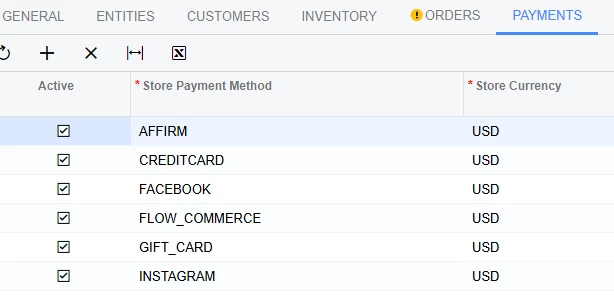
The payment methods are also correctly mapped as follows:


We tried uninstalling and reinstalling the connector but still doesn’t work without mapping the currency manually in the customer entity.

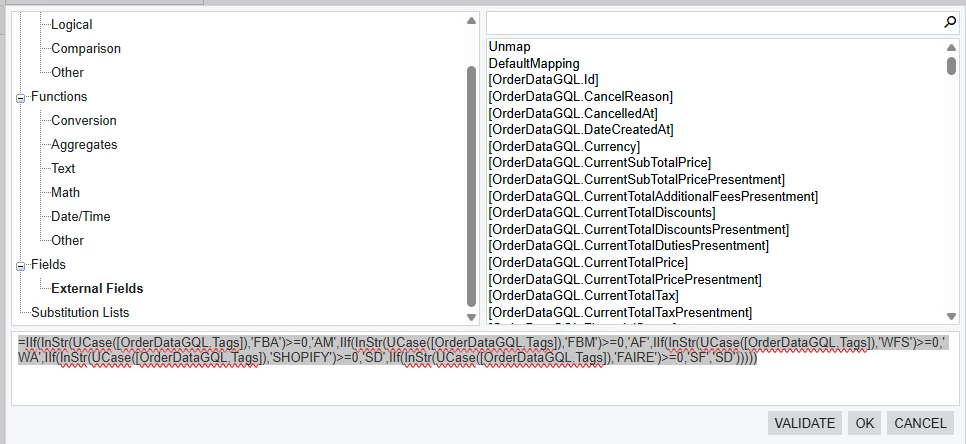
We also noticed that other customers data fields include DataGQL in the field names in 25R2 and 26R1:


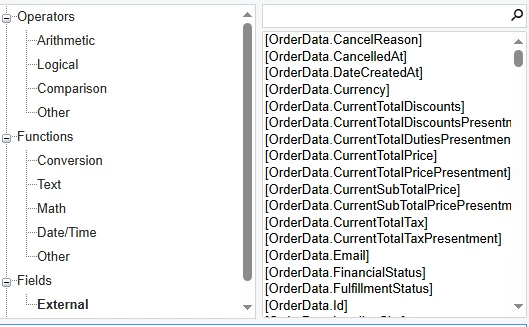
The customer we are having the issue does not have the DataGQL in the field name of 25R1:


Does this mean the connector version is incorrect?


Forum|alt.badge.img
  • Acumatica Employee
  • August 18, 2026

@mtriffon51 It is not necessary to explicitly set the customer currency to USD. The currency can be different; however, all customers involved must have the Enable Currency Override checkbox selected on the Customers (AR303000) form.

If the same synchronization error persists after enabling USD on the Currencies form and selecting the checkbox for the affected customers, please create a support case so that we can investigate the issue.


  • Freshman I
  • August 18, 2026

Thank you for the response. Wouldn’t I have to enable multi-currency accounting to get the setting to appear? They currently only transact in USD only so it would be an unnecessary complication seeing as the problem is all on the Shopify connector side. 

We could set the default in the customer class but the mapping does the same thing I guess.

What about the DataGQL question?


Forum|alt.badge.img
  • Acumatica Employee
  • August 19, 2026

Thank you for the response. Wouldn’t I have to enable multi-currency accounting to get the setting to appear? They currently only transact in USD only so it would be an unnecessary complication seeing as the problem is all on the Shopify connector side. 

We could set the default in the customer class but the mapping does the same thing I guess.

What about the DataGQL question?

Regarding DataGQL in the external field names: starting with version 25R2, the Sales Order entity synchronization was migrated to Shopify’s GraphQL API because Shopify deprecated the REST API previously used by the connector. As a result, GQL was added to the names of all external objects displayed in the entity-mapping field list.                                                                                                         

Regarding importing orders in the store’s default currency: if the Multicurrency Accounting feature is disabled, neither the checkbox nor the currency field is available on the Customers form. The connector should use the base ERP currency if it is the same as the store’s default currency.

The synchronization errors might be related to the individual instance configuration or to any published customizations. It may be advisable to upgrade to a newer ERP version.