Solved

Automatically Chage Customer Status to 'Credit Hold' when invoices are overdue

  • September 29, 2026
  • 2 replies
  • 64 views

bzelinski
Semi-Pro I
Forum|alt.badge.img+1

Does anyone know of a way to have a customer status automatically change to “Credit Hold” when they have invoices past due a certain number of days?

I would like to either do that or have an automatic pop-up occur if an employee begins a sale with this customer, creates a quote for them, or schedules a service appointment.

This type of reminder would be great!

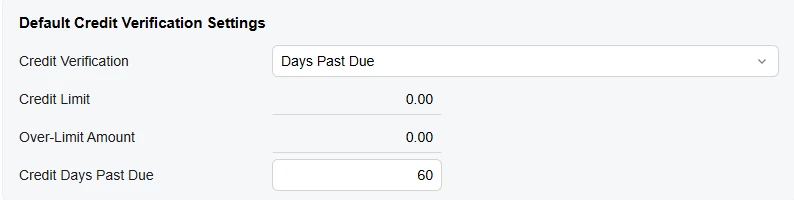
I already set the credit verification settings in the customer class:

We’re using 2026.R1

Thanks for sharing any ideas!

Best answer by valentynbeznosiuk

Hi ​@bzelinski 

The Credit Verification settings on the customer class don't put the customer itself on Credit Hold. They only put sales orders and invoices on Credit Hold, and only when a document is created or taken off hold. So if a sales order is already Open by the time the customer's documents go overdue, nothing stops you from creating and processing the shipment. It'll only get caught when the invoice is created, which may be too late. These settings also don't apply in the CRM module, if you use it.

A better approach is to put the customer record itself on Credit Hold status. This still doesn't cover CRM, but it closes the gap with orders that are already Open: the system won't let you create a shipment for them. There are a few ways to change the status:

Manually. Change the Status on the Customers (AR303000) form yourself.

Business Event. Set up a Business Event that detects the condition you need and updates the customer status automatically (for example, with an Import Scenario as the subscriber).

Dunning letters. Use dunning letters together with the Manage Credit Holds (AR523000) form, which can put customers on Credit Hold on a schedule. Keep in mind it only picks up customers who have already been sent their final dunning letter.

For the alert, pop-up notes could be worth a look. In Modern UI, though, they're no longer a pop-up window that has to be clicked to close, so they may not be noticeable enough for you. You can add them to customers manually, or through a Business Event that fires at the right moment.

If you need a proper pop-up, that would take a customization, and it's probably the best option here compared to the native functionality. It could show a warning when a user selects a customer on Credit Hold on a sales order, quote or appointment, or even block the save, depending on how strict you want it.


2 replies

valentynbeznosiuk
Varsity I
Forum|alt.badge.img+5

Hi ​@bzelinski 

The Credit Verification settings on the customer class don't put the customer itself on Credit Hold. They only put sales orders and invoices on Credit Hold, and only when a document is created or taken off hold. So if a sales order is already Open by the time the customer's documents go overdue, nothing stops you from creating and processing the shipment. It'll only get caught when the invoice is created, which may be too late. These settings also don't apply in the CRM module, if you use it.

A better approach is to put the customer record itself on Credit Hold status. This still doesn't cover CRM, but it closes the gap with orders that are already Open: the system won't let you create a shipment for them. There are a few ways to change the status:

Manually. Change the Status on the Customers (AR303000) form yourself.

Business Event. Set up a Business Event that detects the condition you need and updates the customer status automatically (for example, with an Import Scenario as the subscriber).

Dunning letters. Use dunning letters together with the Manage Credit Holds (AR523000) form, which can put customers on Credit Hold on a schedule. Keep in mind it only picks up customers who have already been sent their final dunning letter.

For the alert, pop-up notes could be worth a look. In Modern UI, though, they're no longer a pop-up window that has to be clicked to close, so they may not be noticeable enough for you. You can add them to customers manually, or through a Business Event that fires at the right moment.

If you need a proper pop-up, that would take a customization, and it's probably the best option here compared to the native functionality. It could show a warning when a user selects a customer on Credit Hold on a sales order, quote or appointment, or even block the save, depending on how strict you want it.



bzelinski
Semi-Pro I
Forum|alt.badge.img+1
  • Author
  • Semi-Pro I
  • September 29, 2026

Thanks, ​@valentynbeznosiuk for the well thought through answer. Appreciate your time!