Question

How to change the Acumatica Sales Order type based on a mapped field in Shopify?

  • September 18, 2026
  • 3 replies
  • 33 views

dgodsill97
Varsity I
Forum|alt.badge.img+6

The client needs to have a different order type for orders passed thru Shopify from TikTok.  An Order Data field, Source Name, is populated with ‘TikTok’. A different Acumatica Sales Order Type is required because TikTok takes care of the reporting of sales taxes so Tax Calculation needs to be disabled.  The normal Shopify Orders are only taxed in two states and the client has Avalara.

The Expression Editor only can be used for the External fields.

3 replies

riglesias
Acumatica Employee
Forum|alt.badge.img+2
  • Acumatica Employee
  • September 18, 2026

Hello ​@dgodsill97 

Have you tried using Shopify metafields? These fields can be used to map an if expression under entities screen. 


Steve Milner
Varsity III
Forum|alt.badge.img+2
  • Varsity III
  • September 18, 2026

@dgodsill97 Rodrigo has the right mechanism: an Iif expression on the Entities screen. You don't need a metafield for it though, because Source Name is already a mappable field on the order. The trick is which row you put the formula on.

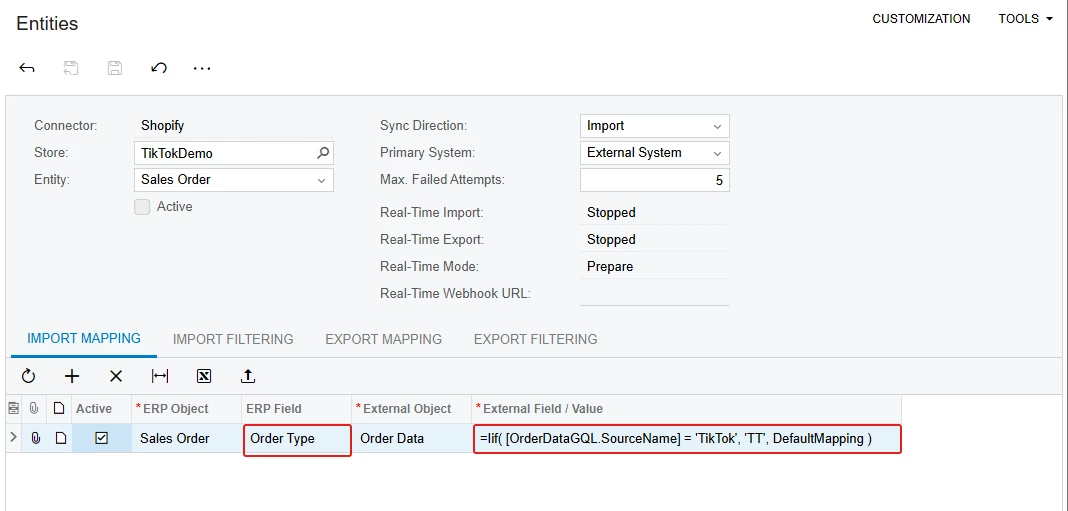
On Entities (BC202000), pick the store and the Sales Order entity, then go to the Import Mapping tab. Add a row with ERP Object = Sales Order, ERP Field = Order Type, and External Object = Order Data. Click the pencil in External Field / Value and enter:

=Iif( [OrderDataGQL.SourceName] = 'TikTok', 'TT', DefaultMapping )

Swap TT for your TikTok order type. Source Name is in the editor's field list under Fields > External Fields if you'd rather pick it than type it, and Validate will tell you if the name is off for your version. DefaultMapping is the important part. It tells the connector to fall back to the store's normal order type logic for everything that isn't TikTok, so your regular and POS orders don't change. The Shopify user guide has this same pattern in the entity mapping examples, keyed on shipping country.

Only new imports pick it up. Orders already synced keep their type. Try it in a test tenant first, then open the first TikTok order and check the Taxes tab before you trust it.

If your client is on 2026 R1, also look at the Tax Withheld by Marketplaces feature. It handles marketplace-remitted tax natively, but only for channels Shopify flags as marketplaces, and I haven't confirmed TikTok is one.


dgodsill97
Varsity I
Forum|alt.badge.img+6
  • Author
  • Varsity I
  • September 18, 2026

Thanks. I had a brain fog (it’s Friday almost cocktail hour) and I did figure it out.  They are on 25R1 but the withheld by marketplace is a good tip and probably a better choice that the Source Name 


Now it we can only get the orders imported because the Tax string is not being truncated by the connector so the substitution list won’t replace it - I have a case opened.