


Answer

Why do cost budget lines pull to my report when I have revenue coded and how do I remove them?

  • November 15, 2023
  • 6 replies
  • 66 views

Forum|alt.badge.img

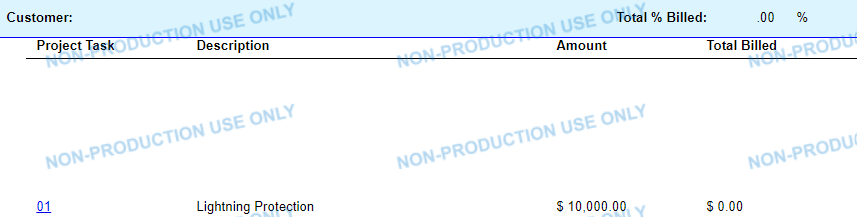
We copied the out of box project task report and made some tweaks for our field to use it as their billing list. We are wanting only the revenue budget lines to pull, and even though I have it coded as [PMRevenueBudget.ProjectTaskID], both revenue and cost budget tasks are pulling to the report. Because we have our cost task set to always be 00, I was able to put in a condition to hide the cost budget lines task =IIF([PMRevenueBudget.ProjectTaskID]>0,[PMRevenueBudget.ProjectTaskID],''). However, the hidden lines are leaving gaps in between the group header and where the revenue lines start, see below. All the wasted space is making the report several pages longer than it needs to be. Any ideas on how I can adjust the coding or add additional conditions or variables where the cost lines don’t show and there aren’t big gaps in the report? 
 

Best answer by mnecaise

I was able to figure this out. All I had to do was add ([PMRevenueBudget.ProjectTaskID]>0) as another condition under the visible expression. 

6 replies

Robert Sternberg
Captain II
Forum|alt.badge.img+7

You can add this as a filtering condition to the report, can you attach the report in its current form.  The file extension should be .rpx


Forum|alt.badge.img
  • Author
  • Varsity I
  • November 15, 2023

@Robert Sternberg Here is the report as it is currently coded. Thanks! 


Robert Sternberg
Captain II
Forum|alt.badge.img+7

Sorry about this, I should have asked, what version are you on? 


Forum|alt.badge.img
  • Author
  • Varsity I
  • November 17, 2023

@Robert Sternberg No worries, we are on 2023 R1. Thanks! 


Forum|alt.badge.img
  • Author
  • Varsity I
  • Answer
  • November 17, 2023

I was able to figure this out. All I had to do was add ([PMRevenueBudget.ProjectTaskID]>0) as another condition under the visible expression. 


Robert Sternberg
Captain II
Forum|alt.badge.img+7

Great news! Glad you were able to figure it out.
