
Answer

Warning in Generic Inquiry RESULTS GRID

  • December 6, 2023
  • 6 replies
  • 453 views

kyoung14
Varsity I
Forum|alt.badge.img

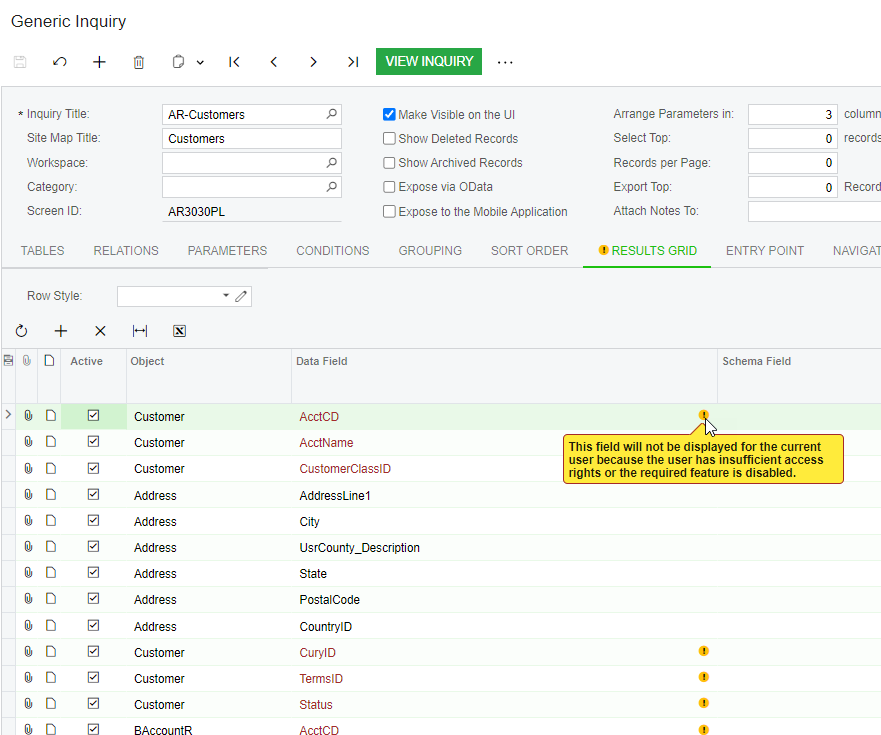
I’ve been testing 23R2.  In many Generic Inquiry definitions I get the warning shown below.  The message makes no sense, when I run the inquiry it does display these field and my user has sufficient rights and there was no warning like this in 22R2.  This issue introduced in 23R2.  Anyone else seen this or have an idea what cause sthis?


Best answer by andrewleusink

I had a similar issue:

I also opened a case with Acumatica support, and got an unexpectedly quick answer.

The gist:

This is a known issue that is scheduled to be fixed in 24R2.

However, it is supposed to be cosmetic and should not have a functional impact.


6 replies

Forum|alt.badge.img+1

Hi,

This is just a warning sign of missing features that might have not been enabled but are part of the module.

This will not impact any data or information.
Enabling these inactive features related to the module should remove the warning.


Hope this helps!


kyoung14
Varsity I
Forum|alt.badge.img
  • Author
  • Varsity I
  • December 6, 2023

I understand what you are saying but I don’t think this is that.  I have everything enabled in this 23R2 test instance as I do in the 22R2 test/dev instance and do not see these warnings there.  I am seeing this warning on many standard GI’s.  For example, the above is the Customer List and you see many “Customer” fields with this warning.  Same goes for Vendors PL GI and Projects list.  I know it isn’t an access rights thing and not sure what feature would be missing that would prompt error for Customer.AcctCD or AcctName.  Something seems odd - I’ll keep digging but yes it doesn’t really appear to impact anything..


Thanks for the response.


Chris Hackett
Community Manager
Forum|alt.badge.img
  • Acumatica Community Manager
  • December 21, 2023

Hi @kyoung14 were you able to find a solution? Thank you!


kyoung14
Varsity I
Forum|alt.badge.img
  • Author
  • Varsity I
  • December 22, 2023

No.  Previous person thought it was because something wasn’t enabled but that isn’t it from what I can tell.  Something in 23R2 causing this issue.  However, near as I can tell it isn’t really impacting anything other than an annoying incorrect warning so I haven’t followed up on it further.  


hsarjapur
Varsity I
Forum|alt.badge.img
  • Varsity I
  • January 9, 2024

I agree, we just ran into this issue over the weekend when we upgraded our client and this could be a annoying warning sign but totally not acceptable for Customers and Partners serving our clients. I was told this warning is for the fact “Matrix items” feature is not enabled and Why should we enable that feature? Our client is in MFG edition and they don’t need Item matrix feature. if it worked in 2022 R2 then it should work in 2023 R2 as well. Please remove this un-necessary warning signs, one less thing to worry. 


I had a similar issue:

I also opened a case with Acumatica support, and got an unexpectedly quick answer.

The gist:

This is a known issue that is scheduled to be fixed in 24R2.

However, it is supposed to be cosmetic and should not have a functional impact.