

Answer

"Use in Quick Search" option not available for all fields in a GI

  • May 24, 2022
  • 1 reply
  • 282 views

Forum|alt.badge.img

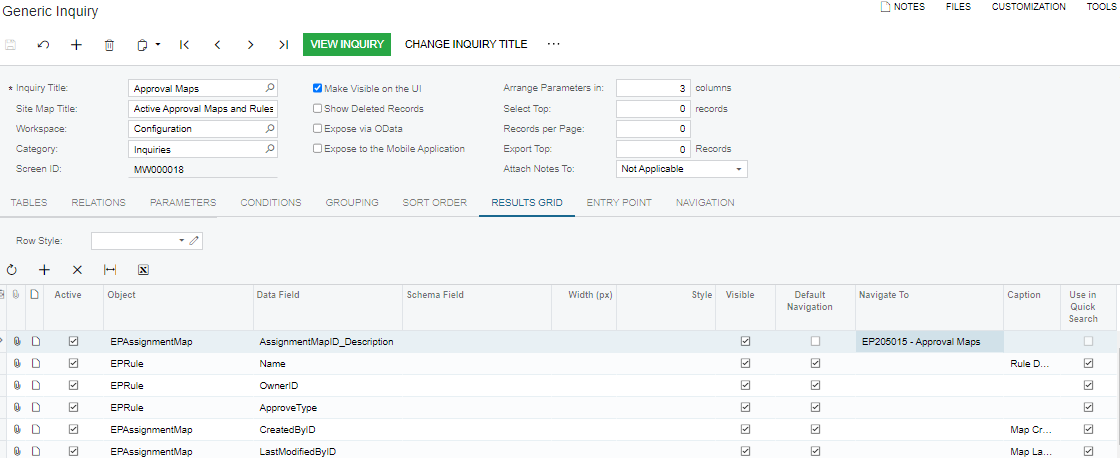
I have created a GI to use as as an overview of all approval maps.  For some reason I can’t select “Use in Quick Search” for the AssignmentMapID_Description.  Is that because it has a navigation target selected?  Also I noticed that for some of these fields, it takes really long to search, is that because of the complexity of the query?


Best answer by Naveen Boga

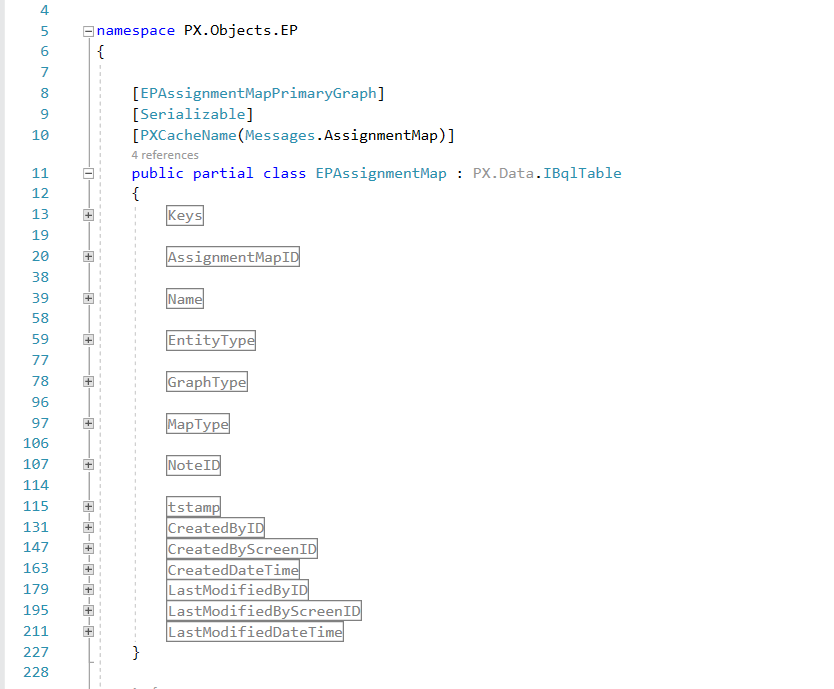
Hi, @MarciaW  AssignmentMapID_Description is NOT a direct field of the “EPAssignmentMap” DAC, hence the system will not us to do a search with this field.

Coming to the slowness, it might be with the below reasons

  • That search field might not be a KEY field, hence it takes time.
  • If you wanted to search with other than KEY fields, then you need to apply the proper indexes on the field.
  • Also, we need to consider the data set. if we have huge data set, it might take some time to fetch the data. 


1 reply

Naveen Boga
Captain II
Forum|alt.badge.img+19
  • Captain II
  • Answer
  • May 24, 2022

Hi, @MarciaW  AssignmentMapID_Description is NOT a direct field of the “EPAssignmentMap” DAC, hence the system will not us to do a search with this field.

Coming to the slowness, it might be with the below reasons

  • That search field might not be a KEY field, hence it takes time.
  • If you wanted to search with other than KEY fields, then you need to apply the proper indexes on the field.
  • Also, we need to consider the data set. if we have huge data set, it might take some time to fetch the data.

