Question

String function on Attributes not working - InventoryItem

  • June 12, 2026
  • 1 reply
  • 23 views

Forum|alt.badge.img

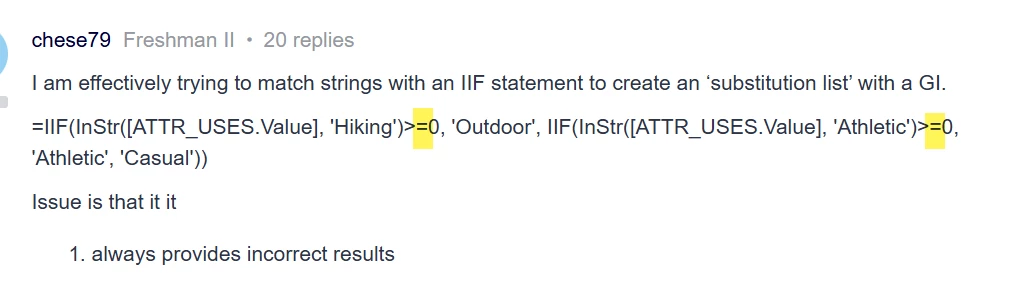
I am effectively trying to match strings with an IIF statement to create an ‘substitution list’ with a GI. 

=IIF(InStr([ATTR_USES.Value], 'Hiking')>=0, 'Outdoor', IIF(InStr([ATTR_USES.Value], 'Athletic')>=0, 'Athletic', 'Casual'))

Issue is that it it

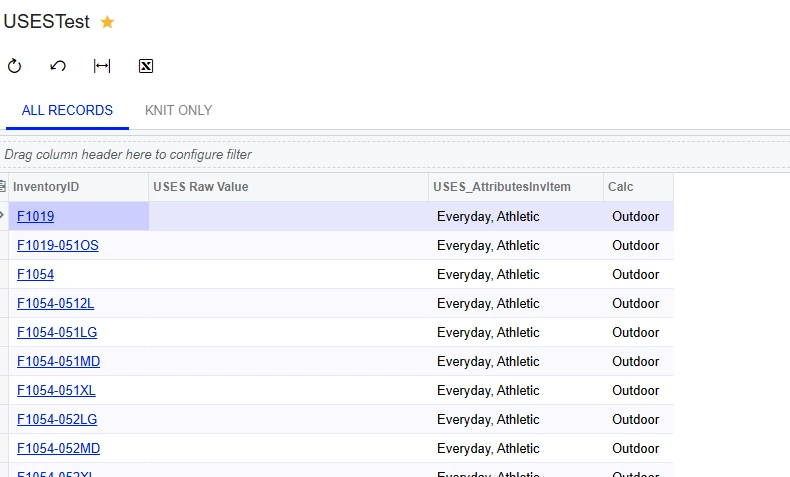
  1. always provides incorrect results
  1. As you can see above, when I join on CSAnswers I don’t get the raw values back? 


Looking for answers on both.


thanks!
 

1 reply

bwhite49
Captain II
Forum|alt.badge.img+12
  • Captain II
  • June 12, 2026

You don’t want the equal signs in your formula. Remove these...


You might find a Switch formula easier to work with in this case rather than repeated IIFs and then use an ISNULL to replace the null values. 

=ISNULL(SWITCH(InStr([ATTR_USES.Value], 'Hiking')>0, ‘Outdoor’, InStr([ATTR_USES.Value], 'Athletic')>0, ‘Athletic’), 'Casual')

Can you share a screenshot of your join to CSAnswers?

After CSAnswers, you will also want to join to the table CSAttributeDetail for combo attributes to access the description field.