Answer

Report's custom report parameters not displaying any results.

  • November 22, 2024
  • 3 replies
  • 69 views

Forum|alt.badge.img

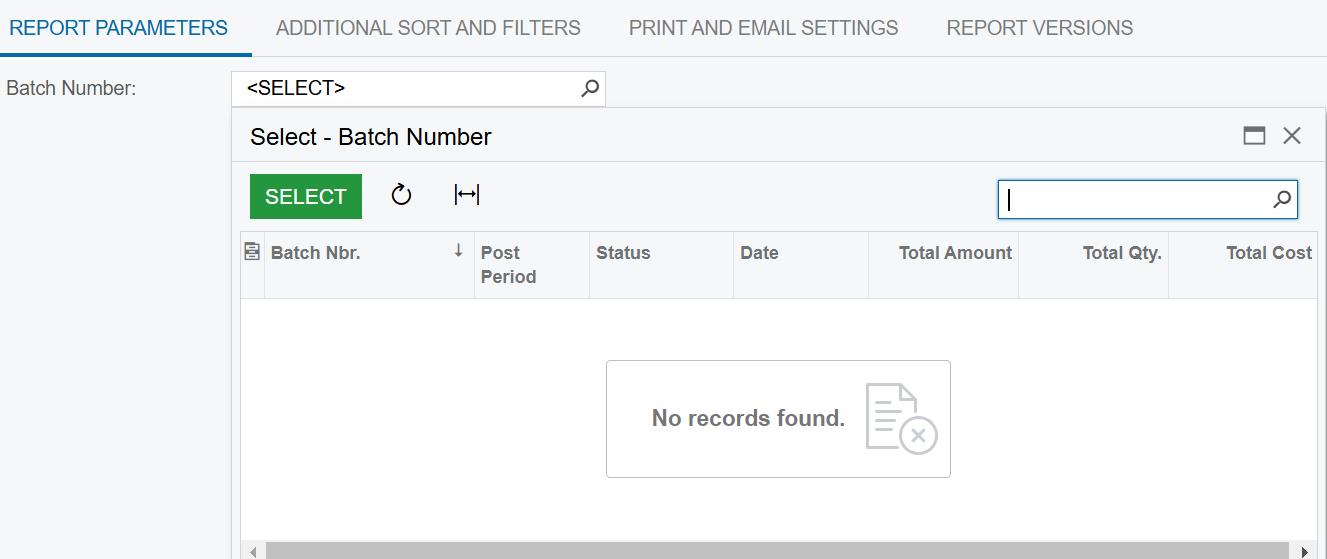
I’m trying to create a report attached below, and use custom data as a filter field. However, whenever I try to search via the filter box, no data appears within the search function. I’ve tried my best to keep the report as close to the standard ones as possible, but I’m not sure what is causing this issue.
 

Best answer by DipakNilkanth

Hi ​@kkraus,

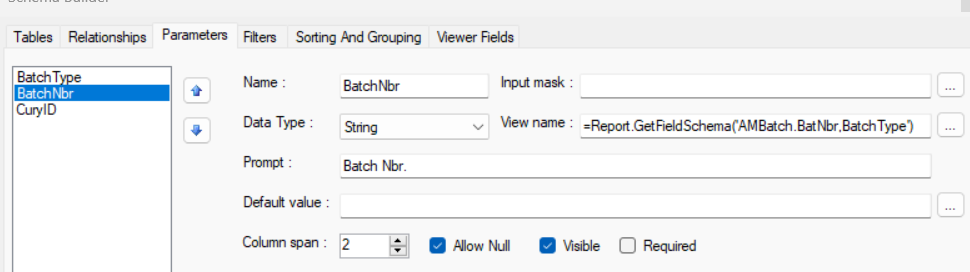
Try to add Batch Type as a Parameter and includes the Batch Type parameter in your Batch Number Parameter View name as below.
=Report.GetFieldSchema('AMBatch.BatNbr,BatchType')


Hope, it helps!

3 replies

DipakNilkanth
Pro III
Forum|alt.badge.img+13
  • Pro III
  • Answer
  • November 23, 2024

Hi ​@kkraus,

Try to add Batch Type as a Parameter and includes the Batch Type parameter in your Batch Number Parameter View name as below.
=Report.GetFieldSchema('AMBatch.BatNbr,BatchType')


Hope, it helps!


Forum|alt.badge.img
  • Author
  • Freshman II
  • November 25, 2024

@Dipak Nilkanth, That worked. Had to use Doc Type instead of Batch Type, but it worked perfectly.


DipakNilkanth
Pro III
Forum|alt.badge.img+13

@kkraus, Happy to hear. Thank you for sharing the solution with Acumatica community.