Solved

Report's custom report parameters not displaying any results.

  • November 22, 2024
  • 3 replies
  • 106 views
  • Translate All

Forum|alt.badge.img

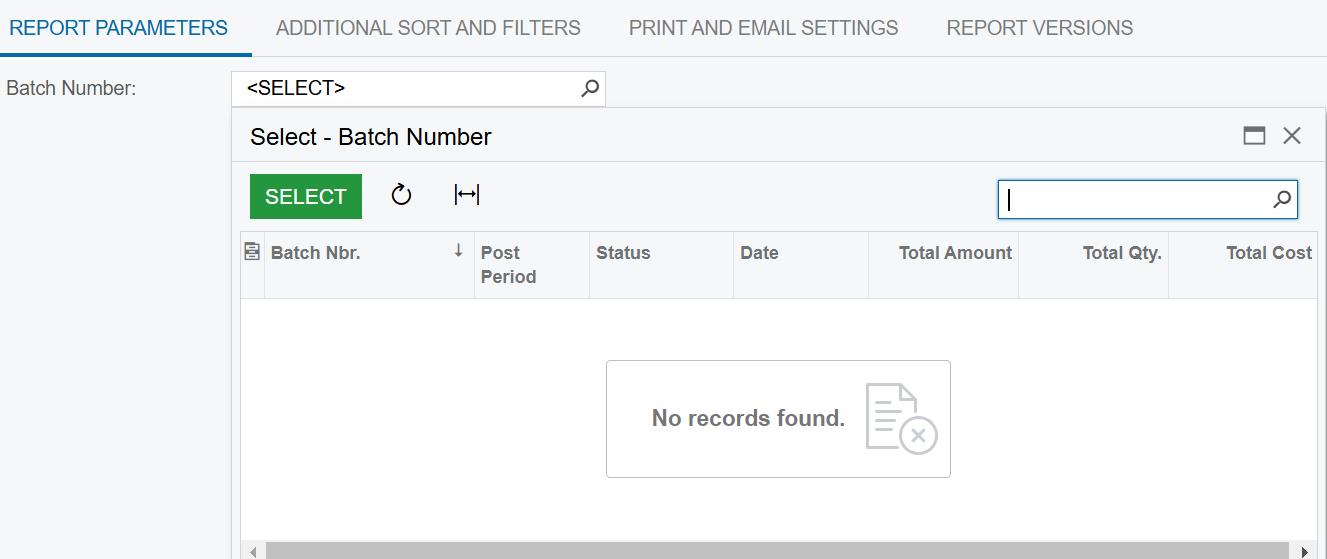
I’m trying to create a report attached below, and use custom data as a filter field. However, whenever I try to search via the filter box, no data appears within the search function. I’ve tried my best to keep the report as close to the standard ones as possible, but I’m not sure what is causing this issue.
 

Best answer by Dipak Nilkanth

Hi ​@kkraus,

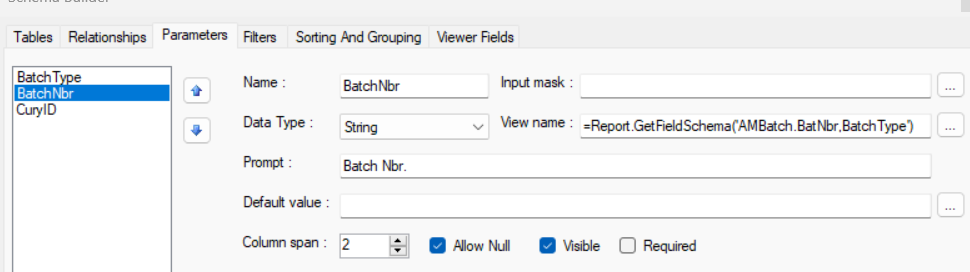
Try to add Batch Type as a Parameter and includes the Batch Type parameter in your Batch Number Parameter View name as below.
=Report.GetFieldSchema('AMBatch.BatNbr,BatchType')


Hope, it helps!

View original

3 replies

Dipak Nilkanth
Pro III
Forum|alt.badge.img+14

Hi ​@kkraus,

Try to add Batch Type as a Parameter and includes the Batch Type parameter in your Batch Number Parameter View name as below.
=Report.GetFieldSchema('AMBatch.BatNbr,BatchType')


Hope, it helps!

Translate

Forum|alt.badge.img
  • Author
  • Freshman II
  • November 25, 2024

​@Dipak Nilkanth, That worked. Had to use Doc Type instead of Batch Type, but it worked perfectly.

Translate

Dipak Nilkanth
Pro III
Forum|alt.badge.img+14

​@kkraus, Happy to hear. Thank you for sharing the solution with Acumatica community.

Translate