Solved

Report Designer - edit cached URLs and Login ID

  • December 6, 2023
  • 4 replies
  • 181 views
  • Translate All

Forum|alt.badge.img+5

Hello,

I edit a lot of reports and always log in as ADMIN.  Now, when I open report designer and type admin@ I get a huge list of past tenants I have logged into.


Is there a way to edit this list of cached past admin@ logins I have used?

Same question for URLs, but the admin@ login is the list I would really like to reduce.

Thanks for any thoughts!
Best answer by Harshita

Hello @ltussing03 ,
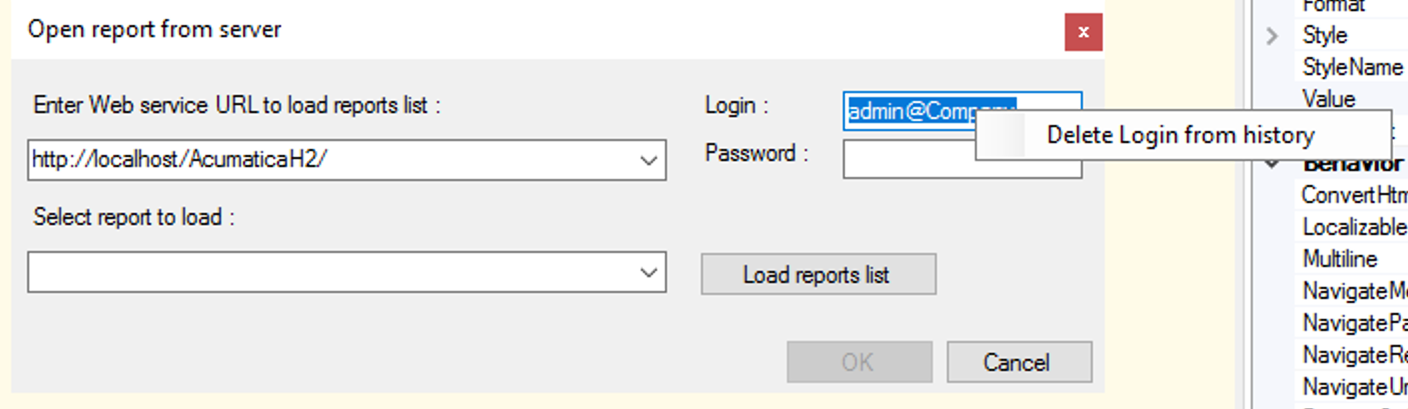
While trying to enter the login details, in the Login field select the account that you are looking to select and the right click, the designer would ask to delete the selected login account as shown below:
Hope this helps.
 

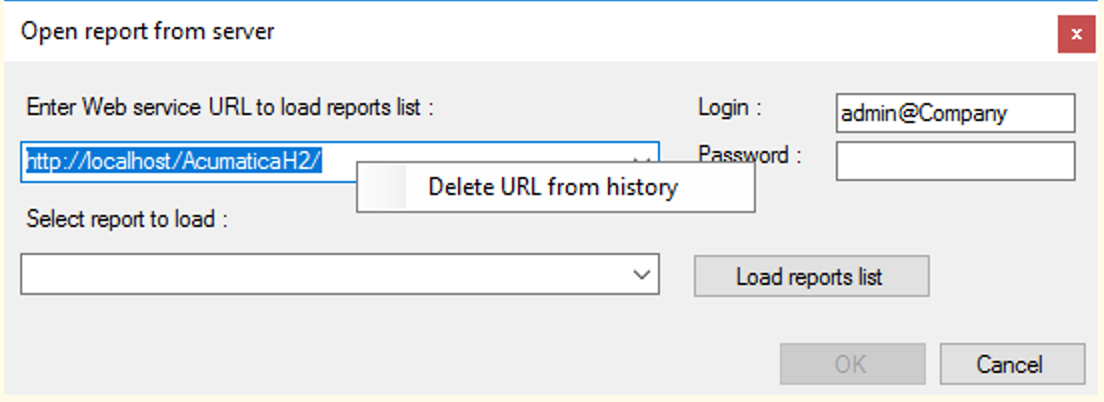
And the same for the URLs:


View original

4 replies

Forum|alt.badge.img+3
  • Captain II
  • Answer
  • December 6, 2023

Hello @ltussing03 ,
While trying to enter the login details, in the Login field select the account that you are looking to select and the right click, the designer would ask to delete the selected login account as shown below:
Hope this helps.
 

And the same for the URLs:


Translate

Connor Morse
Jr Varsity III
Forum|alt.badge.img+1

@Harshita - This is helpful, never knew this feature. Thanks!

Translate

Forum|alt.badge.img+5
  • Author
  • Captain II
  • December 6, 2023

Thanks!!!!


Perfect!!!

Translate

Forum|alt.badge.img

@Harshita - This is helpful, never knew this feature. Thanks!

You're welcome! I'm glad I could help you discover a new feature.

Translate