Solved

Printing a Generic Inquiry

  • December 29, 2021
  • 4 replies
  • 352 views
  • Translate All

Forum|alt.badge.img+5

I have published Generic Inquiry that functions as designed.  All is well except there is a request to be able to print the results.  Can you make a generic inquiry printable without first exporting to EXCEL?


Thanks!

Best answer by vkumar

Hi @ltussing03 

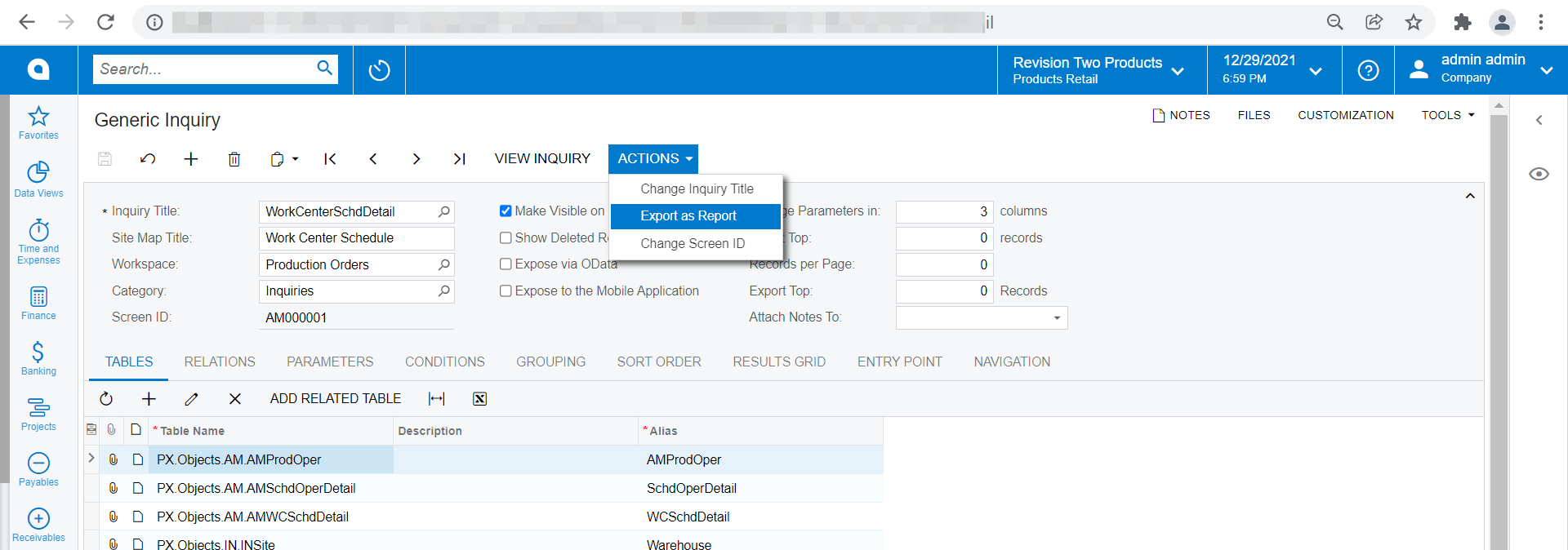
One has to export the GI results to be able to print.  Else, you may build a report for the GI, there is an option to ease building report from GI using Action > Export as report, which creates a rpx file for the GI.
Hope this helps.

Regards,

View original

4 replies

Forum|alt.badge.img+12
  • Acumatica Support Team
  • Answer
  • December 30, 2021

Hi @ltussing03 

One has to export the GI results to be able to print.  Else, you may build a report for the GI, there is an option to ease building report from GI using Action > Export as report, which creates a rpx file for the GI.

Hope this helps.

Regards,

Translate

Forum|alt.badge.img+5
  • Author
  • Captain II
  • December 30, 2021

Thanks!

Translate

kboyko43
Freshman I
Forum|alt.badge.img
  • Freshman I
  • January 5, 2022

hi @vkumar, 


are there any directions or training materials on how to export a GI as a report and convert it to a Report via Report designer?  i failed to find any material on Acumatica wiki or Acumatica university

Translate

Forum|alt.badge.img+2

I understand you can make a report, but then you have to have two separate menu items, one for the GI which can be sorted and filtered on the fly, and one for the report.  I think it would be a platform improvement to make all GIs printable where it can grab the currently filtered records and print it in a reasonable format (title of GI at top, current date, user, give selection window for which columns should be printed which would print ratably to their pixel size on the screen).

Translate