

Solved

Passing variable from sub report to main report and how to share variables and where I need to set the variable

  • December 11, 2024
  • 12 replies
  • 756 views
  • Translate All

Forum|alt.badge.img

Hi

How can I pass Class Item description of the inventory id and the sum of  projectreveneue budget.Amount based on the project and customer id in a sub report that is needs to be passed in the group footer of the main report which contains the project revenue budget details based on project id and customer id.

I struggle to apply the variable declared in the detailed section of subreport to use it in main report to display     Item Class description     Sum ($ Subreport_amount)

Thanks
Best answer by arthia

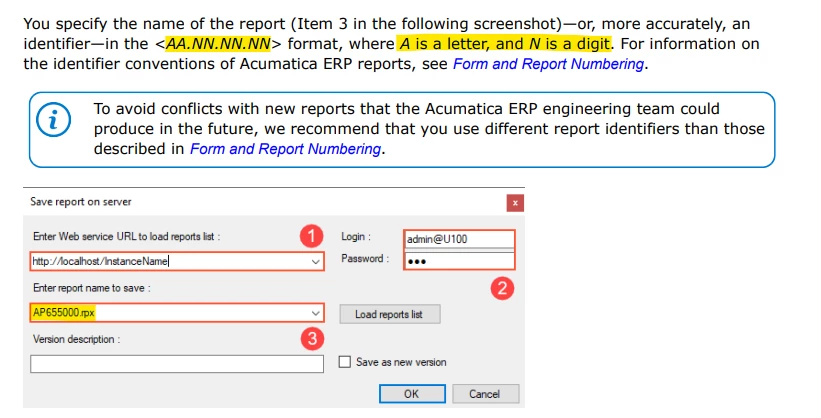
​@SujaFMS , ReportID should be in below format


View original

12 replies

Forum|alt.badge.img+4
  • Varsity I
  • December 11, 2024

Hi ​@SujaFMS , To get the subreport variable in main report, we can use this format in main report - $Subreport_Variable. Hope this link helps you


Translate

Forum|alt.badge.img
  • Author
  • Freshman II
  • December 11, 2024

Thanks.. I have gone through these posts. However, I am not able to get the value of the $totalsum variable in main report. for eg I created a text box in main report and in value property I entered $Prinvc01_totalsum. Can you post the screenshot if its possible for you?


Translate

Forum|alt.badge.img+4
  • Varsity I
  • December 11, 2024

Could you please share your reports to review?

Translate

Forum|alt.badge.img+4
  • Varsity I
  • December 11, 2024

Hi ​@SujaFMS , I’m using subreport variable in main report, sharing screenshot for your reference

Subreport in Main report:

Subreport Variable in Main report:


Translate

Forum|alt.badge.img
  • Author
  • Freshman II
  • December 11, 2024

Hi Thanks ….for sharing screenshot. However, I am getting an error in expression editor and not displaying the value in preview

Attached the screenshots of my report My main report and sub report

Translate

Forum|alt.badge.img+4
  • Varsity I
  • December 11, 2024

​@SujaFMS , Can you rename the subreportid with proper acumatica reportid format, instead of “PRINVC001.rpx” .

Translate

Forum|alt.badge.img
  • Author
  • Freshman II
  • December 11, 2024

Can you please help me in understanding the Acumatica report format?


Translate

Forum|alt.badge.img+4
  • Varsity I
  • Answer
  • December 11, 2024

​@SujaFMS , ReportID should be in below format


Translate

Forum|alt.badge.img
  • Author
  • Freshman II
  • December 11, 2024

​@arthia98 Thanks for that... Is the error having to do something report format?

I am a newbie to Acumatica .

Translate

Forum|alt.badge.img
  • Author
  • Freshman II
  • December 11, 2024

​@arthia98 … I am getting the value now. Thanks.   


Translate

  • Freshman I
  • December 26, 2024

Hi ​@SujaFMS, 

Can you please clarify your solution?

Did changing the report name result in the variable being passed correctly?

Translate

  • Freshman I
  • January 16, 2025

Hi Thanks ….for sharing screenshot. However, I am getting an error in expression editor and not displaying the value in preview

Attached the screenshots of my report My main report and sub report


Thank you so much, This solved my issue after many searching and trying 

Translate


