Solved

Make sure a 0% discount does not show on Form.

  • September 15, 2025
  • 6 replies
  • 116 views
  • Translate All

Forum|alt.badge.img

Good Morning!

I am currently working on a few forms and one of the requests is to make sure that if the discount is showing 0% to remove it from the form. The title “Discount” can still be there but the number needs to go away. 

Currently I have =IIF (Null ([ARTran.DiscPct]) ,'',  [ARTran.DiscPCT]) . I feel like I’m close but I know I’m missing something. This is being done on the Sales Order invoice but will also be applied to others.

Any help would be appreciated.

Thanks,
Brent

Best answer by darylbowman

 Remove the parenthesis after [ARTran.DiscPct])


View original

6 replies

dcomerford
Captain II
Forum|alt.badge.img+16
  • Captain II
  • September 15, 2025

​@bbondura The DiscPct is a decimal field if its empty will have 0 in it not Null your fomulae would need to be 

=IIF ([ARTran.DiscPct]) = 0 ,'',  [ARTran.DiscPCT]) 

Translate

darylbowman
Captain II
Forum|alt.badge.img+17

Better yet

=IIf(IsNull([ARTran.DiscPct],0)=0 ,'',[ARTran.DiscPct])

Translate

Forum|alt.badge.img
  • Author
  • Jr Varsity III
  • September 15, 2025

Thank You guys! I get an error when entered and previewing the report. Is this normal?
 

Syntax error in the expression. Context: TextBox ‘TextBox39’ property ‘Value’


Brent

Translate

Forum|alt.badge.img
  • Author
  • Jr Varsity III
  • September 19, 2025

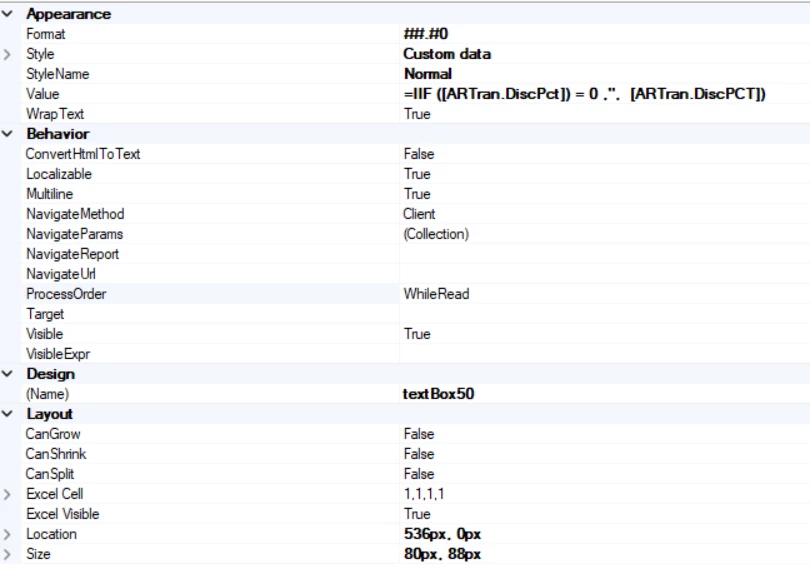
So I was working on this a little more today. This was on a different from and received the same error. Here is the properties box. Should anything look different?


Translate

darylbowman
Captain II
Forum|alt.badge.img+17

 Remove the parenthesis after [ARTran.DiscPct])


Translate

Forum|alt.badge.img
  • Author
  • Jr Varsity III
  • September 22, 2025

That worked! Thank You.

Translate