Solved

Is it possible to justify text in report Designer.

  • April 11, 2025
  • 6 replies
  • 430 views
  • Translate All

Forum|alt.badge.img

I need to show a data field as justify not left/ center/ right. Is it possible do it 

Best answer by Ankita Tayana

Hi ​@rashmikamudalinayake10,

In Acumatica Report Designer, aligning text to justify  isn't directly supported as a built-in alignment option like Left, Center, or Right.
As a workaround, 

If you want to simulate justified alignment in Acumatica reports:

  • Try increasing the width of the TextBox so the content has more space.
  • Use a monospaced font like Courier New and manually format the text in your data source (or script), inserting extra spaces where needed.
    • This is tedious and mostly feasible only for static or short blocks of text

Alternative solution is 

If justification is critical, consider:

  • Exporting the report to Word or PDF and using a macro or formatting tool to justify it there.
  • Or, embedding HTML content with justification (if using HTML rendering in newer versions or custom extensions).

    Hope this helps!

View original

6 replies

Dipak Nilkanth
Pro III
Forum|alt.badge.img+14

Hi ​@rashmikamudalinayake10,

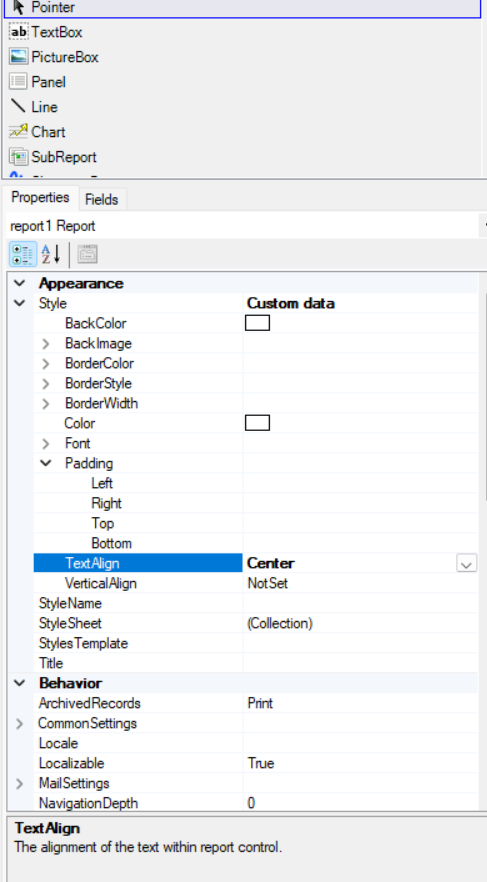
You can use TextAlign option from Style properties of Appearance section.
 

Hope, it helps!

Translate

Forum|alt.badge.img

In ‘Center’ it aligns to the center; I want it justified like in Word.

Translate

saifalisabri
Jr Varsity II
Forum|alt.badge.img

Solution:
Yes, text justification is possible in Acumatica Report Designer:

  1. Select the text field in the report.
  2. In the Properties panel, set Text Alignment to Justify.
  3. Ensure the text container is wide enough to prevent uneven spacing.

Limitations: Justification may not render perfectly in all formats (e.g., uneven spacing in PDFs). Use monospace fonts or adjust text width for better results.


Translate

BenjaminCrisman
Acumatica Employee
Forum|alt.badge.img+4

​@rashmikamudalinayake10 If these suggestions aren’t helping for can you provide an example of the justification you’re looking for?

Translate

Forum|alt.badge.img+6

Hi ​@rashmikamudalinayake10,

In Acumatica Report Designer, aligning text to justify  isn't directly supported as a built-in alignment option like Left, Center, or Right.
As a workaround, 

If you want to simulate justified alignment in Acumatica reports:

  • Try increasing the width of the TextBox so the content has more space.
  • Use a monospaced font like Courier New and manually format the text in your data source (or script), inserting extra spaces where needed.
    • This is tedious and mostly feasible only for static or short blocks of text

Alternative solution is 

If justification is critical, consider:

  • Exporting the report to Word or PDF and using a macro or formatting tool to justify it there.
  • Or, embedding HTML content with justification (if using HTML rendering in newer versions or custom extensions).

    Hope this helps!
Translate

Forum|alt.badge.img+1

Solution:
Yes, text justification is possible in Acumatica Report Designer:

  1. Select the text field in the report.
  2. In the Properties panel, set Text Alignment to Justify.
  3. Ensure the text container is wide enough to prevent uneven spacing.

Limitations: Justification may not render perfectly in all formats (e.g., uneven spacing in PDFs). Use monospace fonts or adjust text width for better results.


This is incorrect. There is no “Justify” text alignment option available currently in report designer.


Translate