Solved

Hyperlink navigates to wrong screen

  • January 11, 2023
  • 13 replies
  • 570 views
  • Translate All

wfilipiak67
Captain II
Forum|alt.badge.img+3

Hi, We added the PO number field to the AP Aging report ( AP631000) 
Now the client would like have that field as a hyperlink to the PO entry. screen ( po301000)

The PO number is being pulled form APTran & is working great. 
I tried to duplicate the hyperlink on the Reference Number but I am having no luck. 
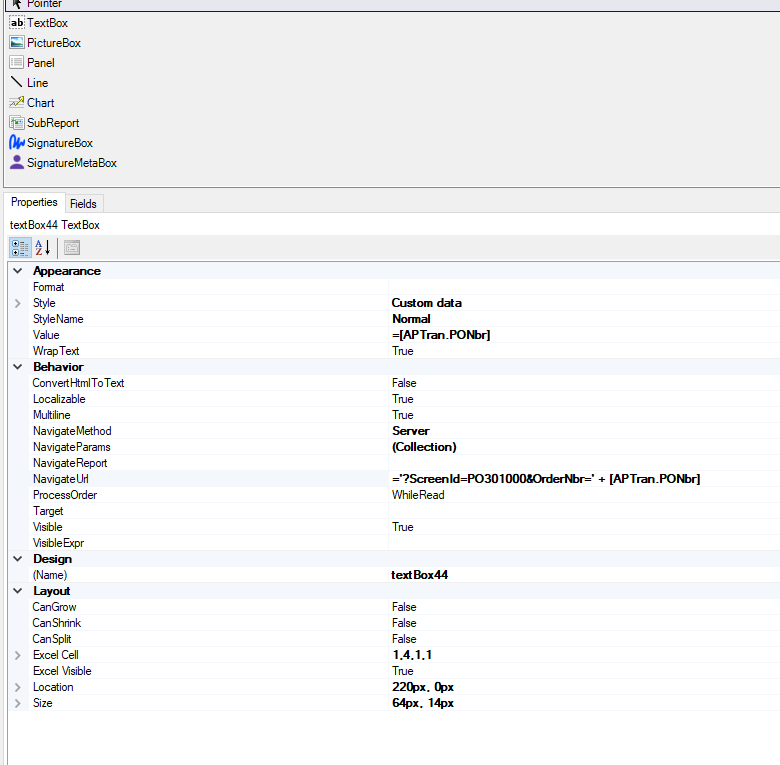
I get the PO Number to show as a hyperlink but when clicked the Bills & Adjustment screen opens with te AP Reference number. 

on the PO field, Properties,  the NavigateMethod is Server 
I added NavigateParams of OrderType→ [APTran,POOrderType], OrderNbr ->[APTran.PONbr]

 and the NavigateURL as https://company.acumatica.com/Main?CompanyID=company&ScreenId=PO301000&OrderType=OrderType&OrderNbr=RefNbr

For the URL, I’ve tried it in ‘ and with a $ before the OrderType & Order Nbr. 

Any help would be appreciated.

Thanks!

Best answer by DavidEichner

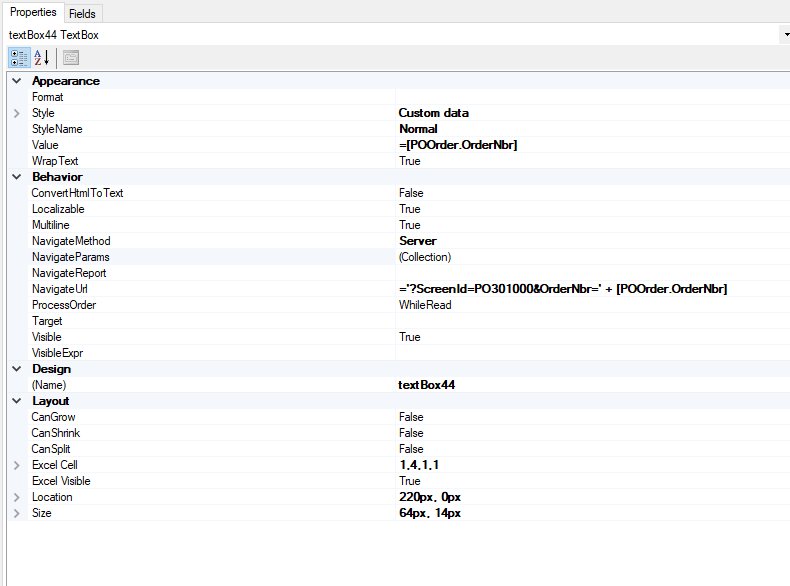
I figured out how to get it to open the PO screen.  Even though we were telling it to open the PO301000 screen, it apparently looks at the value from APTran and decides that we need to open the AP301000 screen instead.  You can add a join to the POOrder table and then use the OrderNbr field from that POOrder table (both for the value and also for the NavigateUrl).  

In my testing, some of the purchase orders work with the URL link and others do not.  Still trying to figure out what is different.


View original

13 replies

DavidEichner
Captain II
Forum|alt.badge.img+14

https://salesdemo.kensium.com/Acu2022R2/(W(32))/Main?CompanyID=Company&ScreenId=PO301000&OrderType=RO&OrderNbr=PO001824

Above is the format of what the NavigateURL should look like (with your site instance instead of mine) when you click on the field.  Can you send me what URL pops up in the browser when you click on the field in the report?


Best,

David Eichner, CPA

Kensium

Translate

wfilipiak67
Captain II
Forum|alt.badge.img+3
  • Author
  • Captain II
  • January 12, 2023

@DavidEichner , My url looks similar to yours. I am having the issue with passing the Type & the Order number to build the url for the field.

Translate

DavidEichner
Captain II
Forum|alt.badge.img+14

When you hover over the field, does the URL look like mine?  

Translate

DavidEichner
Captain II
Forum|alt.badge.img+14

Does your URL show the values for the Type and OrderNbr?  &OrderType=RO&OrderNbr=PO001824

Translate

wfilipiak67
Captain II
Forum|alt.badge.img+3
  • Author
  • Captain II
  • January 16, 2023

@DavidEichner , What I ended up doing is this. I set the Navigation method to Client. 
& the URL to 
='https://company.acumatica.com/Main?CompanyID=Company+Live&ScreenId=PO301000&OrderType='+[APTran.POOrderType]+'&OrderNbr='+[APTran.PONbr]

This then opened the the PO in the same tab as the report. 

I don’t see how to pass the NavigateParams to the URL. 
or how to have clicked URL open in a a new tab.


Translate

DavidEichner
Captain II
Forum|alt.badge.img+14

I had to add the APTran table with a join to the AP Invoice.  I then changed the NavigateMethod to Server and populated the NavigateUrl as shown below.  This worked for me in the demo dataset.  

Best,

David Eichner, CPA

Sr Solutions Architect

Kensium


Translate

wfilipiak67
Captain II
Forum|alt.badge.img+3
  • Author
  • Captain II
  • January 16, 2023

@DavidEichner , What do you have for the NavigateParams? 
 

Translate

DavidEichner
Captain II
Forum|alt.badge.img+14

Nothing.  I thought I needed them but it turned out I didn’t.

Translate

wfilipiak67
Captain II
Forum|alt.badge.img+3
  • Author
  • Captain II
  • January 16, 2023

@DavidEichner, Well I tried what you suggested & It not working for me. The screen that gets opened is the Bills & Adjustments.
This is what I have setup for APInvoice to APTran


Translate

DavidEichner
Captain II
Forum|alt.badge.img+14

@wfilipiak67  Yeah, I thought I didn't need the navigate parameters and removed them...and now it is doing the same thing as yours.  Weird.  I added them back and it is still opening the Bills & Adjustments screen now.  I will play around with it a little more and see if I can get it back to opening the PO screen.

Translate

wfilipiak67
Captain II
Forum|alt.badge.img+3
  • Author
  • Captain II
  • January 16, 2023

@DavidEichner , Thanks. This is/was slowly driving me crazy. 

Thank you for your efforts on this.

Bill

Translate

DavidEichner
Captain II
Forum|alt.badge.img+14

I figured out how to get it to open the PO screen.  Even though we were telling it to open the PO301000 screen, it apparently looks at the value from APTran and decides that we need to open the AP301000 screen instead.  You can add a join to the POOrder table and then use the OrderNbr field from that POOrder table (both for the value and also for the NavigateUrl).  

In my testing, some of the purchase orders work with the URL link and others do not.  Still trying to figure out what is different.



Translate

wfilipiak67
Captain II
Forum|alt.badge.img+3
  • Author
  • Captain II
  • January 18, 2023

@DavidEichner , Thank you for this solution. It is working for me & the client. 
 

Translate