

Answer

How to resize a group header area?

  • November 3, 2020
  • 1 reply
  • 253 views

Forum|alt.badge.img

Hello everyone,


A total newbie here to Acumatica Report designer, so please forgive my question...but how to i precisely set the size of a group header section in the report designer?

At the moment, there are about 4-5 blank lines that is being used up by the address section and it it pushing my document layout further down, so how do it fix this please?


Kind regards,

Melq
 

Best answer by Naveen Boga

Hi @mrivera67,

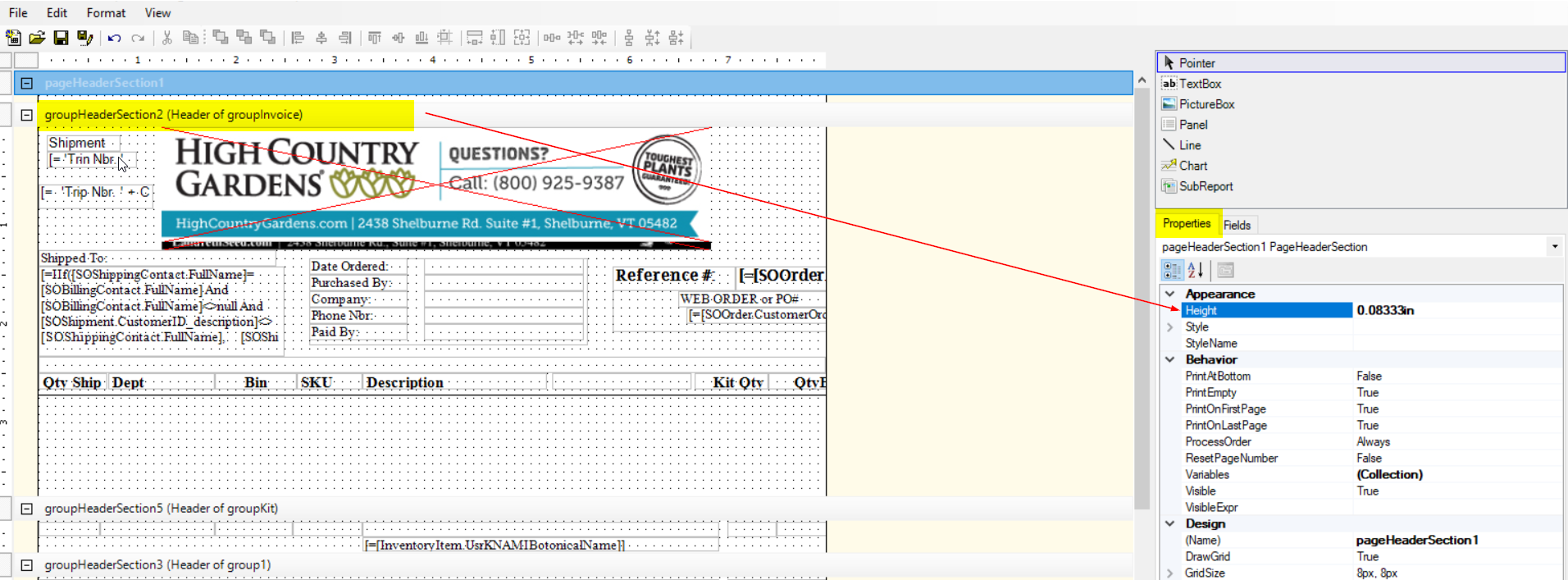
Just click on that specific group header that you want to resize, and on the right side you have all the properties of group header section and set the “Height” property as shown in the screenshot for reference.


Best Regards,

Naveen B

1 reply

Naveen Boga
Captain II
Forum|alt.badge.img+19
  • Captain II
  • Answer
  • November 3, 2020

Hi @mrivera67,

Just click on that specific group header that you want to resize, and on the right side you have all the properties of group header section and set the “Height” property as shown in the screenshot for reference.


Best Regards,

Naveen B

