

Answer

How to have more than one sort attribute in a default sort in a GI

  • November 3, 2021
  • 4 replies
  • 288 views

Forum|alt.badge.img

I have a GI that shows my sales order list that I would like to be able sort by more than one field. When I put more than one attribute into the sort settings of the GI it seems to only work on the top one - is there a way to sort by the top one, then within the top one, sort by the second one? 

For further explanation, we powdercoat our orders and we have two user defined Fields in the sales order - colour, and priority. It would be nice to sort first by priority, then by colour
Best answer by aborisova

Hi @DanielStarke 

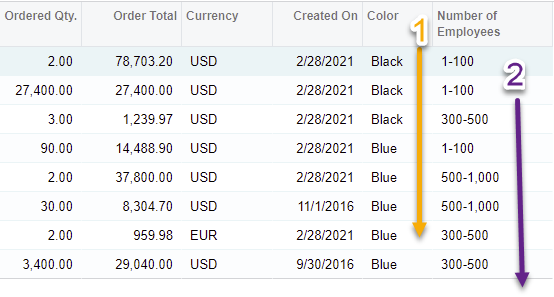
I had no issues replicating it in a GI:


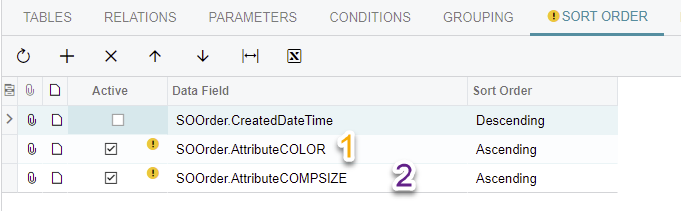
Take a look at the sorting conditions:


4 replies

Naveen Boga
Captain II
Forum|alt.badge.img+19
  • Captain II
  • November 3, 2021

Hi @DanielStarke  In Acumatica default GI, if we mention multiple fields, system will sort the results bases on the fields sequence (First results will sort with 1st field then 2nd field and etc.)


Forum|alt.badge.img
  • Author
  • Varsity I
  • November 3, 2021

Hmmm, it's not working like that for me. 

I am using two attributes stored in the user defined fields...


  • Freshman III
  • Answer
  • November 3, 2021

Hi @DanielStarke 

I had no issues replicating it in a GI:


Take a look at the sorting conditions:


Forum|alt.badge.img+1
  • November 3, 2021

Multiple columns sorting would be great. 
Also see

