Answer

GI: Conditions Filter: Convert to DEC from Attribute

  • September 16, 2024
  • 4 replies
  • 97 views

chrislower
Jr Varsity III
Forum|alt.badge.img

Hi everyone,

I’m hoping this is a relatively simple question. I’m working on a Project GI and trying to set a condition that only includes projects with a booked sales amount greater than $1,000. We store the booked sales amount in a User Defined Field.

The issue is that this field is a Text field, which causes problems when applying conditions. I’ve created a calculated field in the Results Grid that converts the text to a decimal (DEC) format, and I use this field for calculations and filtering in reports and dashboards.

What I’m looking for is a way to handle this conversion at the Conditions level, so I don’t have to apply filters manually to every report and dashboard going forward.

Thanks,
Chris Lower

Best answer by chrislower

@darylbowman 


That's right, I need to convert it prior to comparing to a set number.  Sounds like that may not be a possible at the moment without utilizing a customization for the new Dec Field.  I will just continue to apply the filter at the report and dashboard level.  Thanks for your help.


Chris

4 replies

darylbowman
Captain II
Forum|alt.badge.img+15

I’m not aware of any way to do this. UDFs are inherently limited. The most effective solution would be a custom database decimal field.


Forum|alt.badge.img+1
  • Varsity I
  • September 18, 2024

Am I correct in thinking that you need to use a text field ,containing numbers, within a formula?

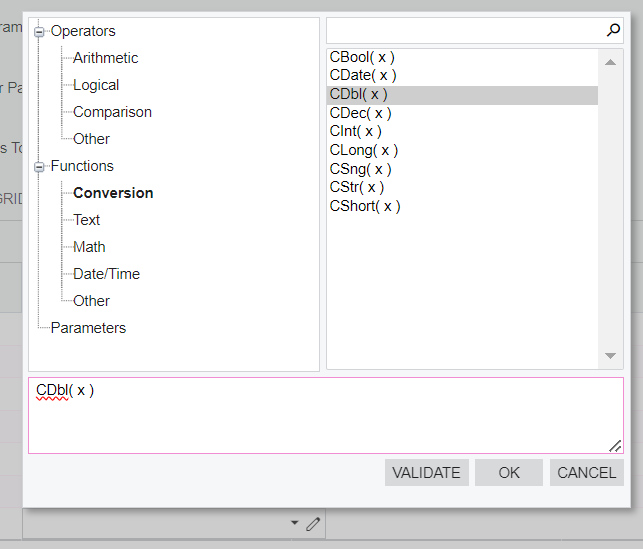
I was able to work around this by enclosing fields with cdbl(). This seems to convert to a numeric field and allow calculations.

In the GI conditions table, select the pencil to open the expressions editor.
Select conversion and CDbl(x)
Place your field where the x is.


Hope this helps.

Helen​​​​​​​


darylbowman
Captain II
Forum|alt.badge.img+15

Formulas are only enabled on one side of the equals. The tricky bit is that he needs it on both sides:

CDec(udfField) > 1000.00


chrislower
Jr Varsity III
Forum|alt.badge.img
  • Author
  • Jr Varsity III
  • Answer
  • September 19, 2024

@darylbowman 


That's right, I need to convert it prior to comparing to a set number.  Sounds like that may not be a possible at the moment without utilizing a customization for the new Dec Field.  I will just continue to apply the filter at the report and dashboard level.  Thanks for your help.


Chris