Solved

Formatted Decimal Data issue when exporting from Report to Excel

  • June 19, 2021
  • 6 replies
  • 759 views
  • Translate All

Forum|alt.badge.img+6

Hello,

       I am not an excel expert, so I do not know whether the issue I met is related to the below idea:


        The issue I met is as below:

1, I formatted a data field in report designer, using “0.00”
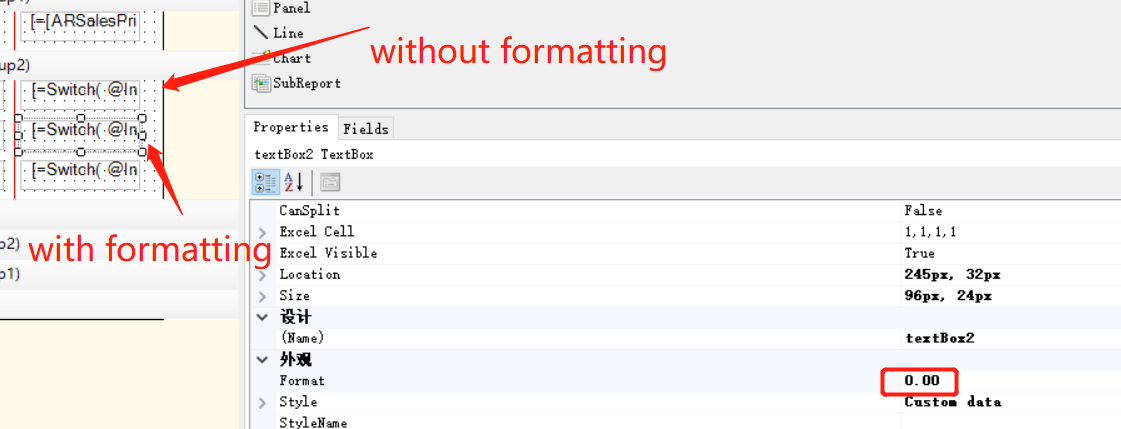
 

2,  It is looked nice in screen and when exporting to PDF

However, the data is only displayed in integer format, while it is indeed having 2 decimals value.
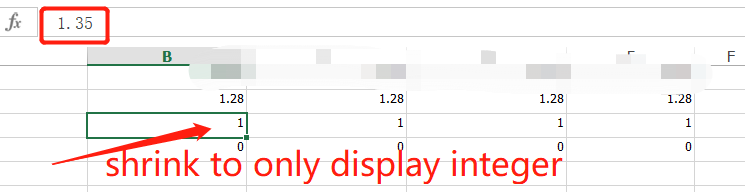
 

on the contrary, the data filed without formatting is looked bad on screen, but it is OK when exporting to excel

 

Best answer by ChandraM

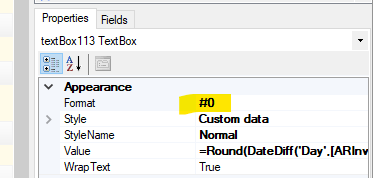
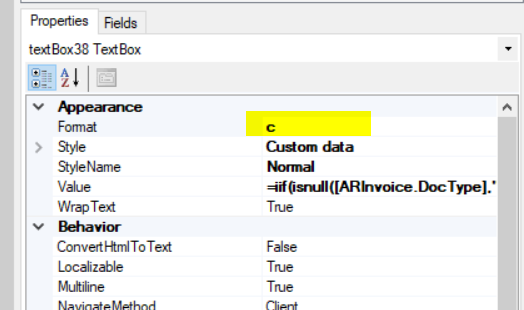
Hi @ray20 Please try setting the Format to ‘c’ (Small case), as shown in the below screenshot. Also, try setting the Format #0.00 


View original

6 replies

arlinewelty93partnerhold
Jr Varsity III
Forum|alt.badge.img

I’ve seen this issue too, occasionally, when I export from Generic Inquiries. If you change the format in Excel, it’s fine but by default I’ve also seen that behavior. This becomes an issue with automated exports (like bank feeds). I’m not sure Acumatica can actually do anything about it though since at least in my experience it’s controlled in the Excel application.

Translate

Forum|alt.badge.img+6
  • Author
  • Captain II
  • June 23, 2021

I’ve seen this issue too, occasionally, when I export from Generic Inquiries. If you change the format in Excel, it’s fine but by default I’ve also seen that behavior. This becomes an issue with automated exports (like bank feeds). I’m not sure Acumatica can actually do anything about it though since at least in my experience it’s controlled in the Excel application.

@arlinewelty93 
Hello, thank you for sharing your experience.
Currently, I am working around it by removing the format control.
It would display 2 decimals in excel.

Translate

Forum|alt.badge.img+8
  • Semi-Pro I
  • Answer
  • July 1, 2021

Hi @ray20 Please try setting the Format to ‘c’ (Small case), as shown in the below screenshot. Also, try setting the Format #0.00 


Translate

Forum|alt.badge.img+6
  • Author
  • Captain II
  • July 2, 2021

@ChandrasekharM 
Thank you , you solved my problem

below is my update:

format ‘c’  displays great on screen and pdf,  ‘c’ stands for currency, so it is shows $ in front of number. But, unfortuantely, it is also shrinked in excel

format ‘#0.00 ’  perfectly showed 2 decimals in everywhere:screen, pdf and excel, Great, Thank you.

Translate

Forum|alt.badge.img+8
  • Semi-Pro I
  • July 2, 2021

Hi @ray20 Glad to know that the solution resolved the issue.

Thanks


Translate

Laura03
Captain II
Forum|alt.badge.img+20
  • Captain II
  • August 2, 2023

Thank you @ray20 and @ChandrasekharM !

My whole number (Number of Days) field was fine on screen but adding .00  (like 365.00 Days) when exported to excel.  This thread helped me!  👍

Laura

Translate