Question

Export or Package Generic Inquiry Pivot on Modern UI

  • June 11, 2026
  • 7 replies
  • 22 views

ejmillar
Semi-Pro I
Forum|alt.badge.img+1

Hello all,

I’ve created a GI on a tenant with the Modern UI, and I’ve created a pivot.

How can I transfer the GI and pivot to another tenant?

I’ve tried: 

  1. Customization Package - just packs the GI without the pivot.
  2. Export the GI to XML - again, doesn’t pack the pivot.
  3. Looked at the GI code - can’t see anything about a pivot view.

I don’t understand, you can pack a filter into a customization but you cannot pack a pivot view.


Thanks,

Ewan.



7 replies

BenjaminCrisman
Acumatica Employee
Forum|alt.badge.img+4

@ejmillar Did you create the pivot as a filter on the GI, or is this a Pivot using the Pivot Tables screen from Classic UI? There is no more Pivot Tables screen in Modern UI, so it should be using the filters on the GI to access pivots. Am I understanding this correctly?


xkylewrightx
Varsity III
Forum|alt.badge.img

Switch to Classic UI, export, and switch back 
Its not the last time you’ll need to do that to find a necessary feature 😎


ejmillar
Semi-Pro I
Forum|alt.badge.img+1
  • Author
  • Semi-Pro I
  • June 11, 2026

@ejmillar Did you create the pivot as a filter on the GI, or is this a Pivot using the Pivot Tables screen from Classic UI? There is no more Pivot Tables screen in Modern UI, so it should be using the filters on the GI to access pivots. Am I understanding this correctly?

Hi Benjamin,

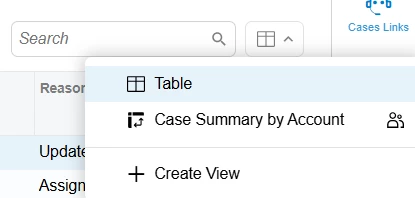
It’s the ‘Create View’ feature on the GI. I’m not using the Pivot Tables screen.


Thanks,

Ewan.


ejmillar
Semi-Pro I
Forum|alt.badge.img+1
  • Author
  • Semi-Pro I
  • June 11, 2026

Switch to Classic UI, export, and switch back 
Its not the last time you’ll need to do that to find a necessary feature 😎

Hi Kyle,

Tried that and it didn’t work.

Thanks,

Ewan.


xkylewrightx
Varsity III
Forum|alt.badge.img

Switch to Classic UI, export, and switch back 
Its not the last time you’ll need to do that to find a necessary feature 😎

Hi Kyle,

Tried that and it didn’t work.

Thanks,

Ewan.


I did a quick test before posting and it worked on my end.


I just did another test where I created one in Modern UI, switched to classic to export, switched back to modern to delete it, switched back to classic to import, and switched back to modern and could view it successfully. 


ejmillar
Semi-Pro I
Forum|alt.badge.img+1
  • Author
  • Semi-Pro I
  • June 11, 2026

Switch to Classic UI, export, and switch back 
Its not the last time you’ll need to do that to find a necessary feature 😎

Hi Kyle,

Tried that and it didn’t work.

Thanks,

Ewan.


I did a quick test before posting and it worked on my end.


I just did another test where I created one in Modern UI, switched to classic to export, switched back to modern to delete it, switched back to classic to import, and switched back to modern and could view it successfully. 

Hi Kyle,

Is this exporting the GI xml or the customization package with the GI? I’ve tried exporting the GI in classic mode and I’ve examined the xml and I cannot see any reference to the pivot view.

Thanks,

Ewan.


xkylewrightx
Varsity III
Forum|alt.badge.img

Its just exporting the pivot table.

You can use Edit Generic Inquiry screen (on Modern UI or Classic) to export the GI, and then use Classic UI to export & import the pivot table to the GI using the steps above.


I can take some screenshots if you need let me know