

Answer

Downloading Acumatica Report Designer

  • July 15, 2025
  • 2 replies
  • 388 views

Forum|alt.badge.img

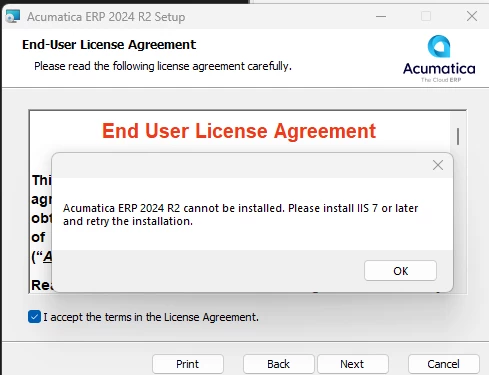
Hello - when I attempt to download the Report Designer for 2024 R2, I am getting this below error message, and am not seeing IIS 7 on the directory as an option anywhere. Do you know where I can get the report designer for 2024 R2 24.211.0024?


Best answer by Abhishek Niikam

Hello, ​@mdyer You don’t need to Download Special Report Designer. The Acumatica Installer it self contains tools for that particular version. In this 2024 R2 24.211.0024, you need to download this Acumatica Installer & while installing, at Start you can check the Report Designer checkbox.(and I think you doing it already).

For you issue you can visit this link:


2 replies

lauraj46
Captain II
Forum|alt.badge.img+8
  • Captain II
  • July 15, 2025

Hi ​@mdyer ,

You should be able to download that version of the Report Designer here:

https://builds.acumatica.com/?prefix=builds/24.2/24.211.0024/AcumaticaTools/

Hope this helps!

Laura


Forum|alt.badge.img+2

Hello, ​@mdyer You don’t need to Download Special Report Designer. The Acumatica Installer it self contains tools for that particular version. In this 2024 R2 24.211.0024, you need to download this Acumatica Installer & while installing, at Start you can check the Report Designer checkbox.(and I think you doing it already).

For you issue you can visit this link:

