Solved

Dashboard Scorecard Colors

  • November 9, 2022
  • 8 replies
  • 390 views
  • Translate All

We have recently updated from 2020 R2 to 2022 R2 (don’t ask) and my dashboards have gone wonky.  I had many score cards with color coding - most are not visible now.  I can’t figure out why.  If I change them to meters they work fine, but as scorecards they show up - at best - like the KPI on the right of my screen shot (black text on white background), but the vast majority show as white on white unless they’re moused over.  I tried deleting one and adding it back in, but the results were the same.  Hopefully someone can help!  Thanks!

left score card is being moused over


Best answer by BenjaminCrisman

Hi @RDelany! That is a strange issue, but can you try changing the color to something else?

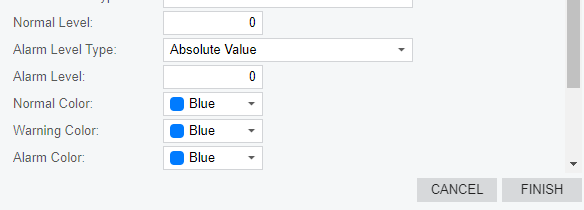
In the screenshot provided there is no color next to the text of the color, i.e. Blue. It should look like:

Somehow the color is showing blue, but actually not present, so it shows white.

Did the site color schema change?

Have you tried rebooting the computer?

Otherwise I would try to make a new dashboard from scratch and add a KPI widget to see if they can just be copied into the new dashboard

View original

8 replies

Manikanta Dhulipudi
Captain II
Forum|alt.badge.img+16

Hi @RDelany  Dashboards are locked or not visible on the screen,

If they are locked please check the below article.

If possible try to delete the site map and recreate it in the sandbox and verify

Thanks

Translate

Forum|alt.badge.img

Longshot - but maybe try clearing your browser cache?

If you want, export a dashboard and at least one underlying GI to XML and post here.  I’ll try it in my 2022R2.

Translate

  • Author
  • Freshman I
  • November 9, 2022

They’re not locked and they are [technically] visible.   It is purely a color issue.  It is on my browser as well as all my colleagues who use the dashboards.  Multiple dashboards.

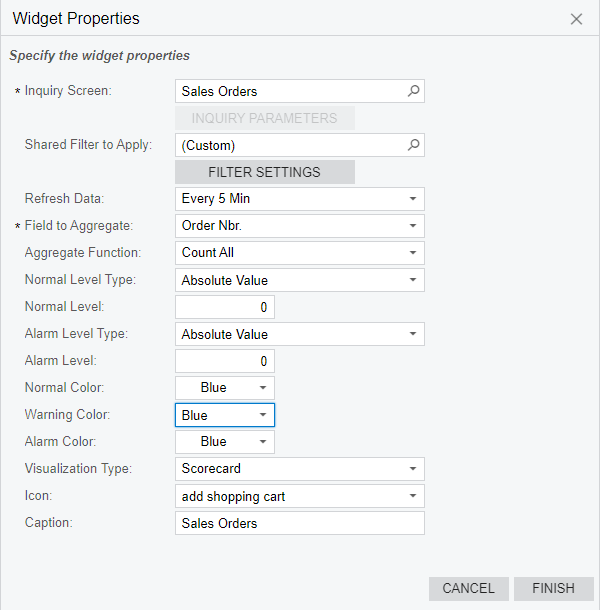
Here’s the widget properties for one:


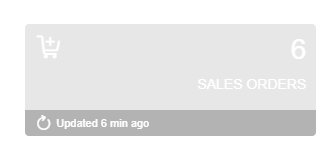
And here’s how it appears if I mouse over (otherwise it is totally invisible as it is white on white):


Translate

  • Author
  • Freshman I
  • November 9, 2022

Longshot - but maybe try clearing your browser cache?

If you want, export a dashboard and at least one underlying GI to XML and post here.  I’ll try it in my 2022R2.

Here’s a dashboard and underlying GI.  Thanks

Translate

BenjaminCrisman
Acumatica Employee
Forum|alt.badge.img+4

Hi @RDelany! That is a strange issue, but can you try changing the color to something else?

In the screenshot provided there is no color next to the text of the color, i.e. Blue. It should look like:

Somehow the color is showing blue, but actually not present, so it shows white.

Did the site color schema change?

Have you tried rebooting the computer?

Otherwise I would try to make a new dashboard from scratch and add a KPI widget to see if they can just be copied into the new dashboard

Translate

  • Author
  • Freshman I
  • November 9, 2022

Hi @RDelany! That is a strange issue, but can you try changing the color to something else?

In the screenshot provided there is no color next to the text of the color, i.e. Blue. It should look like:

Somehow the color is showing blue, but actually not present, so it shows white.

Did the site color schema change?

Have you tried rebooting the computer?

Otherwise I would try to make a new dashboard from scratch and add a KPI widget to see if they can just be copied into the new dashboard

Interesting!  I had not registered that.  No, all the colors show up like that - even when I create a new KPU widget.  Can you advise where I'd look for the site color schema?  I have a suspicion you may be right.

Translate

BenjaminCrisman
Acumatica Employee
Forum|alt.badge.img+4

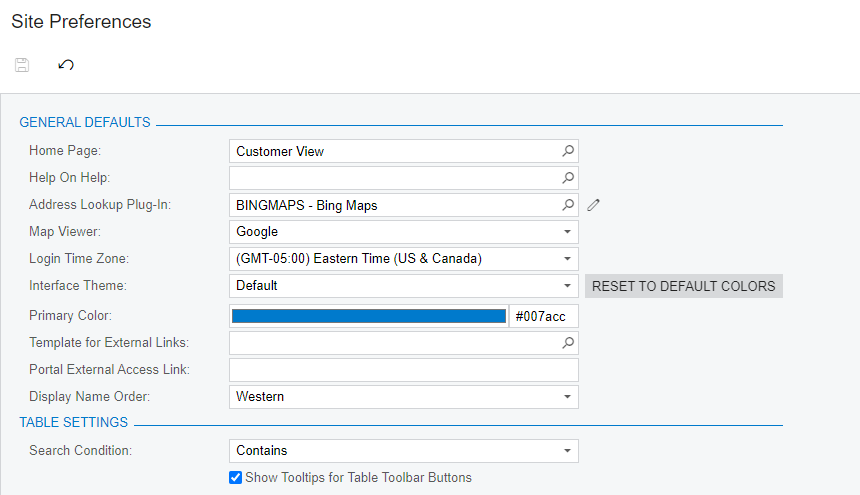
@RDelany These are located in the Site Preferences under System Management:


Translate

  • Author
  • Freshman I
  • November 9, 2022

Thanks @BenjaminCrisman that did it.

Translate