Solved

Column restriction in column layout by last segment of a subaccount

  • July 1, 2026
  • 4 replies
  • 24 views

DavidEichner
Captain II
Forum|alt.badge.img+14

Has anyone figured out how to restrict a column datasource for a specific segment of the subaccount?  We have a client with a 4 segment subaccount and they want to break out columns of the financial statement based on specific values of the 4th segment.  I have tried various different possible wildcard characters in the subaccount string for the first 3 segments but it keeps returning nothing when run like that.

Best answer by DavidEichner

Solution identified.  The issue was that I was trying to use ? in both the beginning and ending subaccount.  The wildcard approach only works if you only populate the beginning subaccount with the wildcards leaving the ending subaccount empty.  Acumatica should probably document that in their documentation.

Alls well that ends well.  :)

Thanks for everyone’s help!

David

4 replies

BenjaminCrisman
Acumatica Employee
Forum|alt.badge.img+4
  • Acumatica Support Team
  • July 6, 2026

@DavidEichner Maybe I’m not able to visualize how you’ve configured your GI but have you tried using the [Table.SubID_Segment4]? If you only want the filter to apply to a single column of the GI then I think you’d need to use a function to restrict the sub or the other mentioned option, but it might help if I could see what you’re working with


Laura03
Captain II
Forum|alt.badge.img+20
  • Captain II
  • July 7, 2026

Hello ​@DavidEichner  ,

Question marks typically work for displaying financial reports by some segment of the Subaccount. Here is an example shown in version 2026 R1.

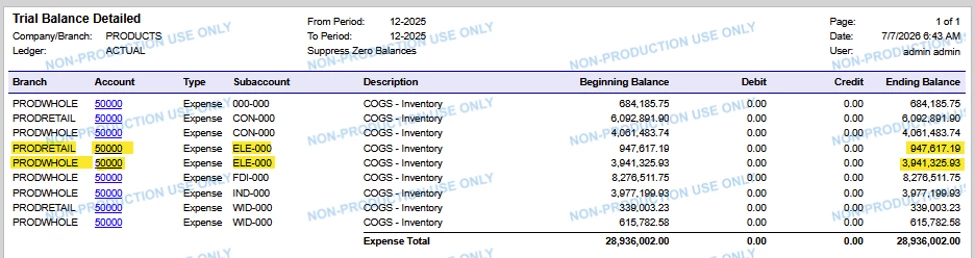
 In this example, I’d like to include in my report all Subaccounts with “LE” in positions 2-3 of the Subaccount.

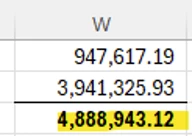
Total expected
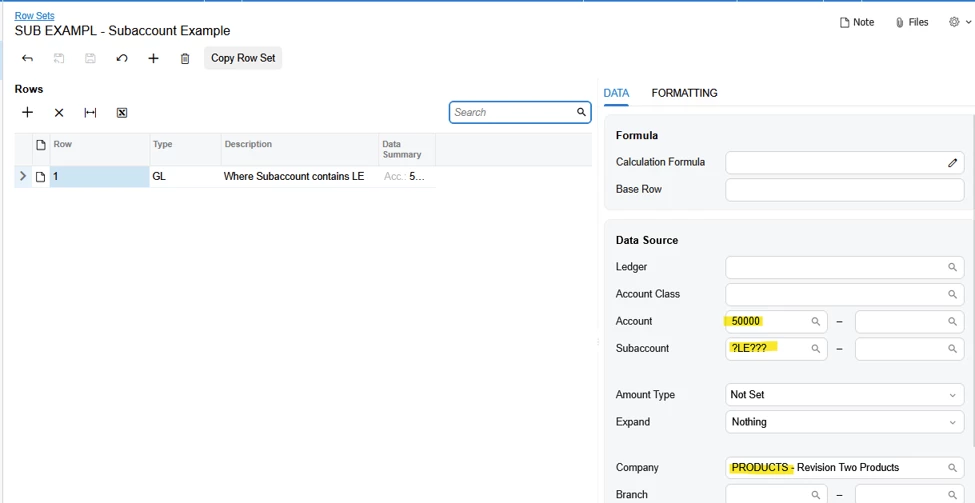
Use ??? as place holders in Subaccount field.
Includes 2 lines where account = 50000 &Sub contains LE (2 branches of 1 company) 

We can include multiple subaccount values, separated by a comma. I’m showing a Row Set filter, where you will enter similar filters in your Column Set.

HTH,


Laura


DavidEichner
Captain II
Forum|alt.badge.img+14
  • Author
  • Captain II
  • Answer
  • July 7, 2026

Solution identified.  The issue was that I was trying to use ? in both the beginning and ending subaccount.  The wildcard approach only works if you only populate the beginning subaccount with the wildcards leaving the ending subaccount empty.  Acumatica should probably document that in their documentation.

Alls well that ends well.  :)

Thanks for everyone’s help!

David


Chris Hackett
Community Manager
Forum|alt.badge.img
  • Acumatica Community Manager
  • July 7, 2026

Thank you for sharing your solution with the community ​@DavidEichner!