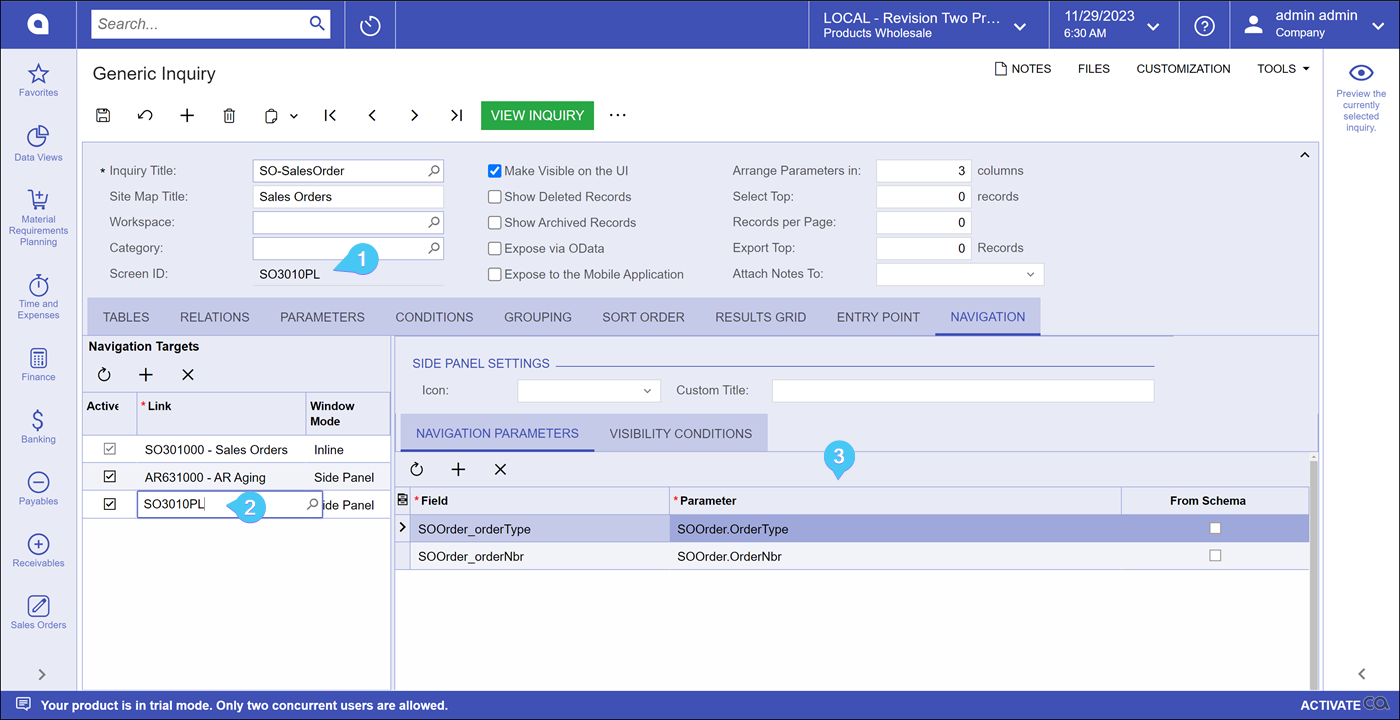
Is it possible to add the same GI as a side side panel? We have a gi that lists kit assembly details and would like to reference the same GI on a side panel but with respect to the selected item as shown below:
However, The GI is not getting filtered based on Inventory ID
We have it set up as shown below:
Desired outcome should be as follows:
Kit Inventory ID
Revision
Qty
Side Panel- Inventory ID
Revision
Qty
Q123
ABC
15
Q123
ABC
15
Q123
CDF
20
How can we achieve this result? Thank you in advance!
@lauraj46 , @Robert Sternberg - any ideas? thank you!
Best answer by Robert Sternberg
I was able to get this to function in 2023R1 by manually typing the Screen ID of the GI directly in the Navigation Target Link and Saving.
With that being said I do not think this is intended functionality (self-Side-Panel) and a better way to handle this is to:
Duplicate your GI using Copy > Paste.
Name the Original GI ‘Kit Assy - Summary’
Name the new duplicated GI ‘Kit Assy - Details’.
Kit Assy - Summary will be your primary GI and you will have a side panel of Kit Assy - Details.
This approach will be less likely to break down the road if validation is added to the link field and will limit unexpected behavior using the approach I mentioned above.
I was able to get this to function in 2023R1 by manually typing the Screen ID of the GI directly in the Navigation Target Link and Saving.
With that being said I do not think this is intended functionality (self-Side-Panel) and a better way to handle this is to:
Duplicate your GI using Copy > Paste.
Name the Original GI ‘Kit Assy - Summary’
Name the new duplicated GI ‘Kit Assy - Details’.
Kit Assy - Summary will be your primary GI and you will have a side panel of Kit Assy - Details.
This approach will be less likely to break down the road if validation is added to the link field and will limit unexpected behavior using the approach I mentioned above.