Solved

Can the 2025R2 Dashboard display the data of the latest 24 periods by default?

  • May 7, 2026
  • 1 reply
  • 28 views

Forum|alt.badge.img+6

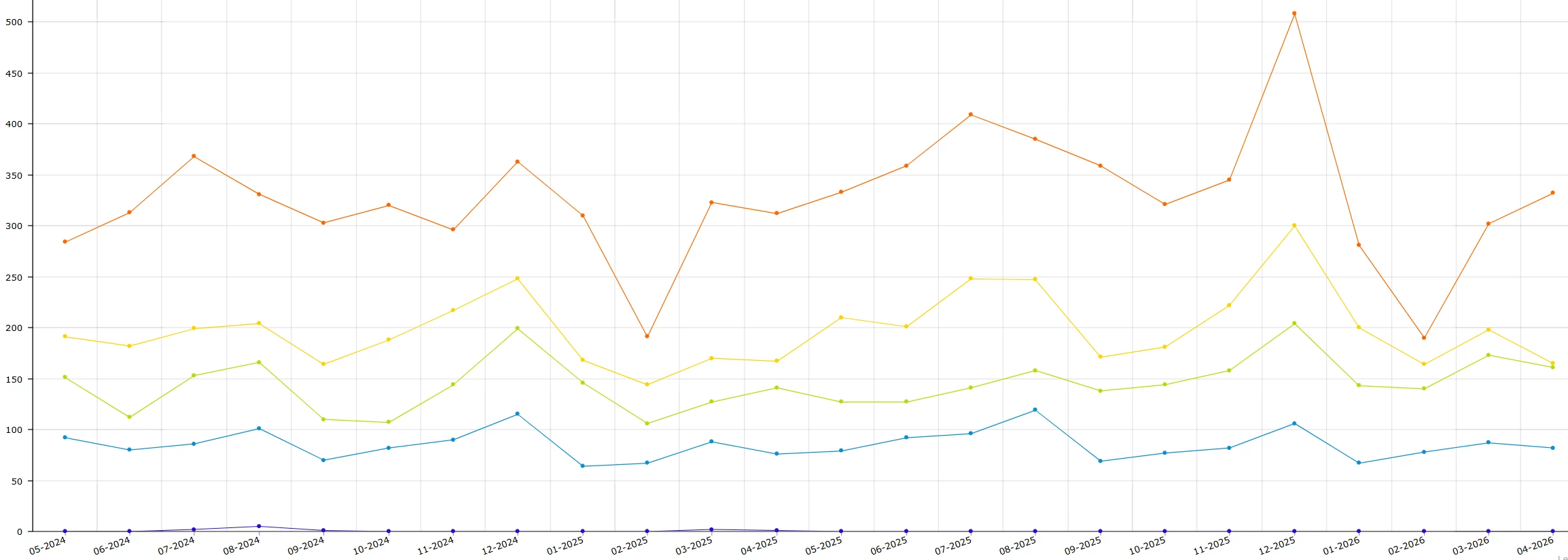
We have built a dashboard whose data source is the InitemsalesHist table. It queries the sales data of the latest 24 periods and presents it with a line chart.I know we can manually adjust the start period every month.
 

But is it possible to realize automatic monthly adjustment without any manual intervention? For instance, even half a year later, it can still show the data of the latest 24 periods at that time.

Best answer by WillH

Hi ​@ray20 

I’d recommend using a Date filter since the syntax for date filters is well documented here: https://help.acumatica.com/Help?ScreenId=ShowWiki&pageid=04a14a8d-72c8-47b7-9da6-0722c561e7df


For a data field of the date type that is based on a schema field (that is, the From Schema check box is selected), you can select one of the following date-relative parameters in the Calendar dialog box (which is opened when you click the down arrow icon in the box):

For more information about financial periods in Acumatica ERP, see Managing Financial Periods.

@Today: The business day.
@WeekStart and @WeekEnd: The start and end of the current week. The start and end of the week are determined based on the default system locale or the locale the user has selected when signing in to Acumatica ERP. System locales are defined on the System Locales (SM200550) form.
@MonthStart and @MonthEnd: The start and end of the current month.
@QuarterStart and @QuarterEnd: The start and end of the current quarter.
@PeriodStart and @PeriodEnd: The start and end of the current financial period. The financial periods are defined on the Financial Year (GL101000) form.
@YearStart and @YearEnd: The start and end of the current calendar year.


I can’t see any easily documented feature for pulling the financial period ID to insert there, so that might require a customization.  Swapping to a date filter is likely the best option in that context.

1 reply

WillH
Semi-Pro II
Forum|alt.badge.img+4
  • Semi-Pro II
  • Answer
  • June 2, 2026

Hi ​@ray20 

I’d recommend using a Date filter since the syntax for date filters is well documented here: https://help.acumatica.com/Help?ScreenId=ShowWiki&pageid=04a14a8d-72c8-47b7-9da6-0722c561e7df


For a data field of the date type that is based on a schema field (that is, the From Schema check box is selected), you can select one of the following date-relative parameters in the Calendar dialog box (which is opened when you click the down arrow icon in the box):

For more information about financial periods in Acumatica ERP, see Managing Financial Periods.

@Today: The business day.
@WeekStart and @WeekEnd: The start and end of the current week. The start and end of the week are determined based on the default system locale or the locale the user has selected when signing in to Acumatica ERP. System locales are defined on the System Locales (SM200550) form.
@MonthStart and @MonthEnd: The start and end of the current month.
@QuarterStart and @QuarterEnd: The start and end of the current quarter.
@PeriodStart and @PeriodEnd: The start and end of the current financial period. The financial periods are defined on the Financial Year (GL101000) form.
@YearStart and @YearEnd: The start and end of the current calendar year.


I can’t see any easily documented feature for pulling the financial period ID to insert there, so that might require a customization.  Swapping to a date filter is likely the best option in that context.