Answer

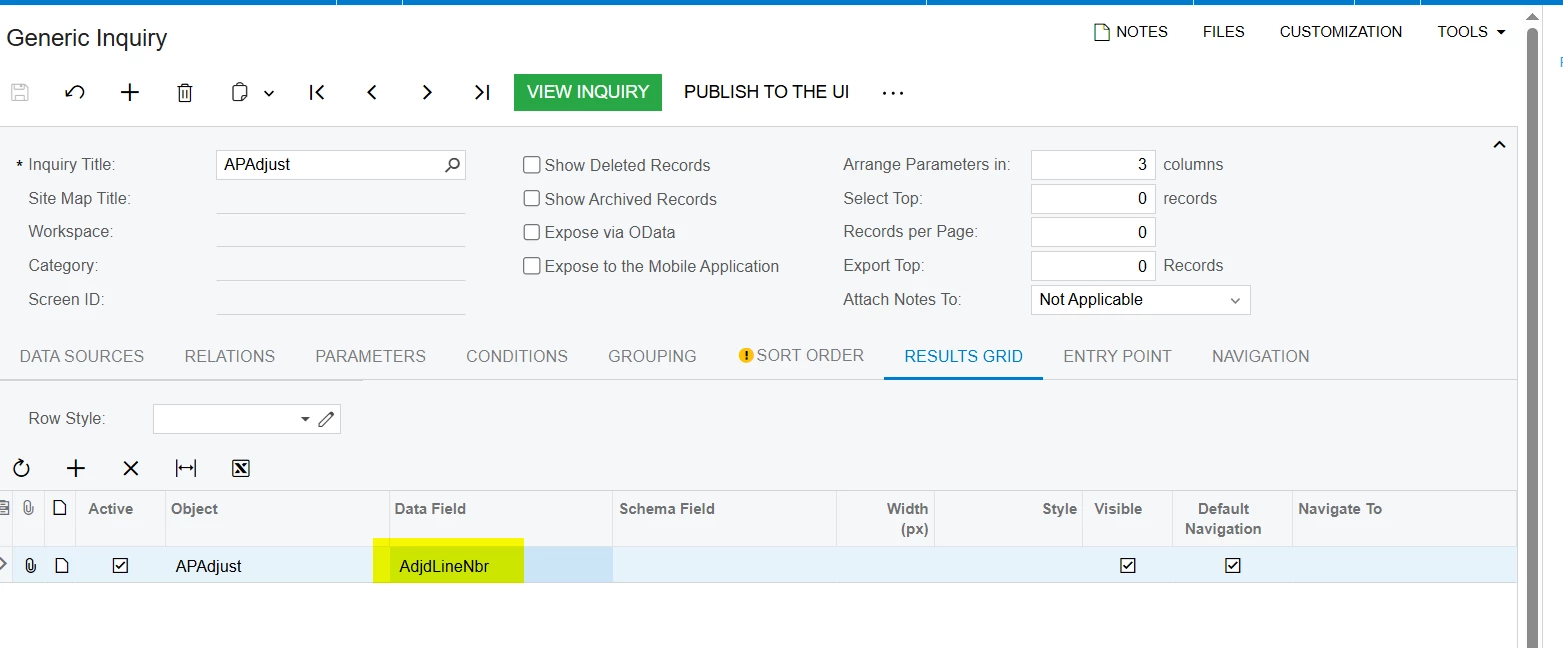
APAdjust Line Number won't show on GI

  • June 15, 2025
  • 3 replies
  • 42 views

I have a GI and want to include the adjdLineNbr field from the APAdjust table, however the column won’t show on the GI. It does have the exclamation point over the field and says “This field will not be displayed for the current user because the user has insufficient access rights or the required feature is disabled.” But I am logged in with the admin account.




I’ve taken a snapshot of their tenant and imported it into a local test environment and I am able to add and see the field in a GI even though that error message remains.

Can anyone think of any reason why it wouldn’t work in the Acumatica hosted instance?

Best answer by Abhishek Niikam

Hello, ​@mmarklow44 
 

  • Navigate to: Enable/Disable Features screen (CS100000).

  • Check if the feature called "Payment Application by Line" is enabled.

  • If this feature is disabled, the AdjdLineNbr field will be hidden across the UI, including in GIs — regardless of user role.

    You can refer to the attached screenshot for clarity.
     

    Make sure you enable this feature.


I hope it helps!

3 replies

nhatnghetinh
Captain II
Forum|alt.badge.img+11
  • Captain II
  • June 16, 2025

Hi ​@mmarklow44 

Please attach your GI.


Best Regards,

NNT


Manikanta Dhulipudi
Captain II
Forum|alt.badge.img+15

@mmarklow44 

I dont see any issue with the Data field. Can you recheck if you have any problem with the access rights


Forum|alt.badge.img+2

Hello, ​@mmarklow44 
 

  • Navigate to: Enable/Disable Features screen (CS100000).

  • Check if the feature called "Payment Application by Line" is enabled.

  • If this feature is disabled, the AdjdLineNbr field will be hidden across the UI, including in GIs — regardless of user role.

    You can refer to the attached screenshot for clarity.
     

    Make sure you enable this feature.


I hope it helps!