

I have my subreport built and ready to attach to my project and sales quotes. This subreport is purely terms and conditions and should print on the back (2nd page) of all sales quotes and project quotes. I am having trouble getting the subreport into the CR604500 and PM604500 reports in the proper place in order for it to print on all quotes. I have followed help from AI and Acumatica and still don’t seem to be able to get the report where is needs to be.
Solved
Adding Subreport to Project and Sales Quotes that is terms and conditions
Best answer by KrunalDoshi
Hi
First, make sure you save the subreport in the Acumatica instance/tenant where you want to add it to the Sales Quote and Project Quote reports.
I would also recommend testing the subreport independently before adding it to the main reports:
- Add the subreport to the Site Map temporarily and provide the appropriate access.
- Run the subreport directly and verify that it produces the expected output.
Subreport
One thing I noticed in your subreport is that the required joins are missing. I believe you need to add at least one join with a dummy value in the filter so that the subreport data is not repeated.
For example, you could add a join between PMQuote and BAccount, and use a filter such as:
PMQuote.QuoteNbr = '<one of the existing quote numbers>'
This should give the subreport a record to work with and allow the data to repeat as expected.
Adding the Subreport to the Quote Report
Once the subreport is working correctly on its own, add it to the Project Quote (PM604500) or Sales Quote (CR604500) report under the Group Footer section.
Set the following properties on the Group Footer:
- KeepTogether: False
- PageBreak: Before
- PrintAtBottom: True
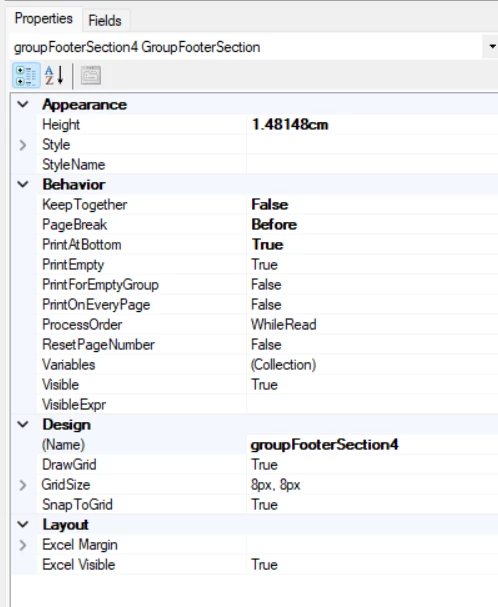
If your report already has totals or subtotals in the Group Footer, you can duplicate the Group Footer section and place the subreport in the duplicated section so the existing totals/subtotals are not affected.
I have attached the following files for your reference:
- Your modified subreport
- Updated Project Quote (PM604500) report
I hope this is helpful. Please let me know if you have any questions or run into any issues while implementing it.
Thanks!



Enter your E-mail address. We'll send you an e-mail with instructions to reset your password.