Hi is there an easier way to generate production tickets for the many levels of sub assemblies when using MRP for replenishing stock items? Seems like a pain to run MRP Generation to create the parent, then keep re-running it over and over to generate all the children. Any suggestions?
thank you
Best answer by andrestamour43
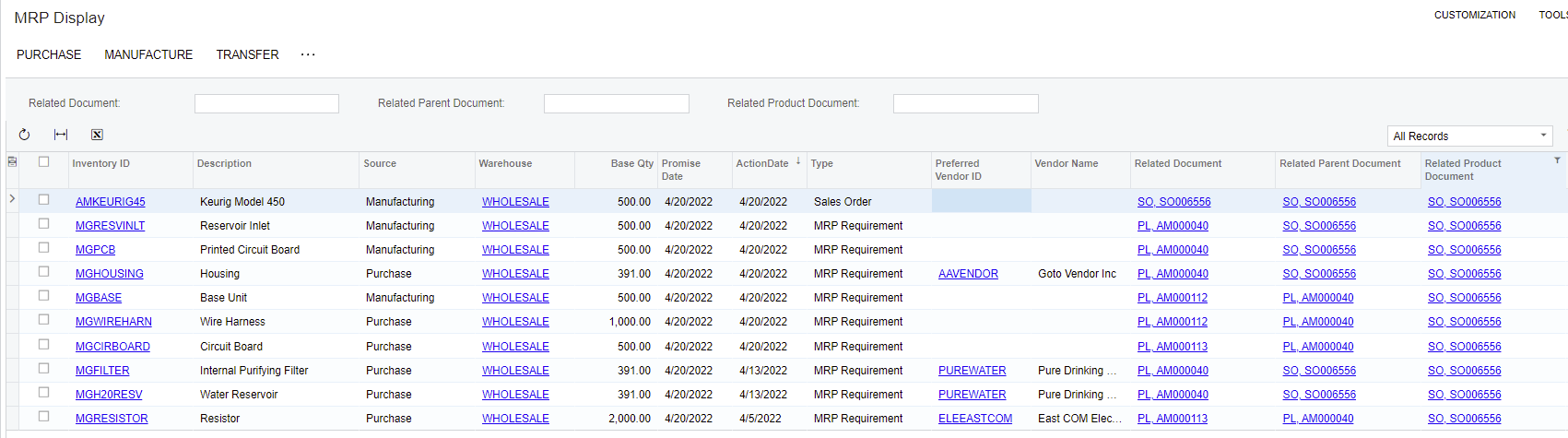
MRP should be suggesting sub-assembly production orders at the same time (see example below). Alternatively, once you create the top level production order, you could utilize the “Generate Orders For Sub Assembly” which will create all production order subassemblies for that order regardless if there are enough of the subassembly items on hand.
MRP Display - Materials and Subassemblies Needed For 500 AMKEURIG Demand
See that AMKERUIG is needing to be produced to satisfy Sales Order Demand SO0006556 (would work for any Demand), MRP recommends creating a production order for AMKEURIG, which generates a planned production order (PL, AM000040), which in turn generates other demand. From here you can select all the recommendations you wish to act on and generate all levels of production orders. If I had enough of any of the material requirements on hand, MRP would not recommend creating a production order for that item since I have enough supply to meet demand.
@kirbygompf32 Do you have sub-assemblies set up as MRP items? MRP should be also suggesting the Production Orders for Sub Assemblies at the same time (unless they are transferred from another branch)
@Debbie Baldwin thanks for the reply! Yes the sub-assemblies are MRP items as well. It appears MRP won’t suggest the sub-assembly production orders until demand is created from parent or level above.
@kirbygompf32 this is a setup issue. Do you have a Default BOM set up for these? If so, check your item warehouse details and make sure they are not set up as purchased items.
MRP should be suggesting sub-assembly production orders at the same time (see example below). Alternatively, once you create the top level production order, you could utilize the “Generate Orders For Sub Assembly” which will create all production order subassemblies for that order regardless if there are enough of the subassembly items on hand.
MRP Display - Materials and Subassemblies Needed For 500 AMKEURIG Demand
See that AMKERUIG is needing to be produced to satisfy Sales Order Demand SO0006556 (would work for any Demand), MRP recommends creating a production order for AMKEURIG, which generates a planned production order (PL, AM000040), which in turn generates other demand. From here you can select all the recommendations you wish to act on and generate all levels of production orders. If I had enough of any of the material requirements on hand, MRP would not recommend creating a production order for that item since I have enough supply to meet demand.
@kirbygompf32 - yes thanks @andrestamour43 - which is why if this is not happening - then something is not set up correctly. You may want to take a look at your Detail Inquiry screen for one of your subassemblies to see if there is demand.