Solved

Business Event not triggering

  • Nov 21, 2026 2:23 PM UTC
  • 7 replies
  • 53 views
  • Translate All

Forum|alt.badge.img

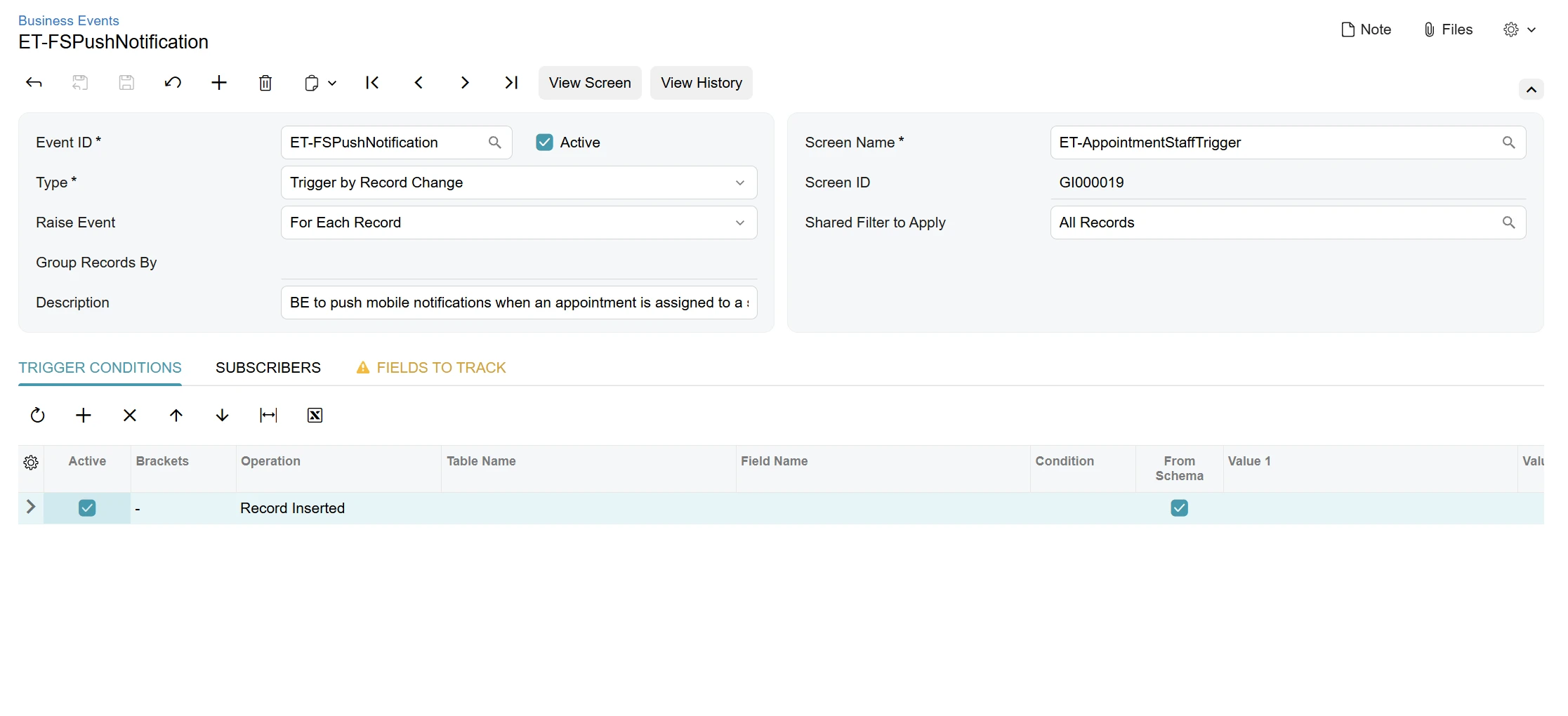
I can’t seem to get this BE to trigger off this simple GI. All the key fields have been added. Any ideas or am I missing anything?

GI is attached. 
 

Best answer by jamest62

Hi ​@jamest62,

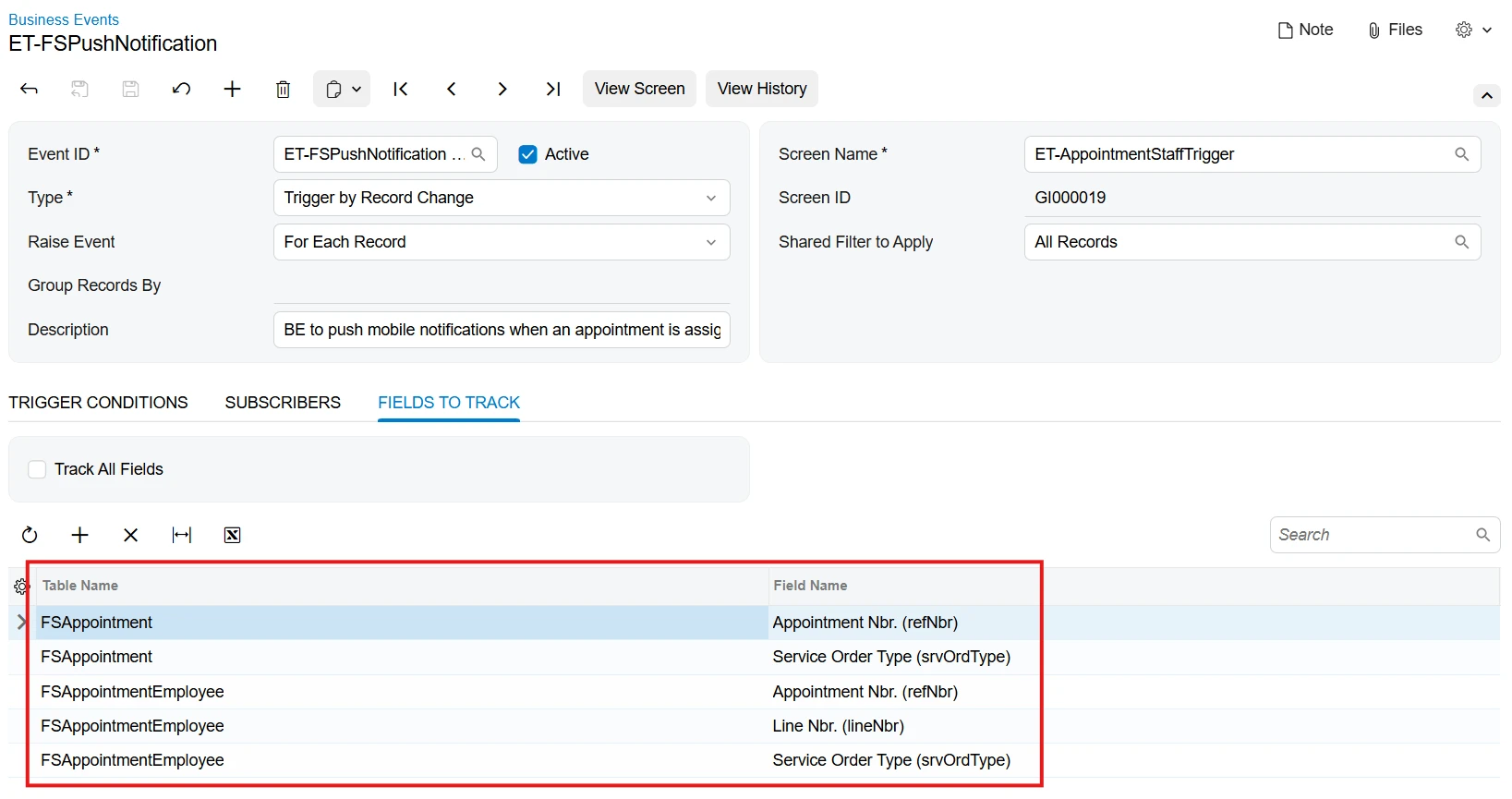
It looks like the issue may be with the Fields to Track tab. Make sure all the required key fields are selected individually rather than using Track All Fields.

Also, since you are trying to trigger a mobile notification, I would first test it with an email notification to confirm whether the Business Event itself is triggering successfully or if the issue is specifically with the mobile notification.

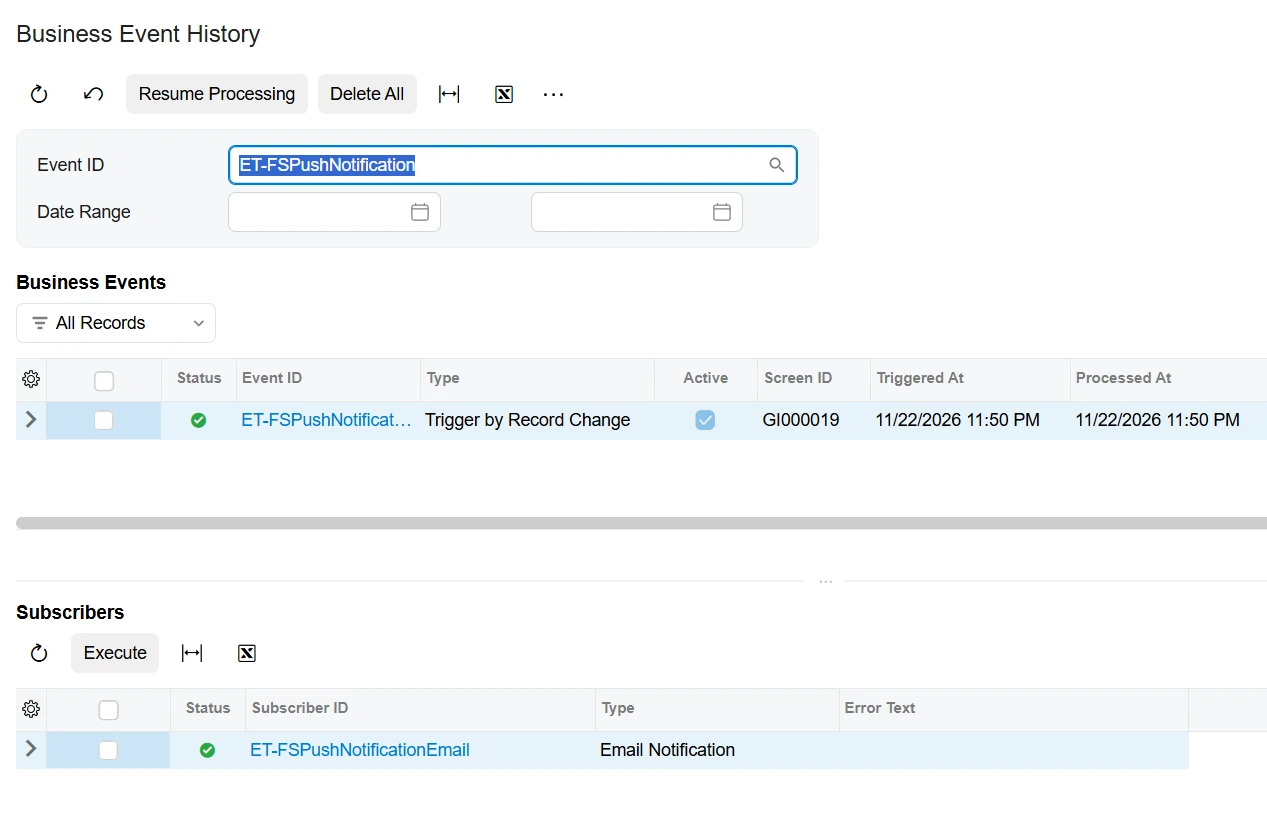
I imported your GI and recreated the Business Event on my end. I was able to trigger it successfully using an email notification, so the GI and Business Event appear to be working correctly.

I would suggest testing with email first, and then troubleshooting the mobile notification separately.

See below screenshots for your reference: -
 

Hope this helps!

Thanks ​@KrunalDoshi I will add those fields specifically instead of all fields. 

Yes, the end result will be a mobile notification, but I was just trying to get the trigger to fire first, then work on the notification. 

View original

7 replies

mohammadnawaz51
Varsity I
Forum|alt.badge.img+8

​@jamest62 

Could you please elaborate on what you are trying to achieve, including when you expect the business event to trigger and what action it should perform?

Also, please confirm whether the relevant fields used in your Generic Inquiry (GI) conditions have been included under Fields to Track in the business event configuration.

Troubleshooting business events can be tricky, so we need to validate each stage of the process. To help isolate the issue, please follow these steps:

  1. Test the basic trigger: Start with a simple trigger, such as Record Inserted, without adding any additional event conditions.

  2. Verify the outcome: Create a test record and check whether the business event triggers and the associated action completes successfully.

  3. Add conditions gradually: If the initial test works, add the required conditions one at a time and retest after each change to identify where the process stops working.

Please share the results so we can narrow down the issue and determine the next steps.

  1. rted.
  2. If succeed then remove condition one by one and troubleshotting with condition causing the issue.
  3. If conditions are not causing an issue then remove Joins steps and step and verify.
  4. Make sure GI is publish to UI and admin user is able to access.


Translate

Forum|alt.badge.img+4
  • Captain II
  • Nov 23, 2026 5:26 AM UTC

​@jamest62 

Your GI looks good. Keys for both FSAppointment (SrvOrdType, RefNbr) and FSAppointmentEmployee (SrvOrdType, RefNbr, LineNbr) are included, and the join is correct. A few things to check on the Business Event side:

  1. Fields to Track tab: there's a warning icon on it in your screenshot. Hover over it to see the message. For a "Trigger by Record Change" event, select at least EmployeeID (or all fields) and save.
  2. Subscribers: make sure a Mobile Push Notification subscriber is active, and that the recipients are signed in to the Acumatica mobile app. Without that, the event can fire but no notification arrives.
  3. Check the GI: right after adding staff to an appointment, open the GI and confirm the new row shows. "Record Inserted" only fires when a new row appears in the GI results.
  4. Restart the application from Apply Updates (SM203510), then test with a new insert. Record-change events often don't pick up the GI until a restart.
Translate

KrunalDoshi
Pro II
Forum|alt.badge.img+9
  • Pro II
  • Nov 23, 2026 7:59 AM UTC

Hi ​@jamest62,

It looks like the issue may be with the Fields to Track tab. Make sure all the required key fields are selected individually rather than using Track All Fields.

Also, since you are trying to trigger a mobile notification, I would first test it with an email notification to confirm whether the Business Event itself is triggering successfully or if the issue is specifically with the mobile notification.

I imported your GI and recreated the Business Event on my end. I was able to trigger it successfully using an email notification, so the GI and Business Event appear to be working correctly.

I would suggest testing with email first, and then troubleshooting the mobile notification separately.

See below screenshots for your reference: -
 

Hope this helps!

Translate

Forum|alt.badge.img
  • Author
  • Jr Varsity III
  • Answer
  • Nov 23, 2026 2:12 PM UTC

Hi ​@jamest62,

It looks like the issue may be with the Fields to Track tab. Make sure all the required key fields are selected individually rather than using Track All Fields.

Also, since you are trying to trigger a mobile notification, I would first test it with an email notification to confirm whether the Business Event itself is triggering successfully or if the issue is specifically with the mobile notification.

I imported your GI and recreated the Business Event on my end. I was able to trigger it successfully using an email notification, so the GI and Business Event appear to be working correctly.

I would suggest testing with email first, and then troubleshooting the mobile notification separately.

See below screenshots for your reference: -


Hope this helps!

Thanks ​@KrunalDoshi I will add those fields specifically instead of all fields. 

Yes, the end result will be a mobile notification, but I was just trying to get the trigger to fire first, then work on the notification. 

Translate

Forum|alt.badge.img
  • Varsity II
  • Nov 23, 2026 2:22 PM UTC

For the trigger condition, does a DAC need to be specified in the Table Name column for the “Record Inserted” condition? I usually specify one but not sure if that is required. 

Translate

Forum|alt.badge.img
  • Author
  • Jr Varsity III
  • Nov 23, 2026 3:57 PM UTC

​@KrunalDoshi So far so good in my initial testing. This may be the secret to triggering BEs with GIs. Always use the key fields instead of all fields. 

Translate

KrunalDoshi
Pro II
Forum|alt.badge.img+9

I am glad ​@jamest62, it has worked for you so far. Yes, key fields are the secret 😊

Translate