

Solved

Reversing of GL Import Scenario Partially Working

  • April 7, 2022
  • 6 replies
  • 215 views
  • Translate All

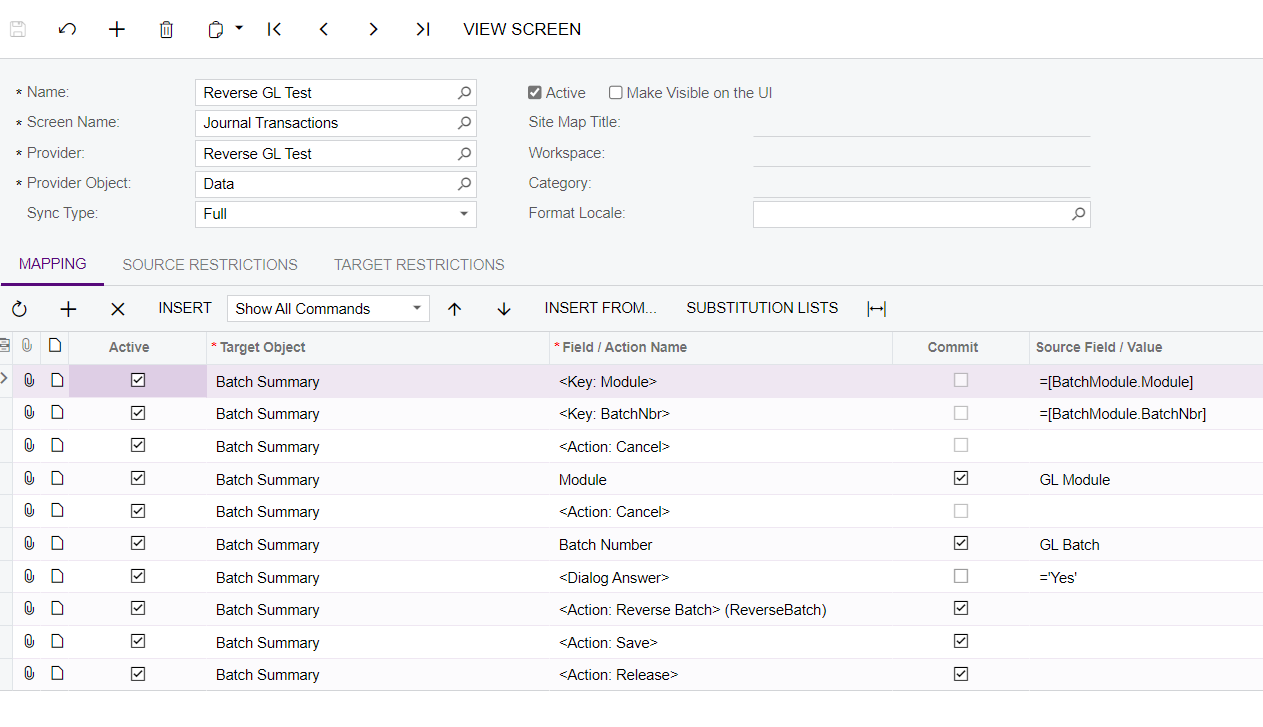
This import scenario in reversing GL Transaction is partially working because it only reverses the entry but does not release the document. 
 

Best answer by Naveen Boga

Hi, @franciacervana05  It seems this is the limitation of the import scenario and we can reverse and SAVE the document.

Releasing documents can be done through the automation schedulers.


View original

6 replies

Naveen Boga
Captain II
Forum|alt.badge.img+20

Hi @franciacervana05  Can you please share the XML format of import scenario, will take a look and let you know.

Translate

Attaching it here for your reference. Thank you!

Translate

Naveen Boga
Captain II
Forum|alt.badge.img+20

Hi, @franciacervana05  It seems this is the limitation of the import scenario and we can reverse and SAVE the document.

Releasing documents can be done through the automation schedulers.


Translate

Hi, @Naveen Boga. Thank you for your insight. I’ll try to utilize the automation schedulers you’ve mentioned.

Translate

Naveen Boga
Captain II
Forum|alt.badge.img+20

Sure @franciacervana05  Thank You!

Translate

Forum|alt.badge.img+12
  • Acumatica Support Team
  • April 18, 2022

Hi @franciacervana05 

As mentioned, its not possible to reverse and release the GL batch on same scenario.

Basically when reversed GL batch is saved ( prior to release ), it does generate a new Batch number. The Import scenario is unable to fetch that batch number and release the batch. 

When you add action to Release, it tries to release initially selected source GL batch and returns an error stating ‘Release button’ is disabled. 

Using automation schedule to release the GL batch after reversal will be the option to use as sugggested by @Naveen Boga 

Regards,

Translate


