Answer

import scenario using SO Process Orders screen

  • October 9, 2021
  • 11 replies
  • 583 views

Forum|alt.badge.img

Hi , @Naveen B ,

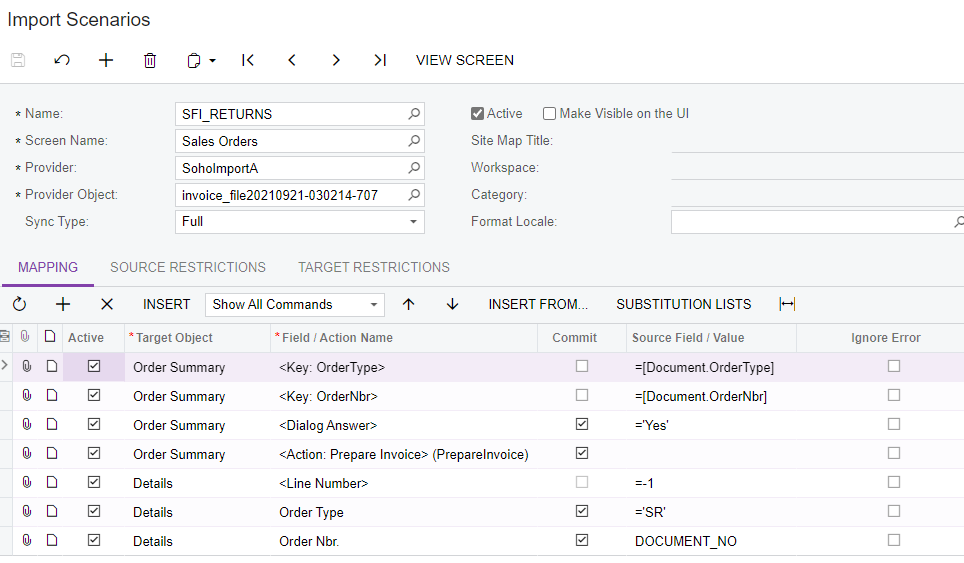
I need to create an import using the Sales Order Process screen.  The file upload in the Import Scenario will contain the Order Number.  I want to use the Sales Order Process screen to  “Prepare Invoice”. 

Any help appreciated.

Cheers,

Laura 

Best answer by lauracastagna

Hey @Naveen B ,


I worked out a solution :-).

I changed the SO Type for a Credit Return.  Then i got the Import scenario to release the Credit Note which automatically creates the inventory transaction as well.  

Thanks for your help Naveen.


Laura

11 replies

Naveen Boga
Captain II
Forum|alt.badge.img+19
  • Captain II
  • October 9, 2021

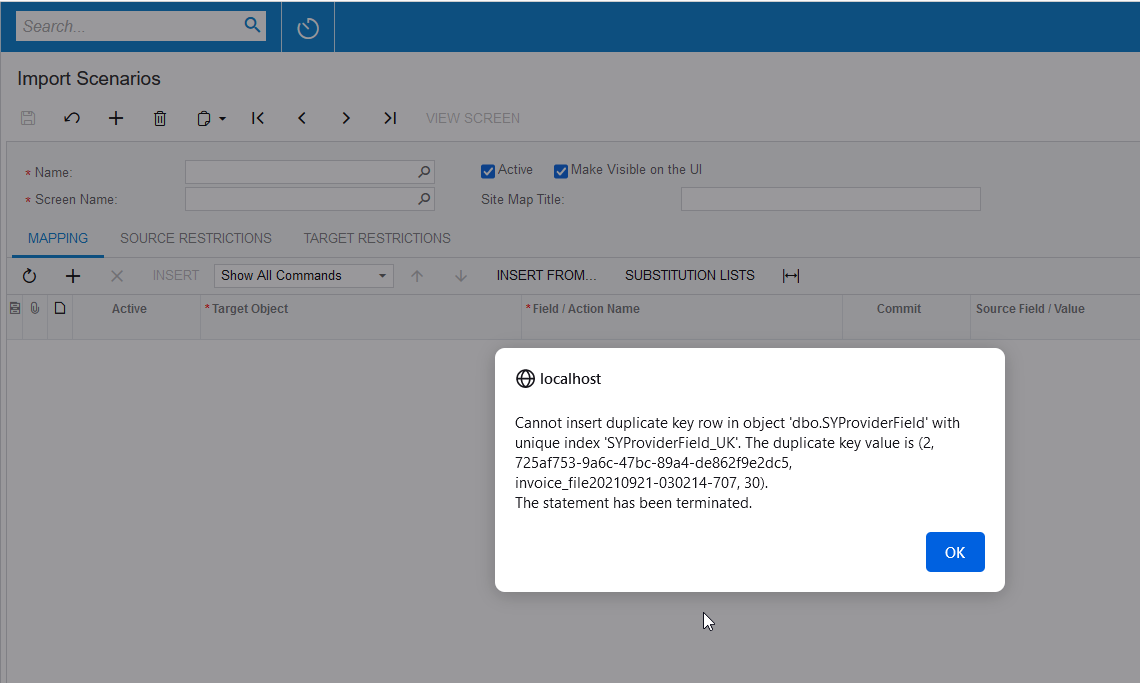
Hi @lauracastagna  Unable to import the file in 21 R1 and 20 R2 versions and getting below error.


Forum|alt.badge.img
  • Author
  • Varsity I
  • October 9, 2021

Hi @Naveen B ,

Attached again. Hopefully okay this time.  if not:-


Naveen Boga
Captain II
Forum|alt.badge.img+19
  • Captain II
  • October 9, 2021

Hi @lauracastagna , 

You are trying to “Prepare Invoice” from the Sales Order screen, in this activity, 2 screens are involved (Sales Order and Invoices screens).

Import Scenarios will NOT work, when multiple screens are involved and this is limitation for the import scenario.

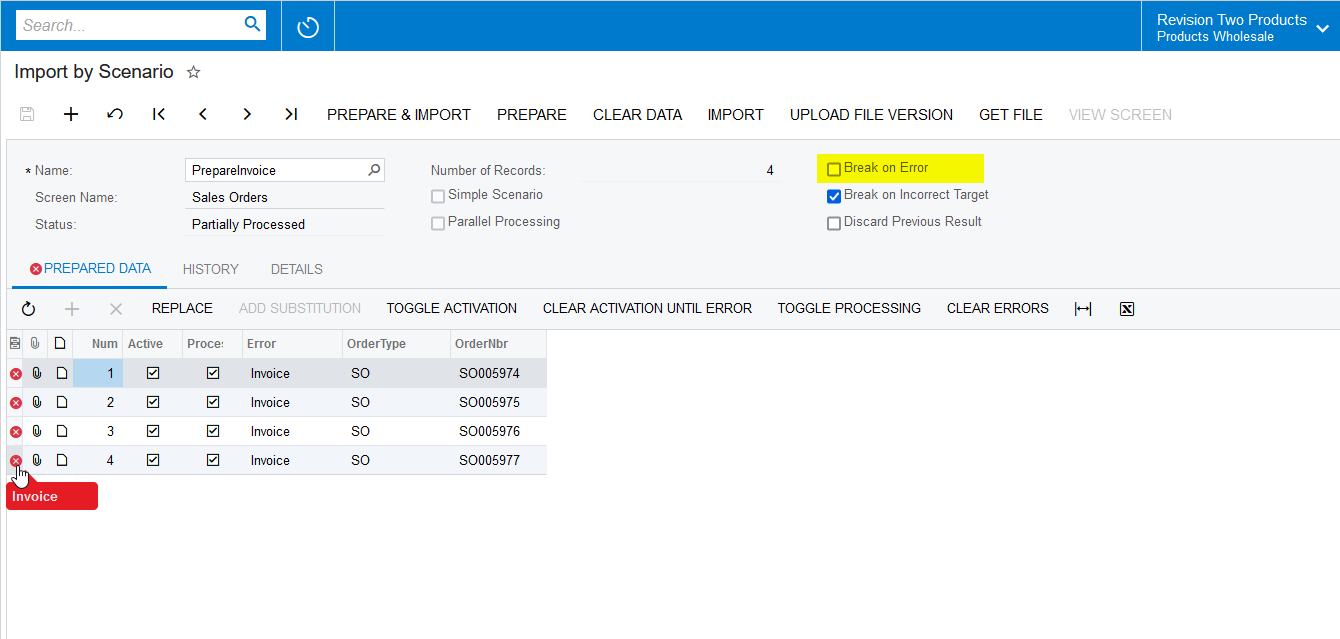
Due to this you will get the below issue. Please find the screenshot for reference.

Solution for this requirement.

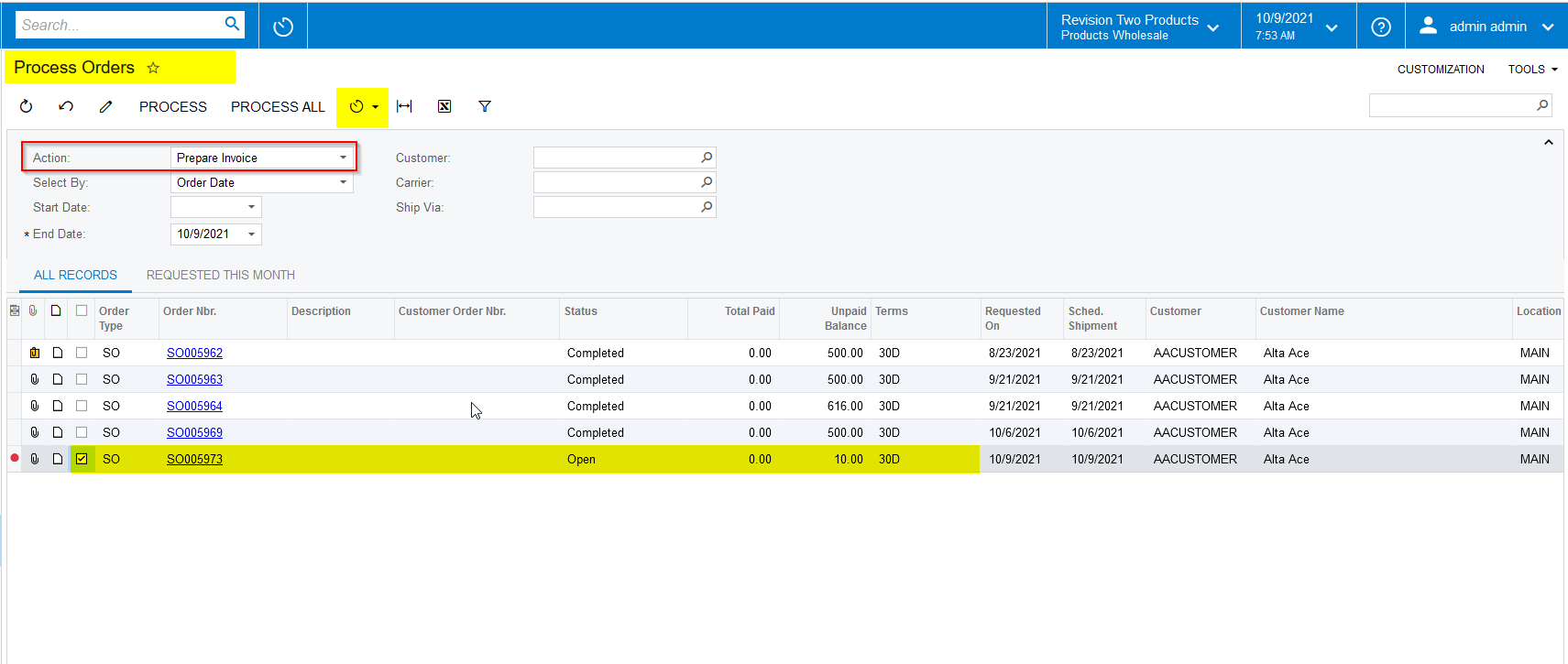
You can schedule a “Process Orders” screen for the “Prepare Invoice” action periodically, so that this process will pick Sales Orders and will Prepare the Invoices. 


Hope this helps!


Forum|alt.badge.img
  • Author
  • Varsity I
  • October 9, 2021

Hi @Naveen B ,

no unfortunately I cant do it this way as the trigger to release comes from the file (not in myob).  Can an Import Scenario be run directly from the Process Orders screen?

Laura 


Forum|alt.badge.img
  • Author
  • Varsity I
  • October 9, 2021

Hi @Greg Mercede,

I am trying to resolve an import solution for a client.  They need to trigger a “Receipt Shipment” from an Order they receive in a file from a third party. 

Is it or will it be possible to run an Import Scenario in the Process Orders screen?  I.e. As I cant to do it from the RC (return for credit) screen.

I really don’t wont to say the system cant do this to the client.

Regards,

Laura


Naveen Boga
Captain II
Forum|alt.badge.img+19
  • Captain II
  • October 9, 2021

Hi @lauracastagna   No, import scenario will NOT work from the Process Orders screen.

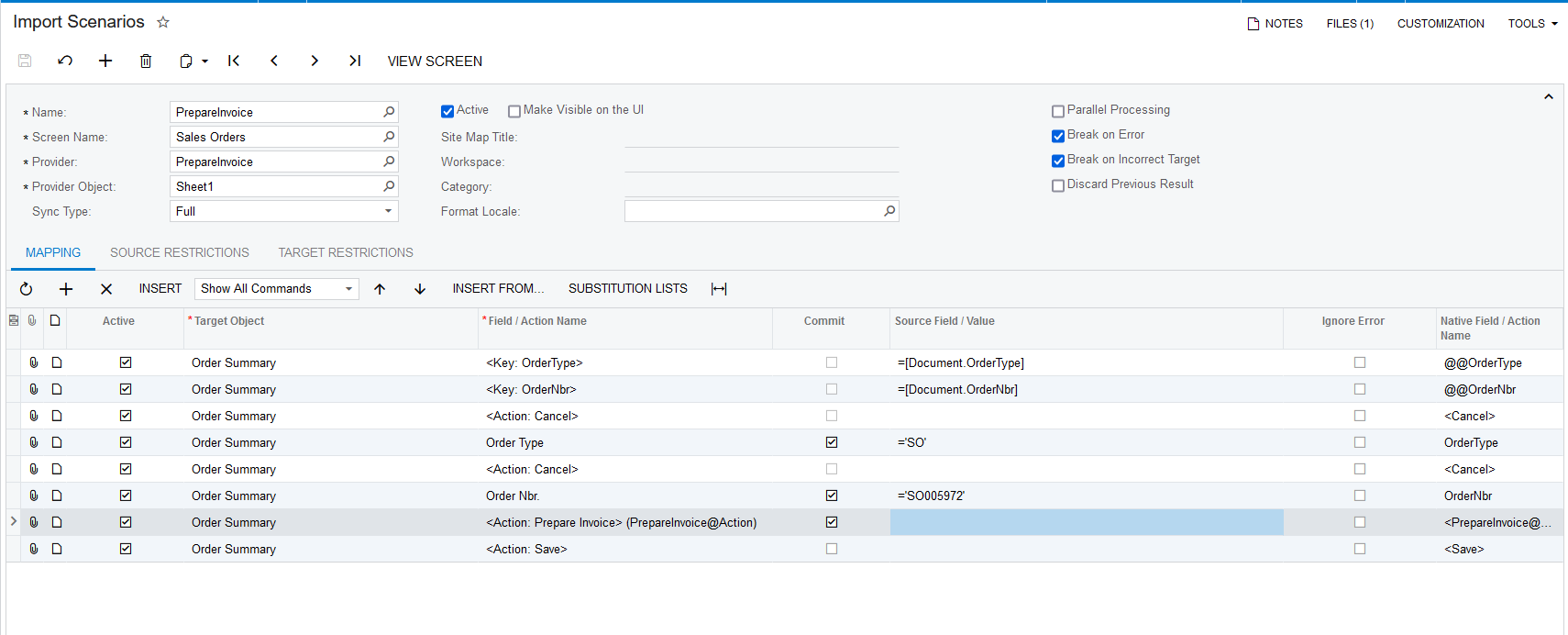
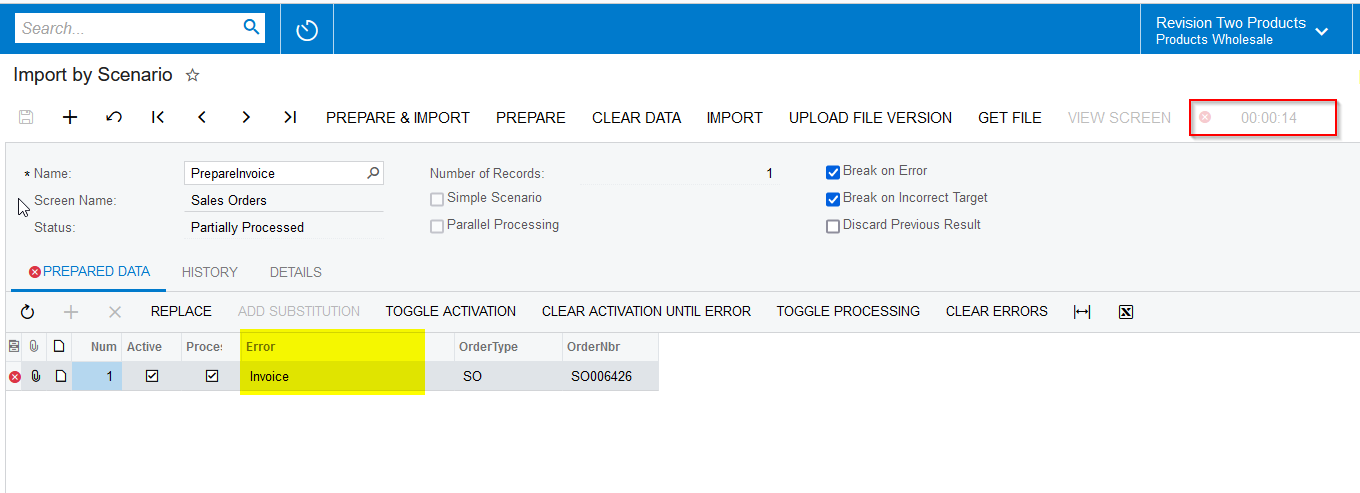
I just verified with multiple Sales Orders for the above import scenario, it is actually “Preparing the Invoice”, with an error message as “Invoice”.

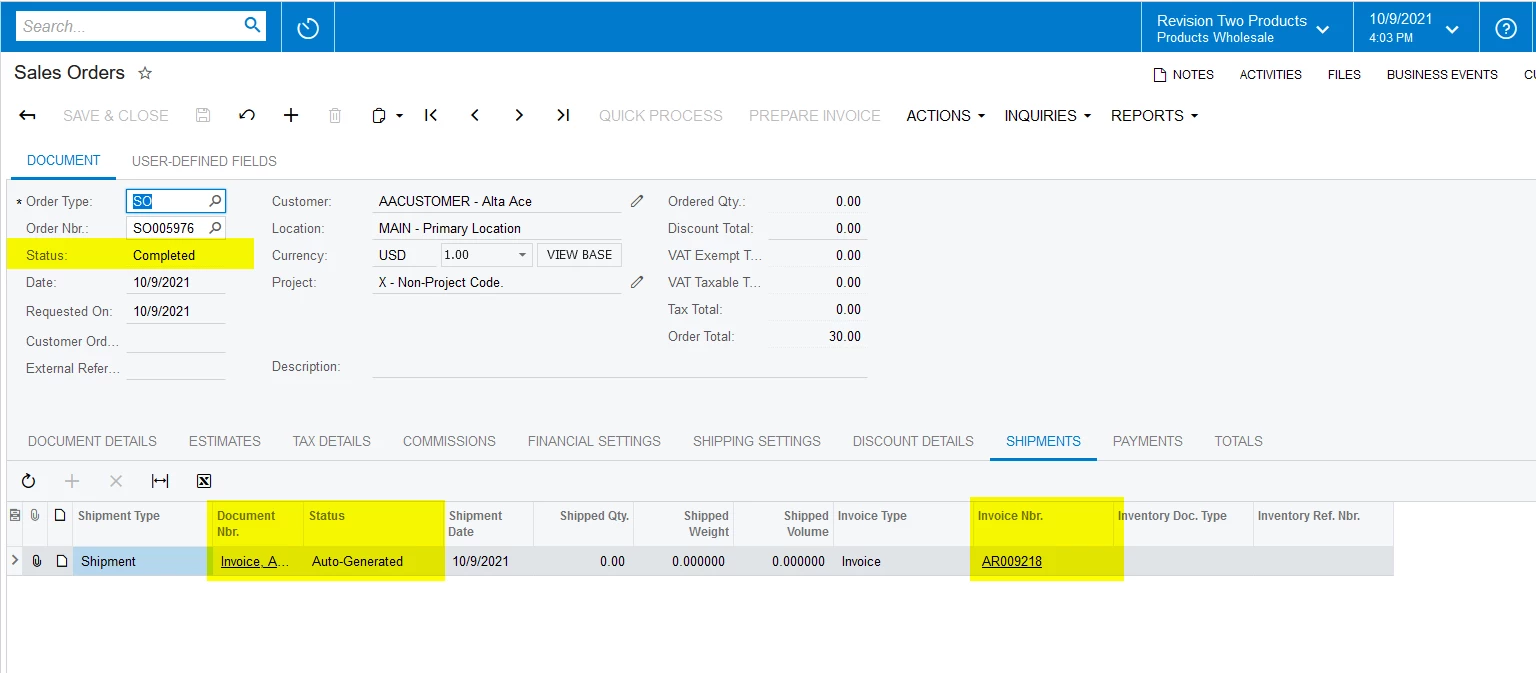
This error message is coming due to the “Redirection of the screen”, if we go and click on the “Prepare Invoice” on the Sales Orders screen, system will auto redirected to the “Invoices” screen. (Due to this redirection we are getting “Invoice” error in the import scenario.)


According to me, you can still use the above import scenario by removing the “Break On Error”, it will process for all the records and prepare the invoices and after completion of process it will give as an error like below.


Hope this will fulfill your requirement!


Forum|alt.badge.img
  • Author
  • Varsity I
  • October 10, 2021

i will give it a go @Naveen B . thanks for your help as always


Naveen Boga
Captain II
Forum|alt.badge.img+19
  • Captain II
  • October 10, 2021

Sure @lauracastagna  Let me know if you get any issues.


Forum|alt.badge.img
  • Author
  • Varsity I
  • October 10, 2021

@Naveen B,

i just realised you are using SO Type “SO”.  I need to use SO Type Return for Credit.  What about this…..refer attachment for the flow.  could I automate this in an import?


Forum|alt.badge.img
  • Author
  • Varsity I
  • Answer
  • October 10, 2021

Hey @Naveen B ,


I worked out a solution :-).

I changed the SO Type for a Credit Return.  Then i got the Import scenario to release the Credit Note which automatically creates the inventory transaction as well.  

Thanks for your help Naveen.


Laura


Naveen Boga
Captain II
Forum|alt.badge.img+19
  • Captain II
  • October 10, 2021

@lauracastagna Awesome, thanks for sharing the update 🙂