

Solved

Import Scenario giving a "Divide by 0" error

  • Oct 22, 2025 8:34 PM UTC
  • 1 reply
  • 39 views
  • Translate All

Forum|alt.badge.img

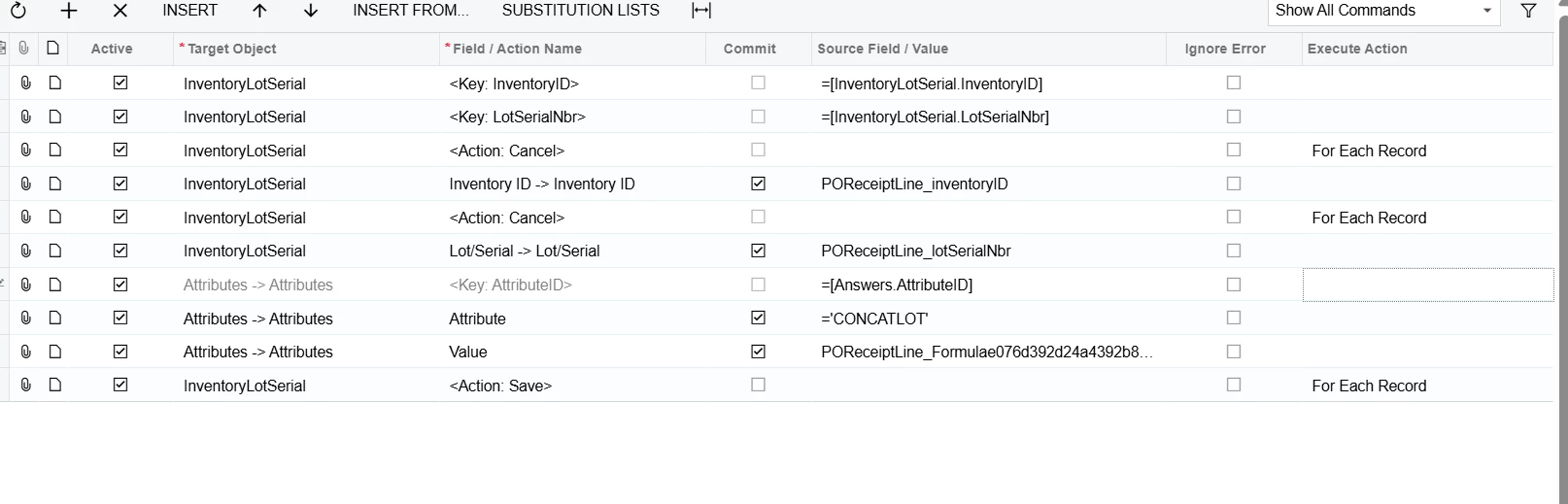
One of the import scenarios that we run has been producing a “divide by 0” error for some, but not all, of the processed lines. I’m not a 100% sure, but I believe the formula is the thing causing the issue. However, I don’t see any division equations in the formula. Could there be something else causing this issue?


The equation: “=IIf( [POReceiptLine.PONbr]=Null, Concat(CStr(Left( [POReceiptLine.VendorID_Segment1],7 )),'-',CStr([POReceiptLine.ReceiptNbr]),'-',CStr([POReceiptLine.LotSerialNbr])), Concat(CStr(Left( [POReceiptLine.VendorID_Segment1],7 )),'-',CStr([POReceiptLine.PONbr]),'-',CStr([POReceiptLine.LotSerialNbr])) )”


The Import Scenario.  
 

Best answer by bwhite49

That’s odd… was the formula validated? It should have an else statement highlighted red below.

=IIf( [POReceiptLine.PONbr]=Null, Concat(CStr(Left( [POReceiptLine.VendorID_Segment1],7 )),'-',CStr([POReceiptLine.ReceiptNbr]),'-',CStr([POReceiptLine.LotSerialNbr])), Concat(CStr(Left( [POReceiptLine.VendorID_Segment1],7 )),'-',CStr([POReceiptLine.PONbr]),'-',CStr([POReceiptLine.LotSerialNbr])),’’)

If that does not fix it, have you gone to the lot number screen to modify those lot numbers that are erroring to see if you get the same error when you try to save the attribute on the lot number screen? Wondering if the issue could be on the screen and not from the import data.

View original

1 reply

bwhite49
Captain II
Forum|alt.badge.img+12
  • Captain II
  • Answer
  • Oct 22, 2025 8:57 PM UTC

That’s odd… was the formula validated? It should have an else statement highlighted red below.

=IIf( [POReceiptLine.PONbr]=Null, Concat(CStr(Left( [POReceiptLine.VendorID_Segment1],7 )),'-',CStr([POReceiptLine.ReceiptNbr]),'-',CStr([POReceiptLine.LotSerialNbr])), Concat(CStr(Left( [POReceiptLine.VendorID_Segment1],7 )),'-',CStr([POReceiptLine.PONbr]),'-',CStr([POReceiptLine.LotSerialNbr])),’’)

If that does not fix it, have you gone to the lot number screen to modify those lot numbers that are erroring to see if you get the same error when you try to save the attribute on the lot number screen? Wondering if the issue could be on the screen and not from the import data.

Translate

