

Answer

Import Scenario giving a "Divide by 0" error

  • October 22, 2025
  • 1 reply
  • 28 views

Forum|alt.badge.img

One of the import scenarios that we run has been producing a “divide by 0” error for some, but not all, of the processed lines. I’m not a 100% sure, but I believe the formula is the thing causing the issue. However, I don’t see any division equations in the formula. Could there be something else causing this issue?


The equation: “=IIf( [POReceiptLine.PONbr]=Null, Concat(CStr(Left( [POReceiptLine.VendorID_Segment1],7 )),'-',CStr([POReceiptLine.ReceiptNbr]),'-',CStr([POReceiptLine.LotSerialNbr])), Concat(CStr(Left( [POReceiptLine.VendorID_Segment1],7 )),'-',CStr([POReceiptLine.PONbr]),'-',CStr([POReceiptLine.LotSerialNbr])) )”


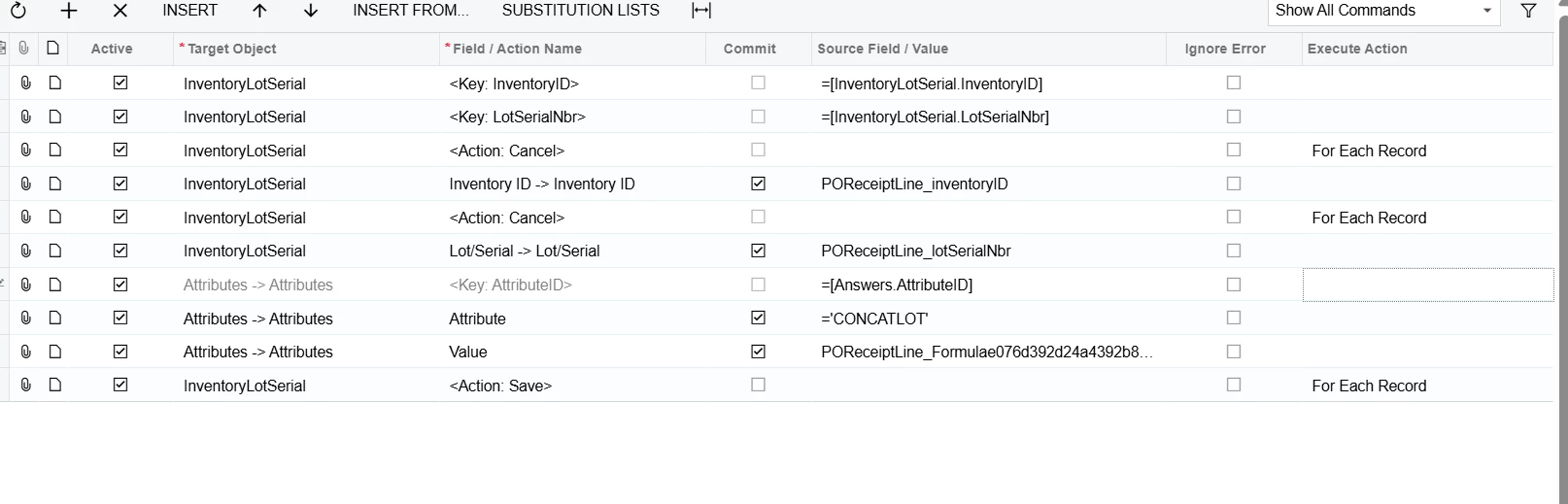
The Import Scenario.  
 

Best answer by bwhite49

That’s odd… was the formula validated? It should have an else statement highlighted red below.

=IIf( [POReceiptLine.PONbr]=Null, Concat(CStr(Left( [POReceiptLine.VendorID_Segment1],7 )),'-',CStr([POReceiptLine.ReceiptNbr]),'-',CStr([POReceiptLine.LotSerialNbr])), Concat(CStr(Left( [POReceiptLine.VendorID_Segment1],7 )),'-',CStr([POReceiptLine.PONbr]),'-',CStr([POReceiptLine.LotSerialNbr])),’’)

If that does not fix it, have you gone to the lot number screen to modify those lot numbers that are erroring to see if you get the same error when you try to save the attribute on the lot number screen? Wondering if the issue could be on the screen and not from the import data.

1 reply

bwhite49
Captain II
Forum|alt.badge.img+10
  • Captain II
  • Answer
  • October 22, 2025

That’s odd… was the formula validated? It should have an else statement highlighted red below.

=IIf( [POReceiptLine.PONbr]=Null, Concat(CStr(Left( [POReceiptLine.VendorID_Segment1],7 )),'-',CStr([POReceiptLine.ReceiptNbr]),'-',CStr([POReceiptLine.LotSerialNbr])), Concat(CStr(Left( [POReceiptLine.VendorID_Segment1],7 )),'-',CStr([POReceiptLine.PONbr]),'-',CStr([POReceiptLine.LotSerialNbr])),’’)

If that does not fix it, have you gone to the lot number screen to modify those lot numbers that are erroring to see if you get the same error when you try to save the attribute on the lot number screen? Wondering if the issue could be on the screen and not from the import data.

