Solved

Import scenario for AR payment and apply to invoice

  • Mar 18, 2021 3:56 PM UTC
  • 10 replies
  • 1841 views
  • Translate All

Forum|alt.badge.img

I need to have an import scenario that records the payment and applies the payment to the related invoice or invoices.  I started using the one included but I am getting the error:

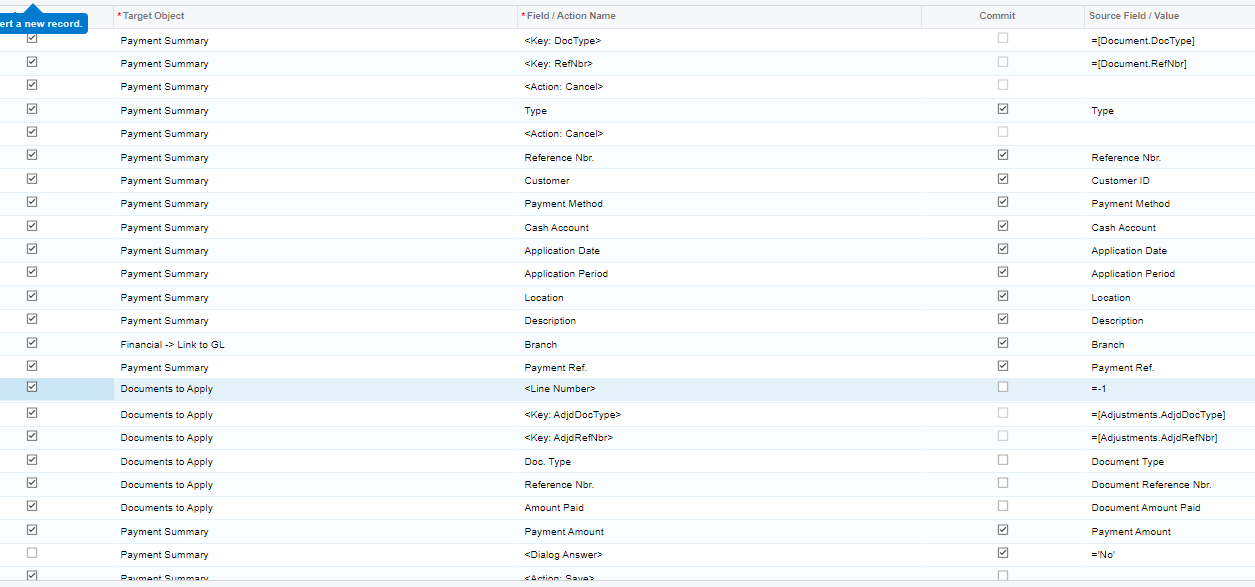
The system failed to commit the adjustment rows.

Here is a screenshot of the application section of my import.

 

Any help would be appreciated.

Thanks...coleen
Best answer by Naveen Boga

HI @coleenmcnally22 

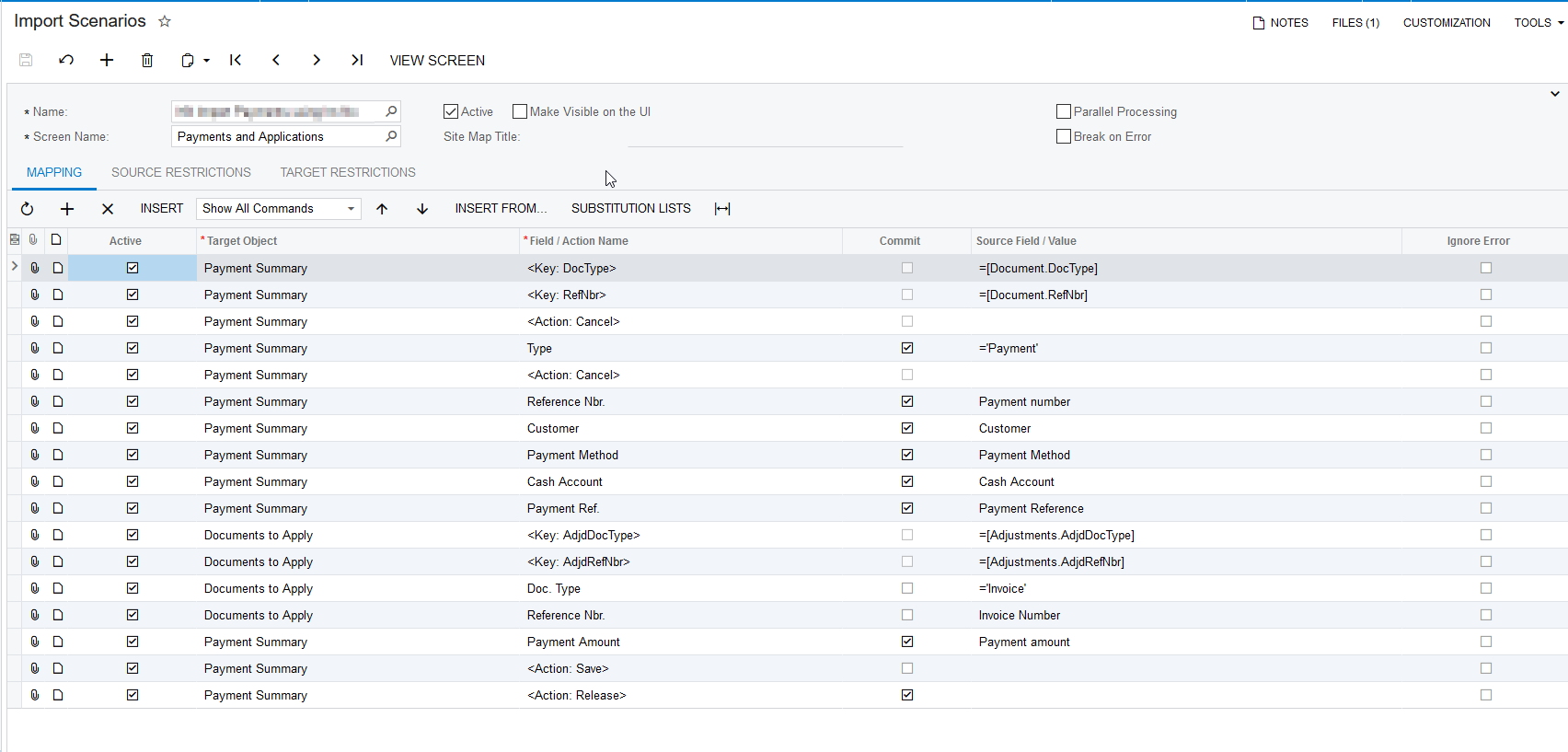
I tried in my local instance and working as expected. Please find the attached screenshot for import scenario.


Hope this helps!!


View original

10 replies

Naveen Boga
Captain II
Forum|alt.badge.img+20
  • Captain II
  • Answer
  • Mar 18, 2021 5:09 PM UTC

HI @coleenmcnally22 

I tried in my local instance and working as expected. Please find the attached screenshot for import scenario.


Hope this helps!!


Translate

Forum|alt.badge.img

Hi @Naveen B 

are you applying to multiple invoices or just one invoice?

Translate

Naveen Boga
Captain II
Forum|alt.badge.img+20
  • Captain II
  • Mar 22, 2021 6:36 PM UTC

@coleenmcnally22  I did verify the above import scenario with only one invoice and observed working as expected!

Translate

pkohler91
Freshman II
  • Freshman II
  • May 4, 2021 10:12 PM UTC

@coleenmcnally22 

We have an import scenario working for applications to multiple invoices in version 2020 R2 but we are not applying cash receipts to specific lines of the invoices. 

The one notable difference is in our scenario the Financial Details → Link to GL row is positioned before the Payment Summary Payment Ref. row before the Documents to Apply section.

Also we do not have the Commit check box selected on the Documents to Apply Doc Type row.

I recall having similar issues with the out of the box import scenario in 2020 R2 and we ended up creating a custom one.

Translate

  • Freshman I
  • Feb 23, 2022 11:24 PM UTC

Which date does this import scenario use?

Translate

Forum|alt.badge.img
  • Varsity I
  • Jul 1, 2022 12:54 AM UTC

Hi @pkohler91 - any chance you can share your import scenario for this? I cannot seem to get mine to work. Below is a screenshot:


Translate

pkohler91
Freshman II
  • Freshman II
  • Jul 1, 2022 1:34 AM UTC

Hi @ashleyb, I will share the import scenario and supporting files but I must edit any customer sensitive data first and create a write up on their specific processes on which the import scenario is designed around.

Translate

Forum|alt.badge.img
  • Varsity I
  • Jul 1, 2022 1:36 AM UTC

Hi @pkohler91 you can actually disregard - I was able to get it working! :) Thank you though!

Translate

Forum|alt.badge.img
  • Freshman I
  • Oct 10, 2025 4:50 PM UTC

Does anyone have a copy of the working import scenario or screen shot? Thanks in advance

Translate

Forum|alt.badge.img
  • Varsity I
  • Oct 24, 2025 5:42 PM UTC

Hi ​@jdabney37 - this is what worked for me!


Translate