Solved

How to import mutliple attributes in one scenario

  • Aug 20, 2024 2:31 PM UTC
  • 6 replies
  • 530 views
  • Translate All

Forum|alt.badge.img

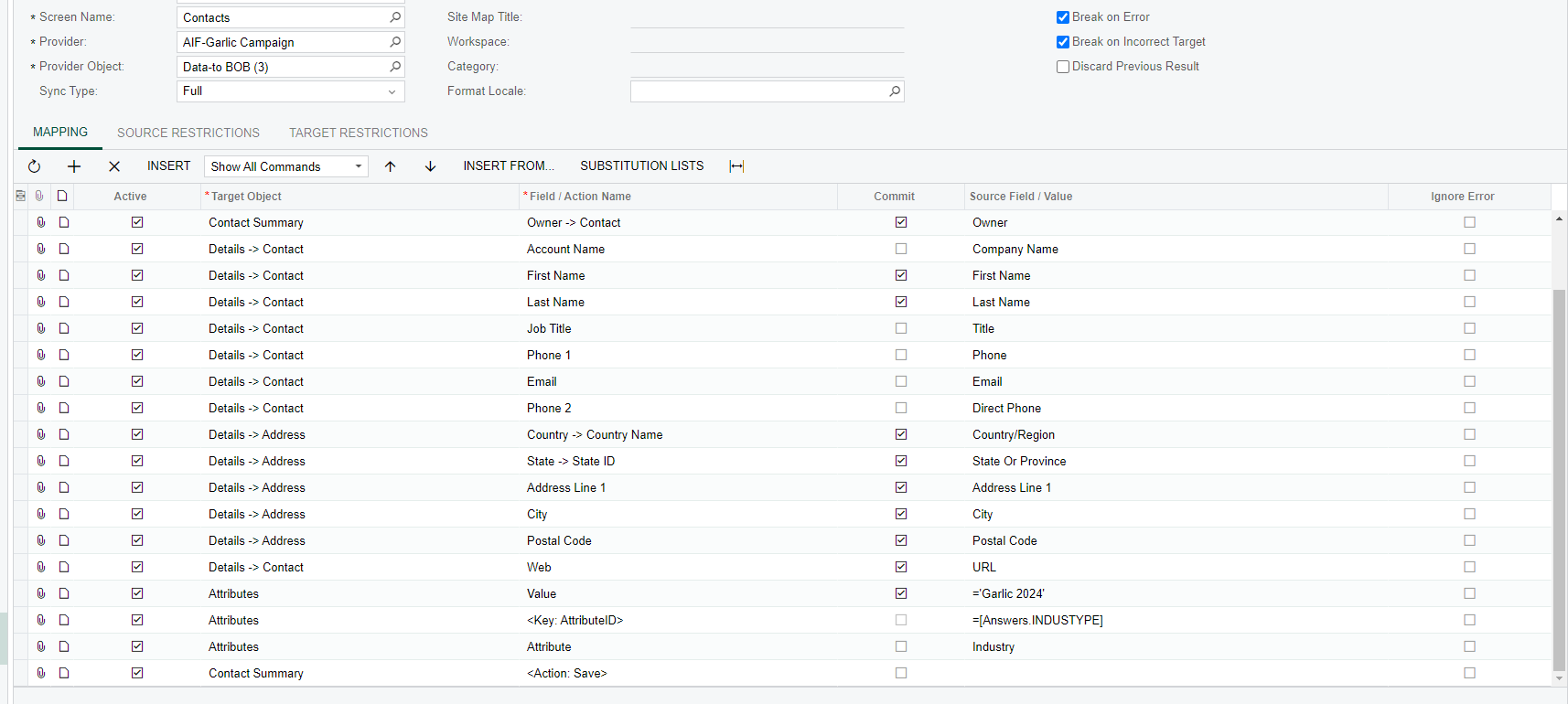
I am doing an import of contacts and there are 2 custom attributes on the contacts that need to be pulled in, one of them is the Campaign name attribute and the other one is Industry type attribute. how do I go about mapping so that I can have both attributes mapped in the Import scenario? here is the screenshot of the mapping as it is now but it doesn’t pull in anything other than the Campaign attribute.


Best answer by lauraj46

Hi @BrendanL ,

You should be able to repeat the Key attribute field multiple times in a scenario.   Just insert another <Key: AttriburteID> row and the other two rows beneath.  We have done this and it works.  

Laura

View original

6 replies

Forum|alt.badge.img
  • Author
  • Jr Varsity III
  • Aug 20, 2024 2:32 PM UTC

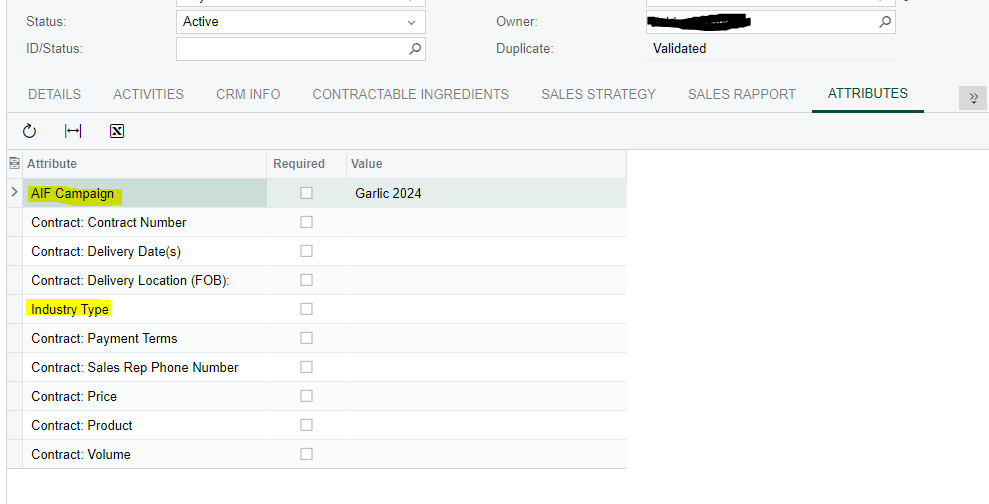
Here are the two attributes I am wanting to pull, so far only one is working from the import.


Translate

Manikanta Dhulipudi
Captain II
Forum|alt.badge.img+16

Hi @BrendanL 

Repeat the same mapping 


Translate

lauraj46
Captain II
Forum|alt.badge.img+9
  • Captain II
  • Aug 20, 2024 2:43 PM UTC

Hi @BrendanL ,

You could add three additional rows to your import scenario to map the additional attribute. Or alternatively you can make the Attribute a column on your data provider and add a row for each combination of contact and attribute. 

Also, in my experience, the Key row is first, then the attribute code, then the value.

Hope this helps!

Laura

Translate

Forum|alt.badge.img
  • Author
  • Jr Varsity III
  • Aug 20, 2024 3:15 PM UTC

Hi @BrendanL ,

You could add three additional rows to your import scenario to map the additional attribute. Or alternatively you can make the Attribute a column on your data provider and add a row for each combination of contact and attribute. 

Also, in my experience, the Key row is first, then the attribute code, then the value.

Hope this helps!

Laura

@lauraj46 it seems that I can’t repeat the Key attribute ID field. how do I set it up so I can import both the ‘industype’ and ‘campaignnm’ attributes?

Translate

lauraj46
Captain II
Forum|alt.badge.img+9
  • Captain II
  • Answer
  • Aug 20, 2024 3:20 PM UTC

Hi @BrendanL ,

You should be able to repeat the Key attribute field multiple times in a scenario.   Just insert another <Key: AttriburteID> row and the other two rows beneath.  We have done this and it works.  

Laura

Translate

Ed Goodman
Acumatica Employee
Forum|alt.badge.img+4
  • Acumatica Employee
  • Aug 23, 2024 1:44 PM UTC

@BrendanL 

The Import Scenario Webinar has a section on importing attributes.

See the last section.

Hope this helps.

Ed

Translate