Answer

How do I upload an import scenario?

  • May 2, 2024
  • 7 replies
  • 235 views

Forum|alt.badge.img

How do I upload an import scenario? I have received an import scenario (.xml) file from another user, but do not know how to import it to our Acumatica instance. 


Best answer by Laura03

Hello,

On searching this community for “SyMapping”, it seems like your file probably is an Import Scenario.  Possibly, its version is not compatible with your version. Possibly the customizations or ACM Edition don’t match between your system and the Import scenario author’s system. I’m guessing - hopefully another poster can provide a solution for you.

Laura

7 replies

Manikanta Dhulipudi
Captain II
Forum|alt.badge.img+15

Hi @jsudak 

We have an Import xml option in import scenario screen.


Forum|alt.badge.img
  • Author
  • Varsity I
  • May 2, 2024

I tried the import from XML on the clipboard and received the following error message: 


Laura03
Captain II
Forum|alt.badge.img+19
  • Captain II
  • May 2, 2024

Hello,

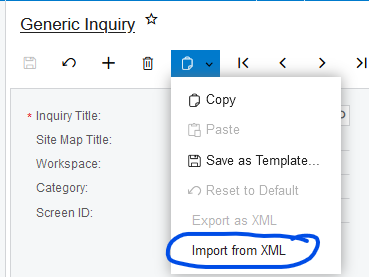
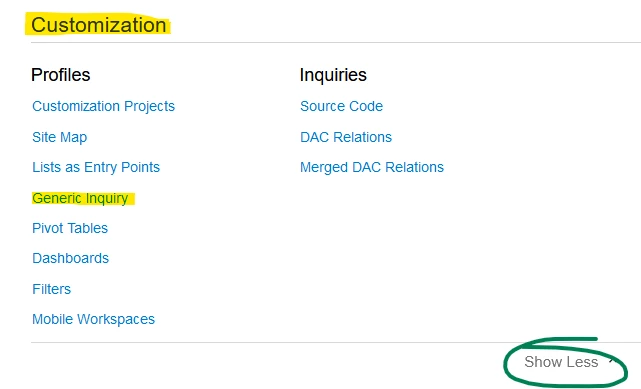
Not all XML files are import scenarios.  If you were given a Generic Inquiry XML, please to to Customization --> Generic Inquiries screen to import your GI  xml, using the Clipboard -->Import from XML action.


Laura


Forum|alt.badge.img
  • Author
  • Varsity I
  • May 2, 2024

Thanks. I don’t understand and cannot perform the action you are suggesting. 

It seems I was given a Generic Inquiry XML. I don’t know where to find the Customization --> Generic Inquiries screen to import the GI xml. Do you mean from Customization Projects? This only allows me to import zip files. 


Laura03
Captain II
Forum|alt.badge.img+19
  • Captain II
  • May 2, 2024

Hello,

If you can’t see Customization → Generic Inquiry, even when you click ‘Show More’ at the bottom of the menu, you may need to ask for additional Roles/Access Rights. If you are in the Customizer Role, you should be able to see:


Forum|alt.badge.img
  • Author
  • Varsity I
  • May 2, 2024

I see this. However, I continue to receive the error message below. 


Laura03
Captain II
Forum|alt.badge.img+19
  • Captain II
  • Answer
  • May 2, 2024

Hello,

On searching this community for “SyMapping”, it seems like your file probably is an Import Scenario.  Possibly, its version is not compatible with your version. Possibly the customizations or ACM Edition don’t match between your system and the Import scenario author’s system. I’m guessing - hopefully another poster can provide a solution for you.

Laura