

Answer

Duplicate & rename import scenario

  • July 28, 2025
  • 1 reply
  • 36 views

Forum|alt.badge.img

I have a large import scenario that I need to amend, to prevent any issues while I do this I would ideally like to be able to duplicate the import scenario and then rename it to something unique so I have a backup essentially.

Is this possible to do? 

I know I can export to XML but when importing I can’t see anyway of renaming / duplicating. 
Best answer by DipakNilkanth

Hi ​@chrisross,

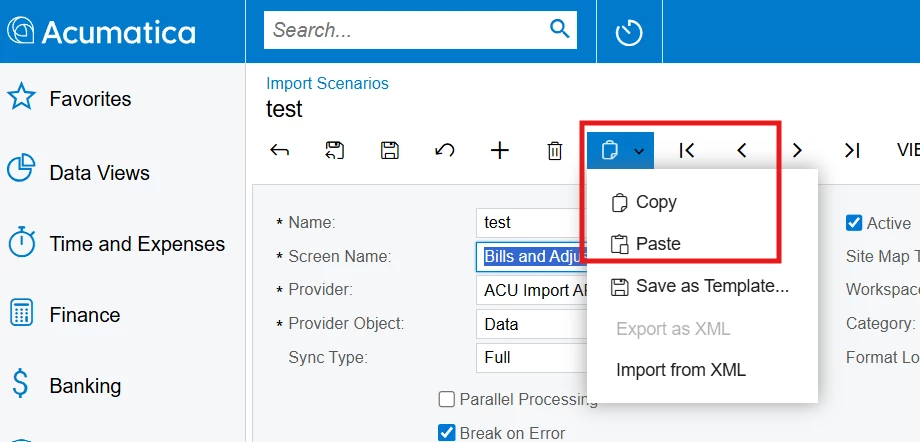
To duplicate an Import Scenario, you can use the Copy-Paste functionality available natively.

  1. Navigate to the Import Scenario you want to duplicate.

  2. Click on Clipboard and select Copy.

  3. Then click on the Add New (+) button.

  4. Enter a name (e.g., "Test") in the Name field and press Enter.

  5. Go back to Clipboard and click Paste.


This will duplicate the import scenario into your newly created one (e.g., "Test"). You can then make any modifications needed to the new import scenario.

1 reply

DipakNilkanth
Pro III
Forum|alt.badge.img+13
  • Pro III
  • Answer
  • July 28, 2025

Hi ​@chrisross,

To duplicate an Import Scenario, you can use the Copy-Paste functionality available natively.

  1. Navigate to the Import Scenario you want to duplicate.

  2. Click on Clipboard and select Copy.

  3. Then click on the Add New (+) button.

  4. Enter a name (e.g., "Test") in the Name field and press Enter.

  5. Go back to Clipboard and click Paste.


This will duplicate the import scenario into your newly created one (e.g., "Test"). You can then make any modifications needed to the new import scenario.

