Solved

Change ID Import Scenario Error

  • Oct 15, 2021 10:35 PM UTC
  • 21 replies
  • 1471 views
  • Translate All

martingaxiola
Varsity I
Forum|alt.badge.img

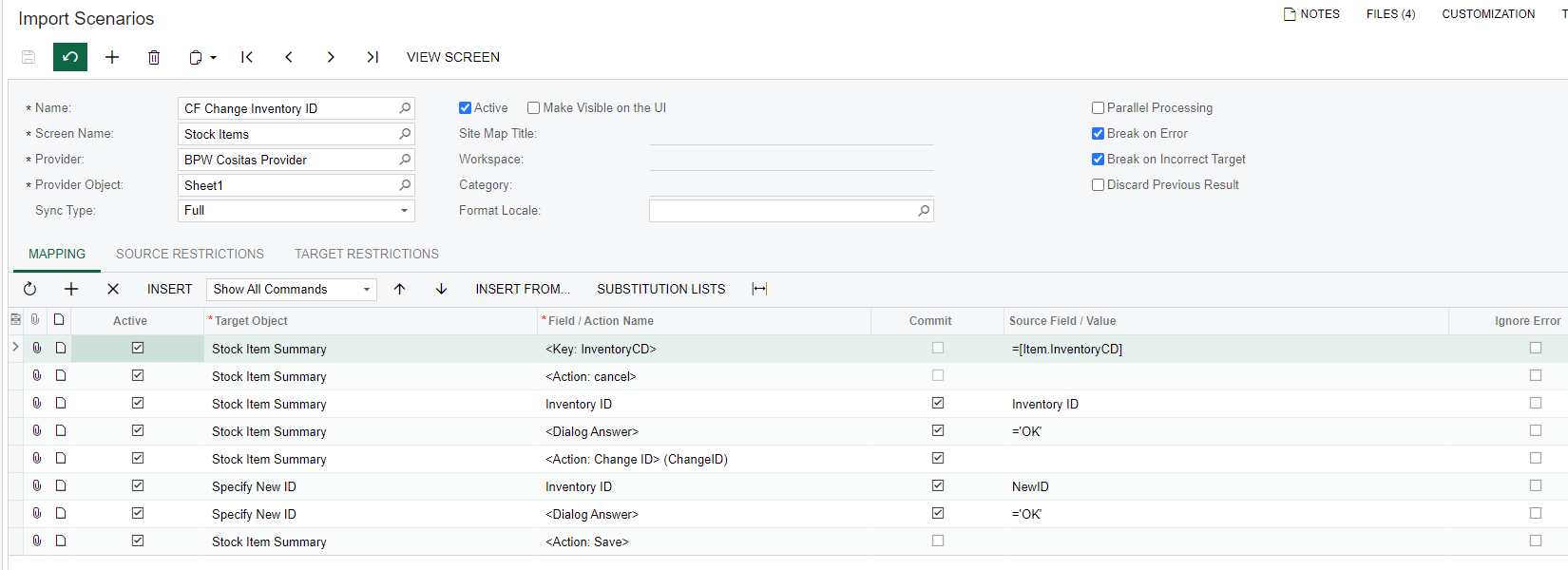
When I run my import scenario I get the famouse error “The Change ID button is disabled.” My import scenario is simple and base on https://www.augforums.com/sample-acumatica-import-scenario-stock-items-change-id/, but after modifying this import back and forward, still having that issue. Do you guys see any errors on the mapping?




Best answer by Naveen Boga

Hi @martingaxiola  The Change ID action, I have done it for Customers screen, and it was working as expected.  Could you please try for the Stock Items screen and verify.

Please find the link below.


View original

21 replies

Naveen Boga
Captain II
Forum|alt.badge.img+20
  • Captain II
  • Answer
  • Oct 16, 2021 3:36 AM UTC

Hi @martingaxiola  The Change ID action, I have done it for Customers screen, and it was working as expected.  Could you please try for the Stock Items screen and verify.

Please find the link below.


Translate

martingaxiola
Varsity I
Forum|alt.badge.img
  • Author
  • Varsity I
  • Oct 18, 2021 10:47 PM UTC

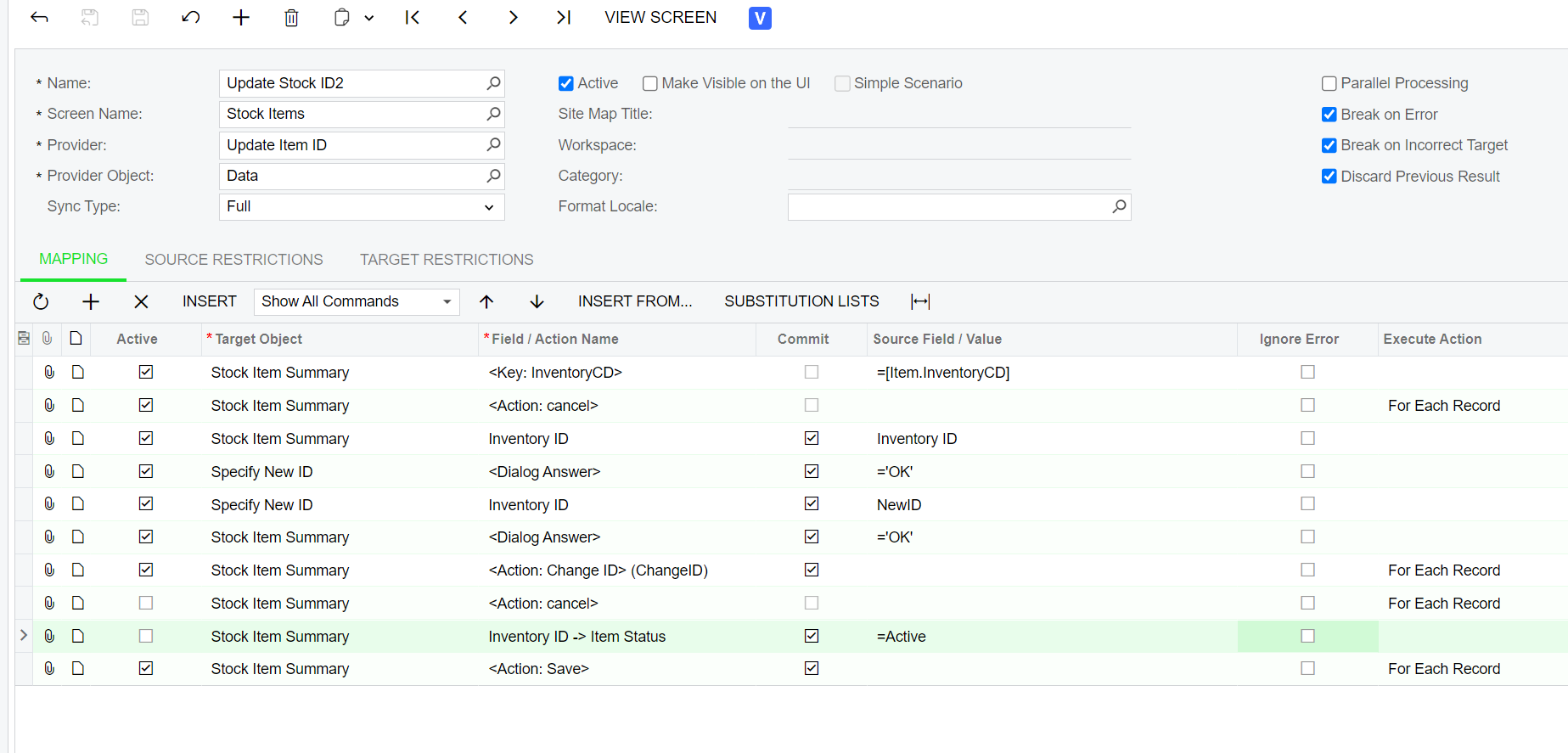
Awesome, it worked flawlessly. THis is the final map:


Thank you so much!!!!! @Naveen B 

Translate

Naveen Boga
Captain II
Forum|alt.badge.img+20
  • Captain II
  • Oct 19, 2021 3:17 AM UTC

@martingaxiola  Great :) Thanks for sharing an update.

Translate

martingaxiola
Varsity I
Forum|alt.badge.img
  • Author
  • Varsity I
  • Oct 19, 2021 4:04 AM UTC

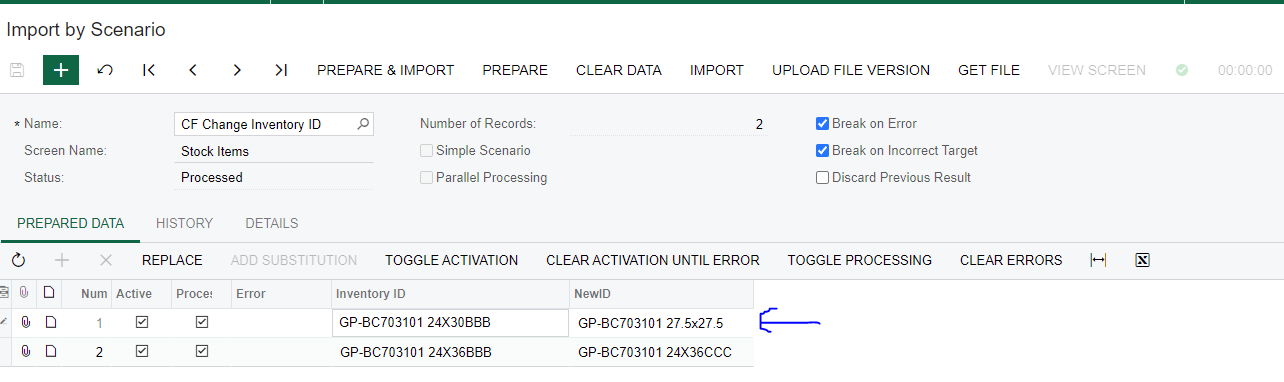
Hola @Naveen B , unfortunally i just found out that my import is not working. It was changing the ID, but from different rows, the relation from the rows is not from the same:

img1

After the import was completed, which is the one on the image 1, the changes where not completed.

Stock Items after import:


But changes will occur, where the incorrect rows will in this case GP-BC703101 24x36BBB was change.

Translate

Naveen Boga
Captain II
Forum|alt.badge.img+20
  • Captain II
  • Oct 19, 2021 4:11 AM UTC

@martingaxiola  Can you please export and share your import scenario of XML format here, and please let me know on which version you are working on this.

Translate

martingaxiola
Varsity I
Forum|alt.badge.img
  • Author
  • Varsity I
  • Oct 19, 2021 4:20 AM UTC

@Naveen B Thank you Naveen, here is the info you requeted:


Acumatica Cloud ERP 2021 R1
Build 21.112.0042

Translate

Forum|alt.badge.img+12
  • Acumatica Support Team
  • Oct 19, 2021 4:25 AM UTC

Hi @martingaxiola 

Please check the following :

  •  ‘NewID’ value you are entering meets the specification set on Inventory segment key
  • Try enter one of those NewID manually to ensure the value is accepted by Acumatica on manual data entry

Regards,

Translate

martingaxiola
Varsity I
Forum|alt.badge.img
  • Author
  • Varsity I
  • Oct 19, 2021 4:29 AM UTC

Hola @vkumar ,


Yes, the values are accepted. I did a lot of test, until i decided to do this manually, as I may incorrectly assigned 100 recoerds wrong. I have not have any issues doing it manually. I had also assigned a new value to a Inventory ID like adding AAA or A1 at the end, just to make sure it was doing the correct work, but that is how I notice the first record never changing. 

Translate

GrahamMartin
Freshman I
Forum|alt.badge.img

Hi @martingaxiola ,


I’ve always found Import Scenarios tricky - you have to do a lot of playing around with them to get the order of operations right and second guess a lot of the “error” messages. If you have a multi-segment Inventory ID, as I do, then its worth remembering that:-

  1. The search key data must have the segment separators removed in your import file, yet when you export the data it will include these separators so you have to modify the key before re-importing
  2. The replacement data needs padding with spaces to make each PRIOR segment full, and must also not contain the separator character

So, for instance, I have a 4 segment (Non-)Stock Inventory code as follows:-

MBLLAB-ABS-0-PAIDBRK

My segments are 6-3-1-8

I wish to change it to MBL   -ABS-0-PAIDBRK

My import spreadsheet needs a SUBSTITUTE run on my Inventory ID key to remove the “-” so that the key becomes MBLLABABS0PAIDBRK

My replacement data needs to pad each of the first 3 segments with spaces, so I can’t use things like “MBL-ABS-0-PAIDBRK” or “MBLABS0PAIDBRK” as that will corrupt the key, I have to use

“MBL   ABD0PAIDBRK” to make it work.

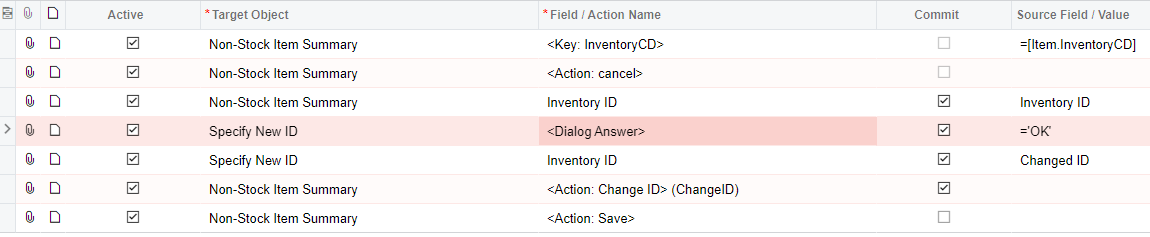
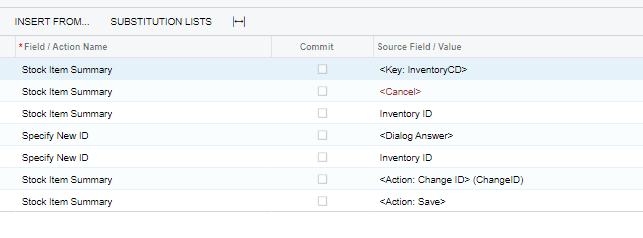
The mapping is as follows:-

Here is an example of a code I wished to change

Here is my Import Scenario data


NOTE: If the first value (my Inventory ID) was as it looks on screen IN202000, in other words MBLCHG-OHD-0-RENTAL, the system can’t find that key because its looking for something that contains the separator. It doesn’t know how to tell you this is the error, so it returns what I suspect is a default or best guess, and that’s why I was getting the “The Change ID button is disabled.” error message.


Here is the changed code after running the import scenario using the data in my screen shot

I hope this helps you as it worked well for me …


Translate

variuxDavidE
Varsity I
Forum|alt.badge.img

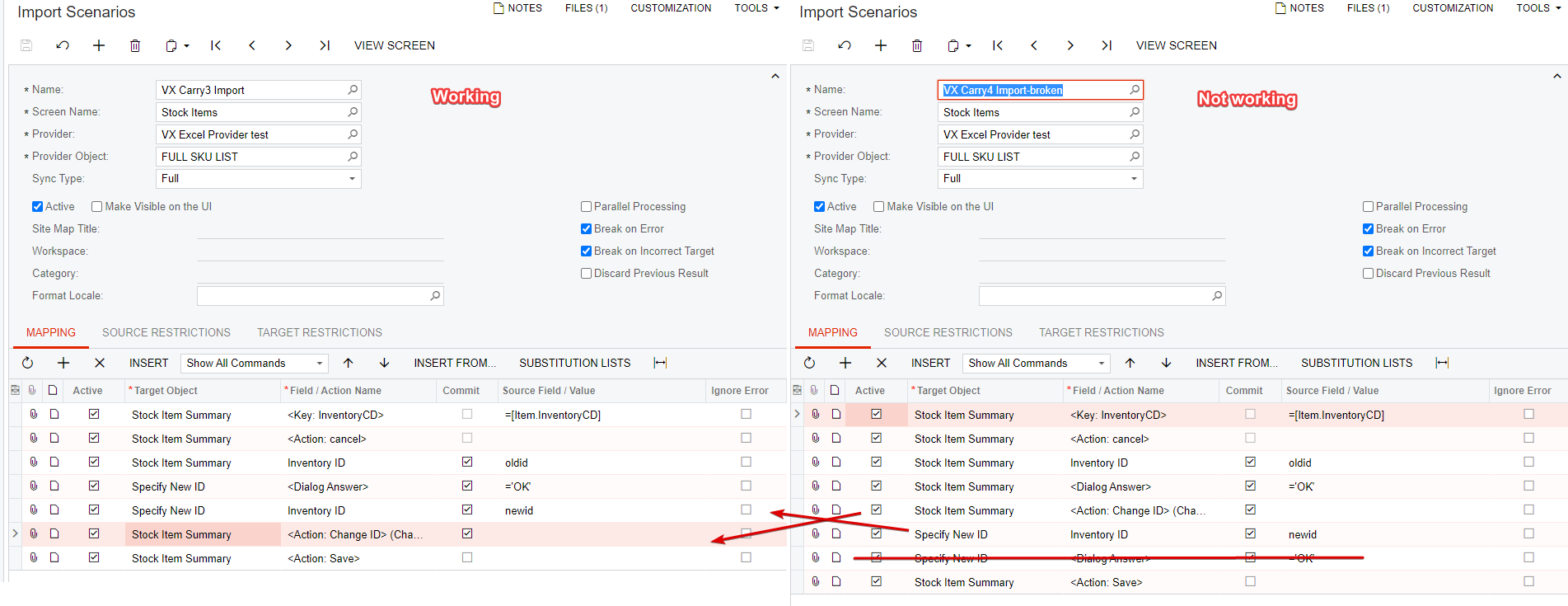
I was following this thread to change product ids. Using Acumatica Cloud ERP 2021 R1
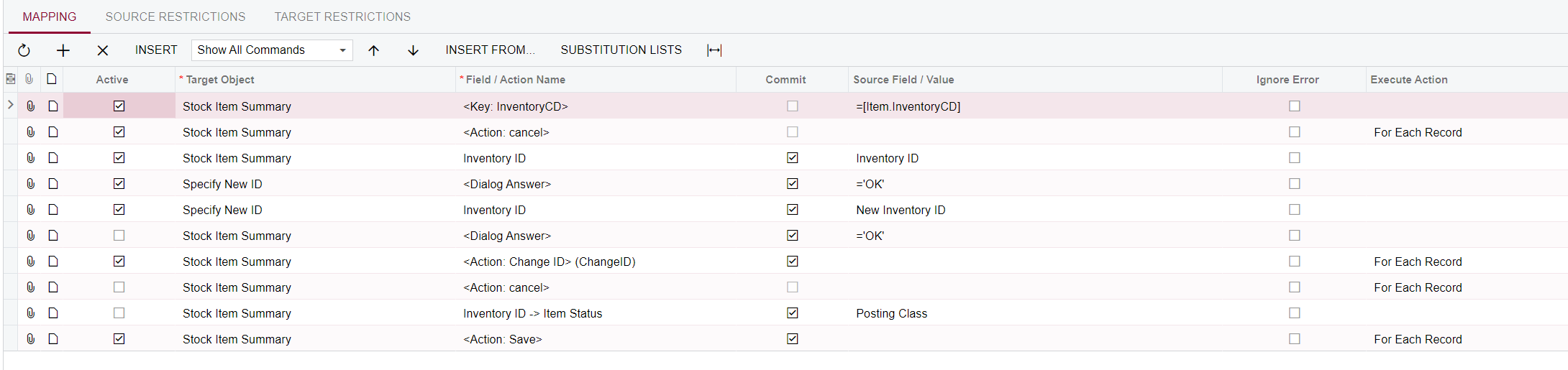
Build 21.126.0013, originally I followed @martingaxiola ‘s screenshots. But, it turns out that something has changed on now the correct way to do this is referenced by @GrahamMartin .

Before and After

I’ve attached a screenshot showing the changes. 


However, I am interested to learn WHY did this change? The same issue is also true when changing Customer ids. 


Translate

martingaxiola
Varsity I
Forum|alt.badge.img
  • Author
  • Varsity I
  • Aug 31, 2022 4:34 PM UTC

@variuxdavid Thank you for sharing, this is awesome information! 

Translate

Manikanta Dhulipudi
Captain II
Forum|alt.badge.img+16

Hi @variuxdavid 

I used the Import scenario to update the change ID IN the sTOCK Item. Please have a look on it


Translate

variuxDavidE
Varsity I
Forum|alt.badge.img

That is great! Did you run into any issues? @manikantad18 

Translate

Manikanta Dhulipudi
Captain II
Forum|alt.badge.img+16

That is great! Did you run into any issues? @manikantad18 

No issues found during import @variuxdavid 

Translate

Forum|alt.badge.img
  • Jr Varsity III
  • Sep 20, 2022 5:57 PM UTC

Hi all! this is a wondeful platform, i got this task today to work on an import to update stock item IDs and was really worried how i will figure this out, within a minute of searching on this community site i got my answer!

i replicated what was described above and worked instantly.

Thanks everyone!

Translate

Chris Hackett
Community Manager
Forum|alt.badge.img
  • Acumatica Community Manager
  • Sep 20, 2022 9:52 PM UTC

Thank you for the kind words about our community @ldancziger ! It’s comments like this that make my day! Cheers!

Translate

Forum|alt.badge.img
  • Jr Varsity III
  • Jul 24, 2023 11:24 PM UTC

I am having success with the changes that @variuxdavid posted.  Thank you for taking the time to share.

Translate

  • Freshman I
  • Apr 11, 2024 4:07 PM UTC

Has anyone gotten the Inventory one to work.  I have tried everything.  Simple 2 columns.  Everytime its the change id button is disabled.  Have tested without the import and it works fine so its not the segmented keys.

Translate

Forum|alt.badge.img
  • Jr Varsity III
  • Apr 11, 2024 5:25 PM UTC

This worked for me.  Notice some of the items are inactive.

Translate

  • Freshman I
  • Apr 11, 2024 6:35 PM UTC

Thanks @kmckenzie, unfortunately didn’t work for me.  This is literally the dumbest thing I have ever seen.  Acumatica really needs to rethink how imports and data changes are done.  I’ve spent hours just trying to do a renumber.


Translate

  • Freshman I
  • Apr 11, 2024 11:05 PM UTC

I actually did get it to work, but as others have mentioned everything is off one row. 

Translate