Answer

Can't use aggregated field from GI in Import Scenario 'Source Restrictions'

  • June 7, 2023
  • 5 replies
  • 102 views

darylbowman
Captain II
Forum|alt.badge.img+15

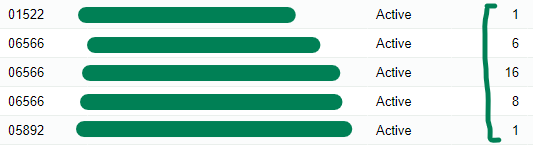
I have an import scenario based on a GI. The GI is grouped by several key fields, and one of the resulting fields is called ‘State’, which is a count of the number of States that are represented in the data.

The GI returns the correct result:
 

But when I attempt to use the resulting value in the Import Scenario
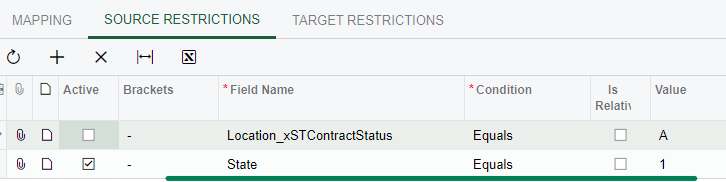
the result is empty.

I’ve tried so many work-arounds, but nothing with aggregate fields seems to compute.

Is this a bug or a known limitation?

Best answer by darylbowman

If I'm thinking right, I wouldn't be able to use a value calculated in the import on the source restrictions tab.

I ended up building a processing screen instead.

5 replies

  • Freshman I
  • June 27, 2023

Also having this issue. I have found that it won’t work if the import scenario is triggered by a business event, however if it uses a data provider and manually run the import scenario, it has no issues.


darylbowman
Captain II
Forum|alt.badge.img+15
  • Author
  • June 27, 2023

I was attempting to run it manually.


Chris Hackett
Community Manager
Forum|alt.badge.img
  • Acumatica Community Manager
  • July 10, 2023

Hi @darylbowman were you able to find a solution? Thank you!


WillieGrothman61
Jr Varsity III
Forum|alt.badge.img

Have you tried performing the calculation in the import scenario instead of the GI?


darylbowman
Captain II
Forum|alt.badge.img+15
  • Author
  • Answer
  • September 20, 2023

If I'm thinking right, I wouldn't be able to use a value calculated in the import on the source restrictions tab.

I ended up building a processing screen instead.