Answer

This field will not be displayed for the current user because the user has insufficient access rights or the required feature is disabled.

  • September 4, 2025
  • 8 replies
  • 108 views

Forum|alt.badge.img

Hi all I am having an issue with visibility of “customer status” in the customer GI under receivables. see the screenshot below. 
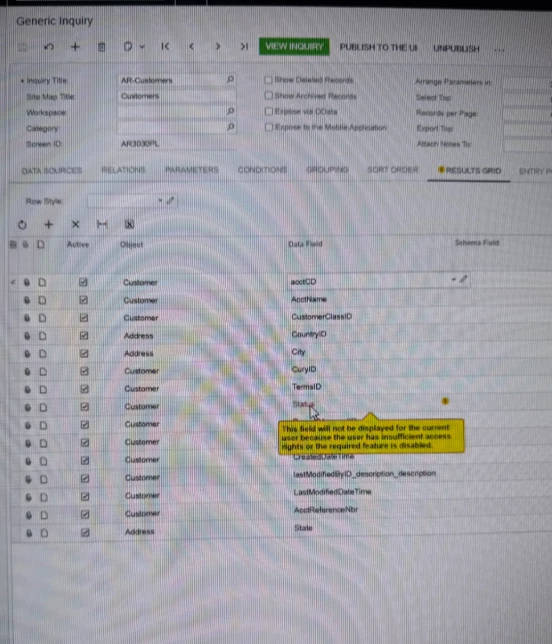
I get the following error which does not make sense because I am an ADMIN user role in the system.


This field will not be displayed for the current user because the user has insufficient access rights or the required feature is disabled.

Best answer by DasunPerera91

Hi ​@fkrug were you able to find a solution? Thank you!

Hi ​@Chris Hackett, I did not find a solution 

Hi ​@fkrug,

This is a known issue that is fixed in 24R2.

However, it is supposed to be cosmetic and should not have a functional impact.

Hope this helps!

8 replies

jhouser
Captain II
Forum|alt.badge.img+6
  • Captain II
  • September 4, 2025

Hi ​@fkrug When you view the inquiry, do you see the field? If yes, I would ignore the message. I think every time I've seen this it is a false alarm. 


Forum|alt.badge.img
  • Author
  • Freshman I
  • September 4, 2025

@jhouser  I have no visibility of customer status. Which is my main issue


jhouser
Captain II
Forum|alt.badge.img+6
  • Captain II
  • September 4, 2025

Have you checked access rights to see if the field is Revoked for admin user? It's not by default, someone would had to change it. If not, I am not sure. May need to submit a case with Acumatica support.


Forum|alt.badge.img
  • Author
  • Freshman I
  • September 4, 2025

@jhouser I have and I have access to everything


jhouser
Captain II
Forum|alt.badge.img+6
  • Captain II
  • September 4, 2025

You could also try another user if you haven’t already. I would have to access the environment to troubleshoot further, but you can submit a support case. 


Chris Hackett
Community Manager
Forum|alt.badge.img
  • Acumatica Community Manager
  • September 30, 2025

Hi ​@fkrug were you able to find a solution? Thank you!


Forum|alt.badge.img
  • Author
  • Freshman I
  • October 1, 2025

Hi ​@fkrug were you able to find a solution? Thank you!

Hi ​@Chris Hackett, I did not find a solution 


DasunPerera91
Acumatica Employee
Forum|alt.badge.img
  • Acumatica Employee
  • Answer
  • October 24, 2025

Hi ​@fkrug were you able to find a solution? Thank you!

Hi ​@Chris Hackett, I did not find a solution 

Hi ​@fkrug,

This is a known issue that is fixed in 24R2.

However, it is supposed to be cosmetic and should not have a functional impact.

Hope this helps!