

Answer

Recurring transactions invoice created outside of schedule

  • April 24, 2024
  • 1 reply
  • 141 views

Forum|alt.badge.img

Hello,

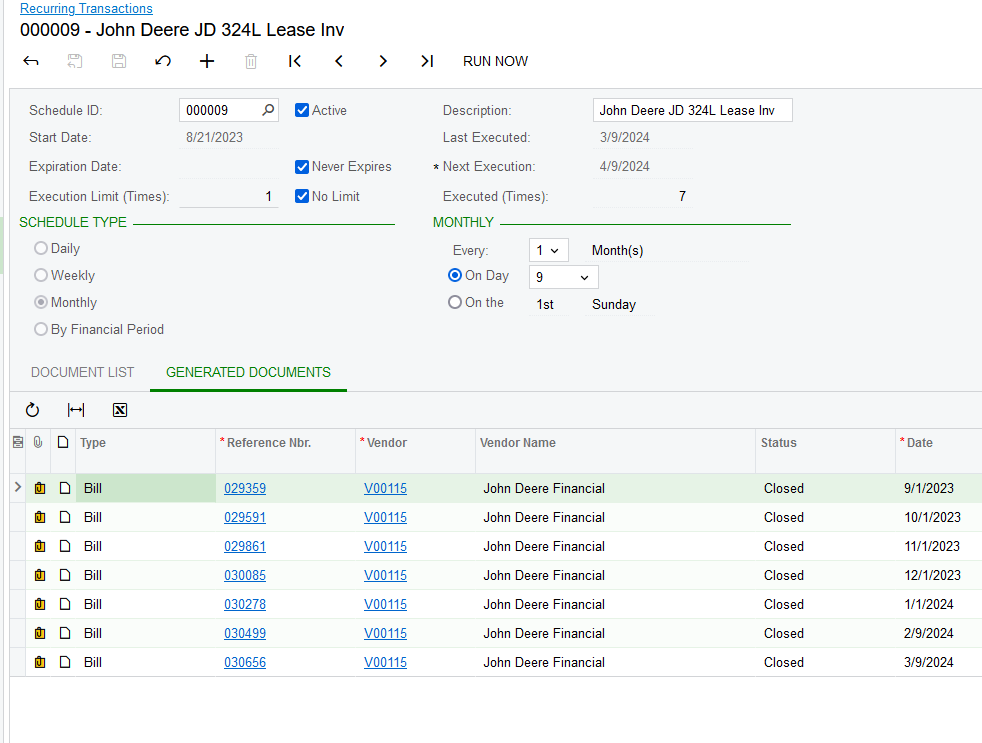
We have a new employee that started.  They entered an AP bills that was suppose to be on a recurring schedule.  The invoices slipped through, approved and paid.  Now that the recurring invoice is off schedule, whats the best way to get it back on schedule, and is there a way to tie the accidental invoice back to the recurring to get it back on schedule?


As you can see the dates are also greyed out and unable to be changed.  I assume i can run the schedule and just delete the invoice, but that still leaves a whole in the generated documents list.


Thanks,
Jeremy 


Best answer by meganfriesen37

Are your generated documents created “on hold”?  In that case, I’d just generate the “duplicate” document, change the dollar value to 0 and then release it.  Add a note to the document referring to the manually created one.

Alternately, reverse the “manual” bill and create the scheduled bill and match and clear those 2 documents against each other.

The only other way to update the next execution date is through a SQL update from the back and requires someone with customization knowledge and is probably more work than it’s worth.

1 reply

meganfriesen37
Captain II
Forum|alt.badge.img+12

Are your generated documents created “on hold”?  In that case, I’d just generate the “duplicate” document, change the dollar value to 0 and then release it.  Add a note to the document referring to the manually created one.

Alternately, reverse the “manual” bill and create the scheduled bill and match and clear those 2 documents against each other.

The only other way to update the next execution date is through a SQL update from the back and requires someone with customization knowledge and is probably more work than it’s worth.

