Solved

Linking SO to PO

  • August 30, 2023
  • 11 replies
  • 2052 views
  • Translate All

Forum|alt.badge.img

Is is possible to link SO to an already existing PO? if so then what’s the process

Best answer by vshashkova

Thanks for your response but still I can not proceed the Purchase detail screen is greyed out
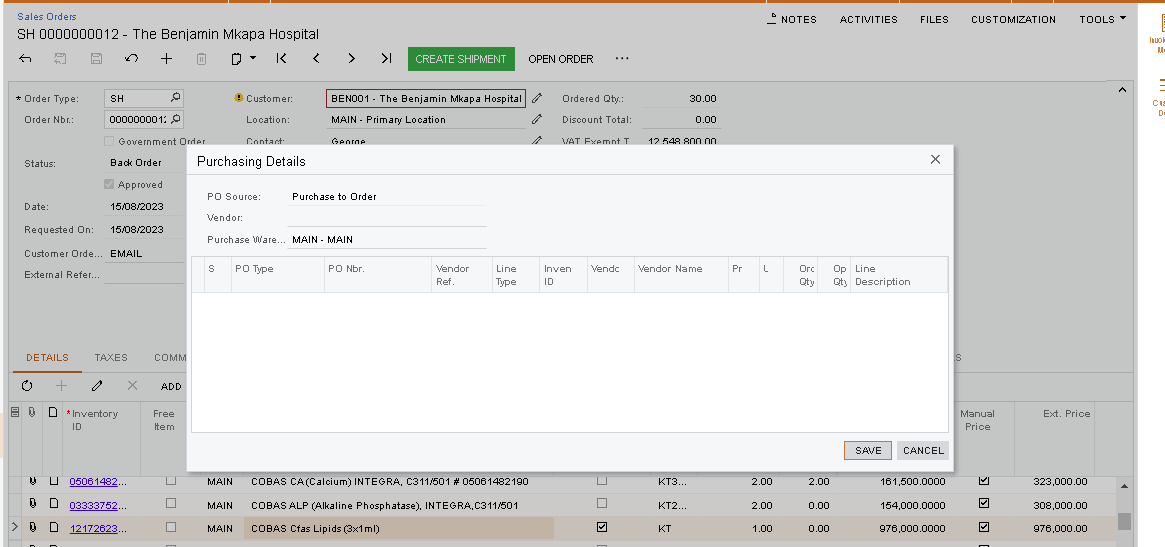
 

Kindly Advise

Did your SO go through the approval process? If so, in approved orders it’s not possible to change line details anymore, including PO linking. You’ll need to put it on hold to link the PO.

View original

11 replies

Kandy Beatty
Captain II
Forum|alt.badge.img+18

HI @helpdesk37 

Here are the steps:

To Link a Sales Order to an Existing Purchase Order


  1. Open the Sales Orders (SO301000) form.
  2. In the Order Type box, select the order type.
  3. In the Order Nbr. box, select the reference number of the order to be linked.
  4. On the Details tab, for each line that is marked for purchasing, do the following:
    1. Click the line, and on the table toolbar, click PO Link.
    2. In the Purchasing Details dialog box, which opens, select Purchase to Order in the PO Source box.
    3. In the Vendor box, select the vendor from which the items have to be purchased.
    4. In the Purchase Warehouse box, specify the destination warehouse.
    5. In the table of the dialog box, select the unlabeled check boxes in the row of a purchase order line to be linked to the sales order line.
    6. Click Save to link the orders and close the dialog box.
  5. Save your changes to the sales order.               


Translate

Forum|alt.badge.img
  • Author
  • Freshman I
  • August 30, 2023

Thanks for your response but still I can not proceed the Purchase detail screen is greyed out


Kindly Advise

Translate

Kandy Beatty
Captain II
Forum|alt.badge.img+18

Thanks for your response but still I can not proceed the Purchase detail screen is greyed out


Kindly Advise

Hi @helpdesk37 

Is that line item marked as completed?

Translate

Forum|alt.badge.img
  • Author
  • Freshman I
  • September 4, 2023

Thanks Kandy, 


The vendor is appearing and  I can choose, but nothing is appearing where I can specify the PO nbr, the PO type….. even if I mark the PO as completed


Translate

Kandy Beatty
Captain II
Forum|alt.badge.img+18

HI @helpdesk37 

That line for PO should not be marked as complete. Try to uncheck it and then see if it allows the link.

Also, does the PO you want to link have that item on it?

Translate

Chris Hackett
Community Manager
Forum|alt.badge.img
  • Acumatica Community Manager
  • October 11, 2023

Hi @helpdesk37 were you able to find a solution? Thank you!

Translate

Hello, i’m looking to see if there’s an update on how to link a purchase order to a sales order, if the purchase order was created first. 

This doesn’t seem to be working:


Translate

Forum|alt.badge.img
  • Freshman II
  • February 4, 2026

After clicking PO LINK, what would cause the Purchasing Details window to be empty, i.e., no POs are listed.

The item and quantity on the SO and the PO are in agreement.

The SO is Open.

The PO is Awaiting Link.

Note: Some items on the PO are linked to another SO.

Translate

vshashkova
Acumatica Moderator
Forum|alt.badge.img+1
  • Acumatica Moderator
  • February 6, 2026

After clicking PO LINK, what would cause the Purchasing Details window to be empty, i.e., no POs are listed.

The item and quantity on the SO and the PO are in agreement.

The SO is Open.

The PO is Awaiting Link.

Note: Some items on the PO are linked to another SO.

Based on the PO status, I’m assuming this is a Drop-Ship PO. If any PO lines are linked to a sales order, you can only link additional lines to that same SO - Drop-Ship SOs and Drop-Ship POs can be linked one-to-one only.

Please also make sure that the PO Source on the SO line is set to Drop-Ship and the quantity matches on the SO and PO lines.

Translate

vshashkova
Acumatica Moderator
Forum|alt.badge.img+1
  • Acumatica Moderator
  • Answer
  • February 6, 2026

Thanks for your response but still I can not proceed the Purchase detail screen is greyed out


Kindly Advise

Did your SO go through the approval process? If so, in approved orders it’s not possible to change line details anymore, including PO linking. You’ll need to put it on hold to link the PO.

Translate

Forum|alt.badge.img
  • Freshman II
  • February 7, 2026

Thank you. All set!

Translate