

Solved

How to multiple discount amount to order quantity

  • March 7, 2025
  • 7 replies
  • 176 views
  • Translate All

Hello,

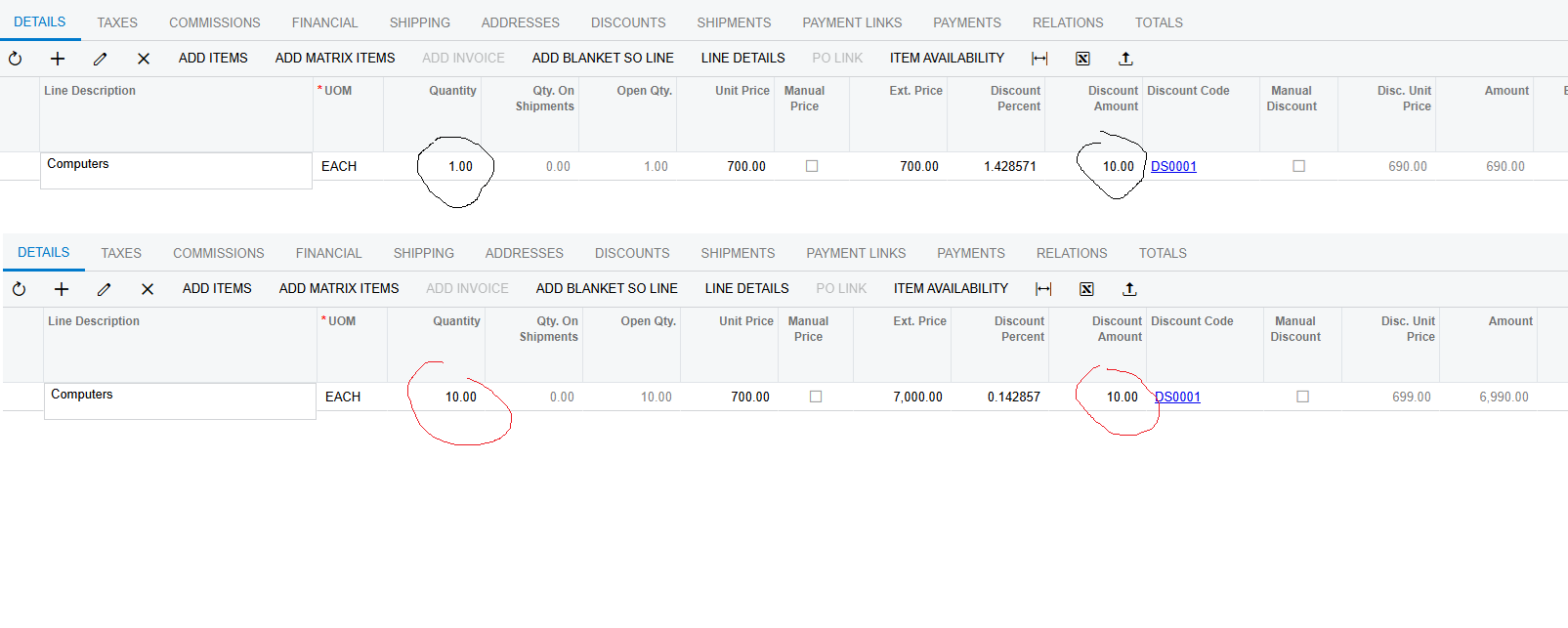
In sales orders I change the quantity, but the discount amount field remains $10 instead of changing value due to the appropriate sales order count, in this case it must be $100. In below screenshot you can see that the discount for total amount remains the same.

The percentage-based discount works correctly, but the fixed amount discount is only applied to 1 unit. When the sales order quantity changes, the total discount amount does not update accordingly.

Do you have any solutions about it?
 

Thank you in advance for your answers.
Best answer by Edgarsimn198587

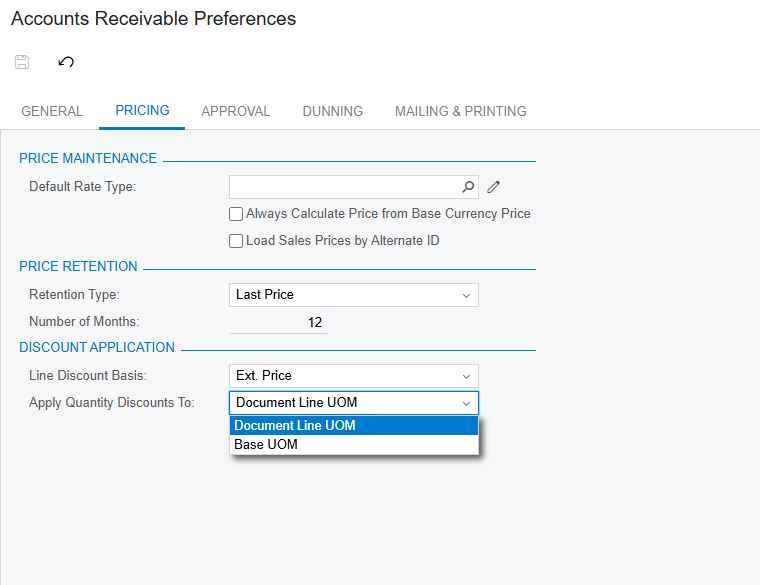
May be somebody will need the resolution of my question.
It is configured in ​​​​​​ Accounts Receivable Preferences


View original

7 replies

Forum|alt.badge.img+12
  • Acumatica Support Team
  • March 7, 2025

Hi ​@Edgarsimn198587 

I am not aware of any option to get this discount calculation on Sales documents. Here is a feature request link with similar requirement. You may add to this request.

Regards,


Translate

dcomerford
Captain II
Forum|alt.badge.img+16

​@Edgarsimn198587 The discount amount is the the total amount in your example you have different discount percentage so the 10 is correct or maybe i am not reading you correctly.

Translate

Hi dcomerford,

Thanks for answer.
I put not in %, mention amount. So, when I put that I give $10 discount for each unit the total amount of discount keeps $10, but it must raise parallel to the units count, so when it will be 10 units, appropriately total discount must be $100

Translate

@ dcomerford

Translate

dcomerford
Captain II
Forum|alt.badge.img+16

​@Edgarsimn198587 apologies follow you now you want to enter the discount per unit of UOM I would believe you would need a customisation to do this

Translate

@ dcomerford I think so, there must me checkbox, which will allow me to resolve it.

Translate

May be somebody will need the resolution of my question.
It is configured in ​​​​​​ Accounts Receivable Preferences


Translate


