


Answer

Time Zone setting for SOOrder OrderDate field

  • November 30, 2022
  • 4 replies
  • 306 views

xkylewrightx
Varsity III
Forum|alt.badge.img

Hello-

We are having an issue with the OrderDate field on SOOrder. When you create a new order, it automatically populates with the ‘current date’ - however there appears to be a timezone discrepancy / bug.

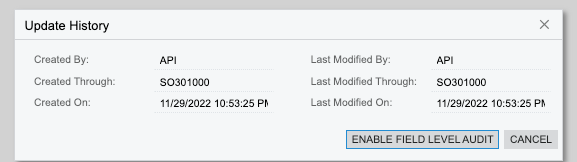
Order created on 11/29/22 at 10:53 PM:
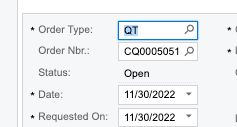
OrderDate field automatically populates with date 11/30/2022:
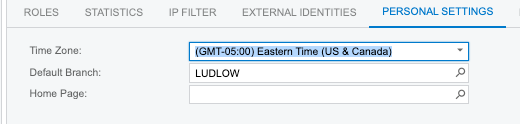
Both the timezone of the user, and the timezone of the site in ‘Site Preferences > Login Time Zone’ are configured to be Eastern Time:



Does anybody know how to set the timezone the system uses to fill the OrderDate field?

The wrong date is resulting in discrepancies in our reporting numbers.


Thank you!!

Best answer by aaghaei

If the CreatedDate value is correct then you can;

Set the PXDefault value of the OrderDate to CreatedDate or

Add a RowInserting EventHandler to set the OrderDate to to UtcDate

4 replies

Manikanta Dhulipudi
Captain II
Forum|alt.badge.img+15

Hi @xkylewrightx 

In one of my ticket, I see this response from Acumatica.

May be it will help you.

https://help-2022r2.acumatica.com/Help?ScreenId=ShowWiki&pageid=9821cff9-4970-4153-a0f8-dbf5758133a7


xkylewrightx
Varsity III
Forum|alt.badge.img
  • Author
  • Varsity III
  • November 30, 2022

@manikantad18

Thank you - The API only mimics the UI. 

You can change the date manually in either case, as you have linked, however the system is still using the wrong time zone to set the default value.

I don’t think remembering, or coding, to set the date manually on every order after 9 or 10 PM is a good solution


Chris Hackett
Community Manager
Forum|alt.badge.img
  • Acumatica Community Manager
  • January 18, 2023

Hi @xkylewrightx were you able to find a solution? Thank you!


aaghaei
Captain II
Forum|alt.badge.img+10
  • Captain II
  • Answer
  • January 19, 2023

If the CreatedDate value is correct then you can;

Set the PXDefault value of the OrderDate to CreatedDate or

Add a RowInserting EventHandler to set the OrderDate to to UtcDate


