

I am unable to understand where I can set the final reminders for the Dunning Letters!
thanks
I am unable to understand where I can set the final reminders for the Dunning Letters!
thanks
Best answer by Laura03
Hello,
I’m not sure we have enough information to accurately answer your question.
I’ll start my guess with AR Preferences screen, Dunning tab.
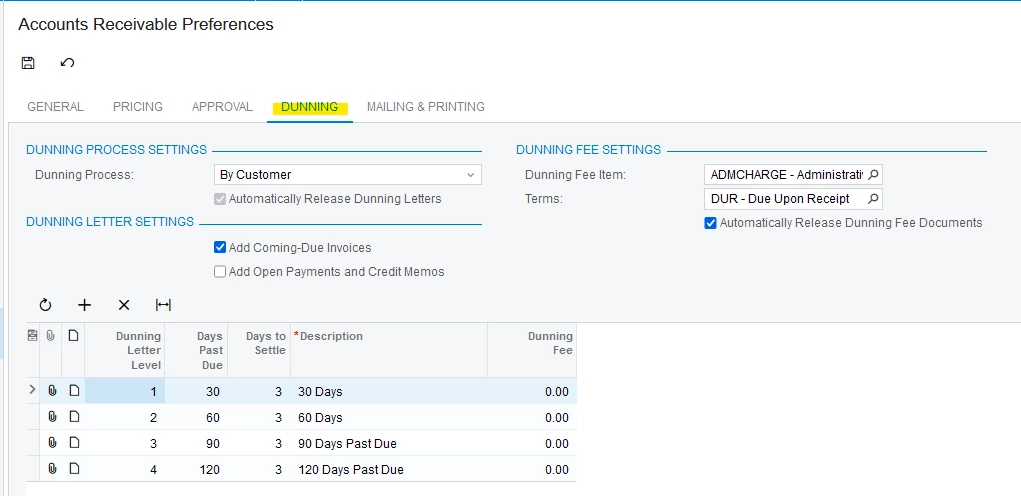
Multiple levels of letters with different text can be configured according to number of days past due. Select # Days to Settle and whether Late Fees are applied. The Dunning Fee Item is a non-stock item that can be configured in the Non-Stock Items screen.
Each dunning letter level specifies the time intervals after which each dunning letter can be prepared for a customer. As many levels of dunning letters as needed can be configured. Dunning letters are prepared successively: A dunning letter of the second level cannot be prepared until after the dunning letter of previous level has been prepared. Also, the dunning letter for each level cannot be prepared for the customer until an outstanding document that matches that level (number of days past due) appears.
If I have not answered your question, please add details. 😉
Laura
No account yet? Create an account
Enter your E-mail address. We'll send you an e-mail with instructions to reset your password.


