

Solved

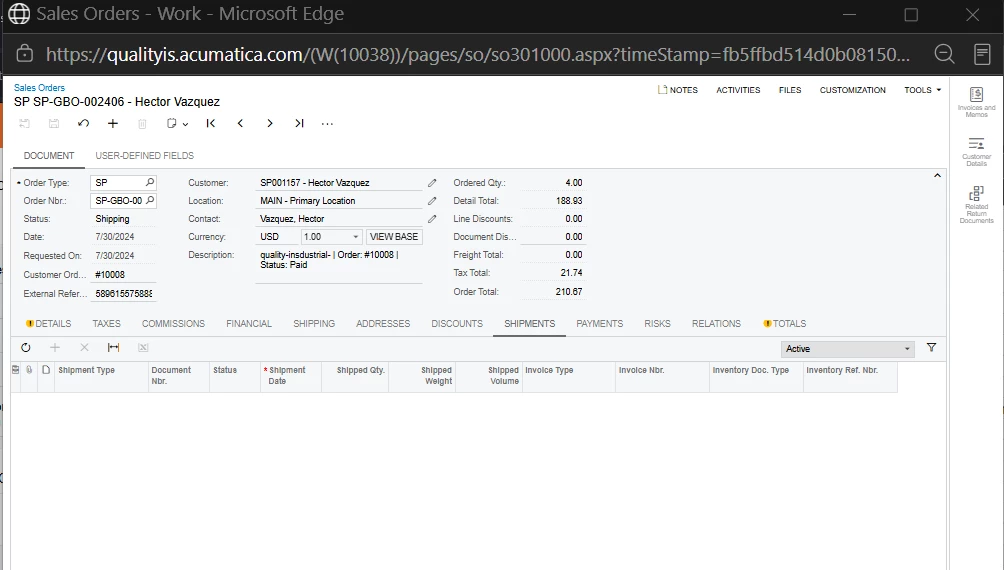
How can I change the status of a sales order to complete when it shows Shipping?
  • August 26, 2026
  • 2 replies
  • 79 views
  • Translate All

Forum|alt.badge.img

How can I change the status of a sales order to complete when it shows Shipping?


Best answer by jinin

Hi ​@ehernandez ,

Shipping means an open or partially processed shipment exists.

On the Shipments tab, change the filter from Active → All. A cancelled/deleted shipment may be causing the issue.

Normal flow: Create Shipment → Confirm → Prepare Invoice → Release Invoice → Completed.

If nothing is left to ship, use Actions → Complete Order or Cancel Remainder, depending on the version.

If the order is still stuck, check SOLine.OpenQty, CompleteQtyMin, the Order Type Complete On setting, and any orphan SOOrderShipment records.

Quickest check: Open the order → Shipments → All and see what records are listed.


View original

2 replies

jinin
Pro I
Forum|alt.badge.img+12
  • Pro I
  • Answer
  • August 27, 2026

Hi ​@ehernandez ,

Shipping means an open or partially processed shipment exists.

On the Shipments tab, change the filter from Active → All. A cancelled/deleted shipment may be causing the issue.

Normal flow: Create Shipment → Confirm → Prepare Invoice → Release Invoice → Completed.

If nothing is left to ship, use Actions → Complete Order or Cancel Remainder, depending on the version.

If the order is still stuck, check SOLine.OpenQty, CompleteQtyMin, the Order Type Complete On setting, and any orphan SOOrderShipment records.

Quickest check: Open the order → Shipments → All and see what records are listed.


Translate

Forum|alt.badge.img

Hii ​@ehernandez , To change a sales order from Shipping to Completed, open the related shipment and click Confirm Shipment. Once the shipment is confirmed and all order lines are completed, the sales order status changes to Completed.

Translate

