Solved

Business Event Not Trigger Based on Record Change in Generic Inquiry

  • December 20, 2023
  • 16 replies
  • 560 views
  • Translate All

Forum|alt.badge.img

I have a generic inquiry that looks at all sales orders. My goal is to send an email to required receipients when a ship date changes. 

Here is the trigger conditions:

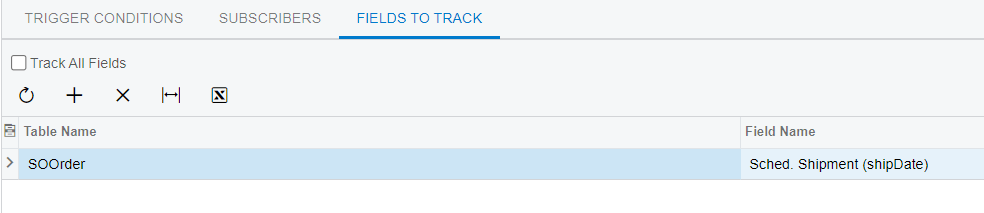
and the fields to track:


The Business Event history is empty. Ship dates are being changed.


Any ideas why it is not triggering? Is it a problem with the BE or GI? 

Best answer by kurtwoeste

I figured the issue out and it seems like a bug in the system to me. I am posting this helping it hopes someone else in the future.

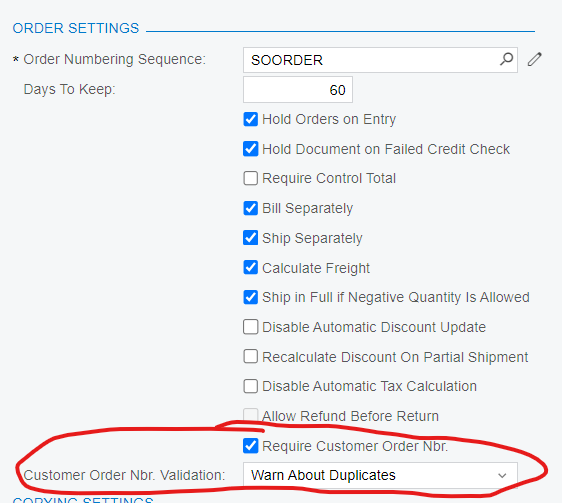
Under Order Types → SO → Order Settings → Require Customer Order Nbr

The BE was not working when the option was set to “Forbid Duplicates”. Once it was set to “Warn About Duplicates” the BE fired as expected.

Order Types - SO - Order Settings


View original

16 replies

Manikanta Dhulipudi
Captain II
Forum|alt.badge.img+16

Hi @kurtwoeste 

There might be an issue with some triggering conditions in acumatica,

Please check with other trigger conditions and verify this.

Which version?

Translate

Manikanta Dhulipudi
Captain II
Forum|alt.badge.img+16

Hi @kurtwoeste 

I have created a sample Business event on schedule shipment dae, Please verify once 

Translate

dcomerford
Captain II
Forum|alt.badge.img+16
  • Captain II
  • December 20, 2023

@manikantad18 Check on the GI you are using that the key fields for all the tables on the GI are on the results grid.

Translate

Forum|alt.badge.img
  • Author
  • Jr Varsity III
  • December 20, 2023

The GI includes ALL of the fields from the SOOrder table.

Translate

Manikanta Dhulipudi
Captain II
Forum|alt.badge.img+16

The GI includes ALL of the fields from the SOOrder table.

Did you get chance to review the business event attached and compare?

Translate

dcomerford
Captain II
Forum|alt.badge.img+16
  • Captain II
  • December 20, 2023

Check this post i have found it very useful 


Translate

Forum|alt.badge.img
  • Author
  • Jr Varsity III
  • December 20, 2023

I have followed all of the tips, and it does not seem to matter. It is so simple, it has to be something silly. The GI includes OrderType,OrderNbr, and ShipDate. When a user modify’s the ship date, nothing happens. The goal is to notify the logistics department of a change in ship date.


Translate

dcomerford
Captain II
Forum|alt.badge.img+16
  • Captain II
  • December 20, 2023

Strange try Restart Dispatcher on the the System Queue Monitor (SM302010) 

Translate

Manikanta Dhulipudi
Captain II
Forum|alt.badge.img+16

Hi @kurtwoeste 

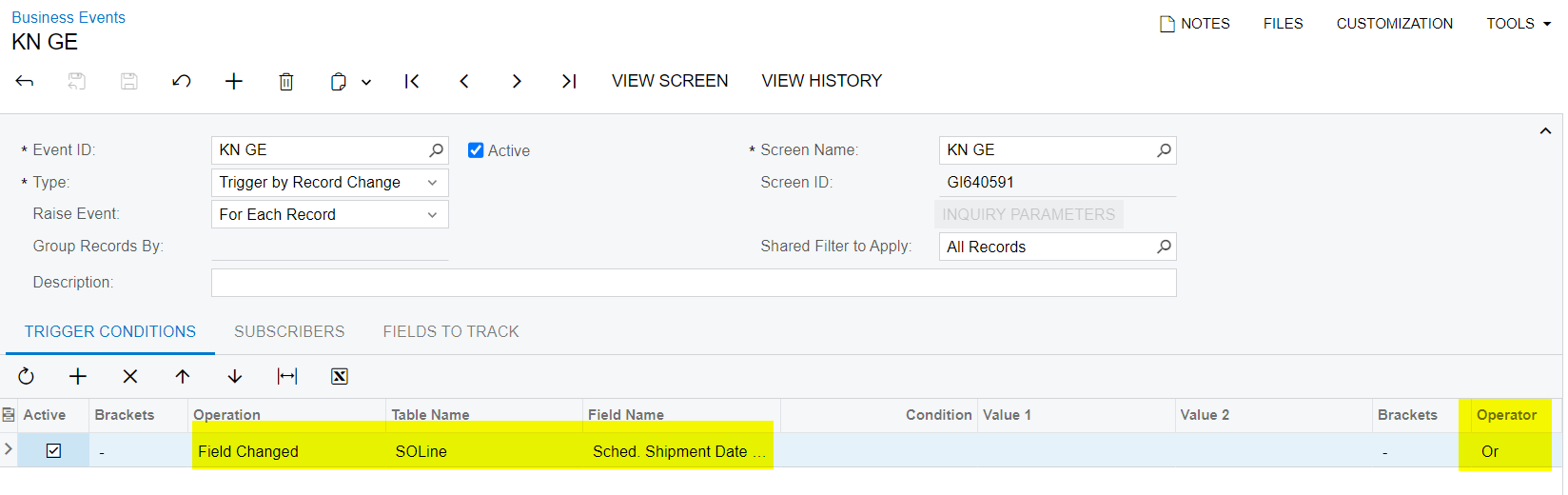
I am using so line sche shipment date and I see below hightlghted operator difference 

can you make a change and review it once.

if not resolved Please share GI, Notification template and Business event xml file

Translate

Forum|alt.badge.img
  • Author
  • Jr Varsity III
  • December 20, 2023

I’ve exported the GI & BE to a different tenent and it works. Is there a setting/preference to not track changes by tenent?

Translate

Manikanta Dhulipudi
Captain II
Forum|alt.badge.img+16

Hi @kurtwoeste I dont think we have a option for that, could you please modify or compare the necessary and confirm?

Thanks

Translate

Forum|alt.badge.img
  • Author
  • Jr Varsity III
  • December 20, 2023

That is not necessary. I am getting it to work in one tenent, but not the other. It’s the exact same GI and exact same BE.

Translate

Manikanta Dhulipudi
Captain II
Forum|alt.badge.img+16

Hi @kurtwoeste 

Can you restart application and verify it?

Translate

Forum|alt.badge.img
  • Author
  • Jr Varsity III
  • December 21, 2023

Restarting the application did not change anything. The field changes are not recognized.

Translate

Forum|alt.badge.img
  • Author
  • Jr Varsity III
  • December 21, 2023

The BE does work when changing the Trigger Conditions Operation is changed from Field Changed, to Record Inserted. 


The operation highlighted in red fires, the “Field Changed” (ShipDate) does not fire.


Trigger Conditions


Translate

Forum|alt.badge.img
  • Author
  • Jr Varsity III
  • Answer
  • December 22, 2023

I figured the issue out and it seems like a bug in the system to me. I am posting this helping it hopes someone else in the future.

Under Order Types → SO → Order Settings → Require Customer Order Nbr

The BE was not working when the option was set to “Forbid Duplicates”. Once it was set to “Warn About Duplicates” the BE fired as expected.

Order Types - SO - Order Settings


Translate