Introducing Acumatica Cloud ERP: 2026R1
Hello Acumatica community,
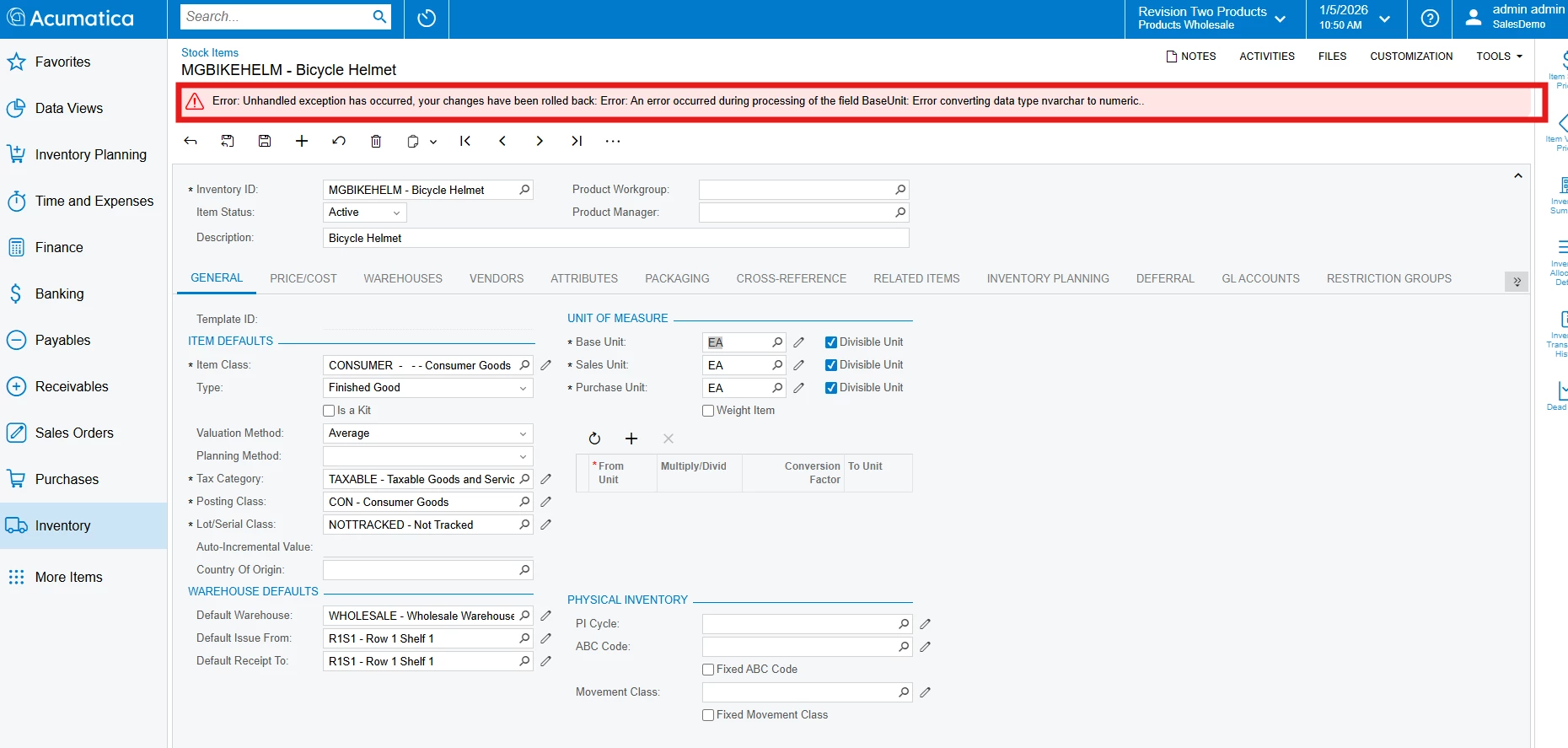
I was testing how to change the base UOM for a stock item and received the following error message:
This was after I created an Adjustment entry and removed the item from all open SO and PO lines.
Has anyone seen and resolved this error message before when changing the base UOM?
Thank you!
Best answer by OshadhiJayasundara82
Hi @aminerd,This issue has been addressed in version 25R2 through the Enhanced Manufacturing feature.Community Article -
Release Note - https://acumatica-builds.s3.amazonaws.com/builds/preview/25.2/ReleaseNotes/AcumaticaERP_2025R2_Beta_ReleaseNotes_Other_Enhancements.pdfAs a temporary workaround, users may remove the associated option and update the Item Class/Base unit of Stock Item.Hope this helps clarify!Thank you!
Hello @aminerd You can check this post:Post
Yes, I have reviewed that community post and was able to zero the inventory and took this inventory item off of any open SO or PO documents. After completing those steps, I got this error message in attempt to change the base UOM.
Already have an account? Login
No account yet? Create an account
Enter your E-mail address. We'll send you an e-mail with instructions to reset your password.