

Solved

AcumaticaERPInstall constantly throwing log errors (26.100.0175)

  • April 9, 2026
  • 2 replies
  • 69 views

Forum|alt.badge.img+2

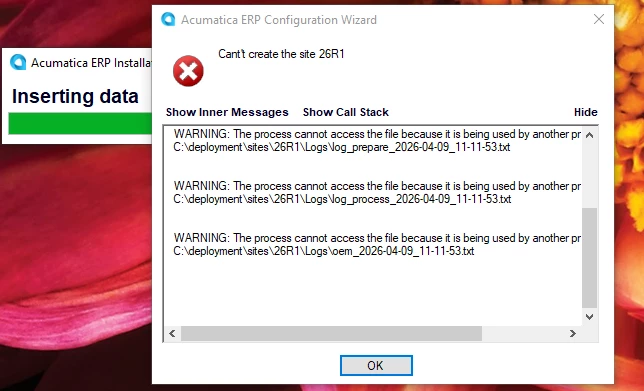
Even after rebooting my machine, every single time that I try to create a new instance of 26R1, I get these errors and the installer stops:
Even if I press OK, I get more log errors:
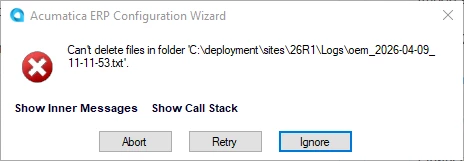
If I press ignore, I just get more of these errors about the other log files that the installer created.

Question: how to get past these log errors so I can create a new instance?

Here’s the full error:

Cant't create the site 26R1
 --------------------------------------
 Inner Exception:
 Exception occurred while deploying the site files.
  --------------------------------------
  Inner Exception:
  Exception occurred while backing up the files from 'C:\deployment\sites\26R1\' directory. Try to do it manually.
   --------------------------------------
   Inner Exception:
   
   WARNING: The process cannot access the file because it is being used by another process.
   C:\deployment\sites\26R1\Logs\log_prepare_2026-04-09_11-11-53.txt
   
   
   WARNING: The process cannot access the file because it is being used by another process.
   C:\deployment\sites\26R1\Logs\log_process_2026-04-09_11-11-53.txt
   
   
   WARNING: The process cannot access the file because it is being used by another process.
   C:\deployment\sites\26R1\Logs\oem_2026-04-09_11-11-53.txt
   

Best answer by bpgraves

When you first run installer and it asks you for the folder location, do NOT choose where you want your instance: this is actually the location of the TOOLS which can’t co-exist on the same folder with the instance since the instance install will attempt to delete the location where the tools are installed.  These log file errors are the direct result of trying to install the Acumatica tools and the instance on the same folder. 

2 replies

Forum|alt.badge.img+2
  • Author
  • Semi-Pro II
  • April 20, 2026

I think I created the 24R1 folder myself in Explorer when I was getting the log errors but when I did it through the installer right now, I didn't get the errors.


Forum|alt.badge.img+2
  • Author
  • Semi-Pro II
  • Answer
  • April 20, 2026

When you first run installer and it asks you for the folder location, do NOT choose where you want your instance: this is actually the location of the TOOLS which can’t co-exist on the same folder with the instance since the instance install will attempt to delete the location where the tools are installed.  These log file errors are the direct result of trying to install the Acumatica tools and the instance on the same folder.